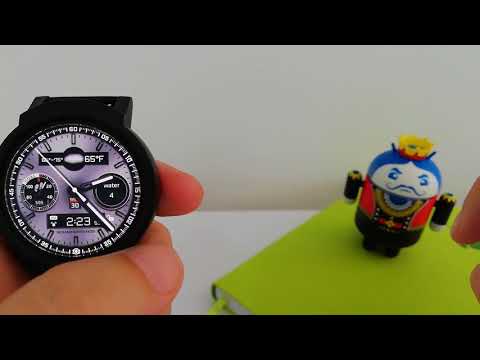

RoverOne Watch Face
Contains adsIn-app purchases

star
731 reviews

Everyone
info
100K+
Downloads


About this app
Watch Face RoverOne for Wear OS is true eye-catcher with digital characteristics and interactive functions.
Watch face contains a huge number and user friendly settings on the watch and the phone companion app.
The Wear OS comes with external complication which this watch face supports completely.
★ Watch Face RoverOne is fully Wear OS supported
★ WEAR OS 2.0 integration
• Fully standalone! (iPhone and Android compatible)
• External complication data for the indicators
★ Compatible with all Wear OS watches
★ Free version
Complications:
• Phone battery
• Date
Options:
• Change color
• 24 hour format
• Leading zero
• Screen time
★ NEW option for paid version ★
• Vibrate on every hour
★ Paid version
Built-in complications
• Alarm shortcut
• Steps
• Distance
• Walking
• Running
• Biking
• Calories
• Fit statistics
• Water counter
• Coffee counter
Options:
• External complications
• Change color
• 24 hour format
• Leading zero
• Screen time
• Forecast
• Full ambient mode option
• Change color preset on tap
• Tap indicator
• Google FIT integration
• Weather settings (location, providers, frequency update, units)
★ DISCLAIMER ★
The free version doesn't have a tap functionality. It just shows data and the user is not able to change it until unlock the PREMIUM version.
★ FAQ
!! Please contact us if you have any trouble with the app !!
richface.watch@gmail.com
How do I install the watch face on Wear OS ?
1. Install it from Google Play Store on your Wear OS smartwatch.
2. Install the companion app for fully customization (Android phone devices).
★ PERMISSIONS Explained
https://richface.watch/privacy
Watch face contains a huge number and user friendly settings on the watch and the phone companion app.
The Wear OS comes with external complication which this watch face supports completely.
★ Watch Face RoverOne is fully Wear OS supported
★ WEAR OS 2.0 integration
• Fully standalone! (iPhone and Android compatible)
• External complication data for the indicators
★ Compatible with all Wear OS watches
★ Free version
Complications:
• Phone battery
• Date
Options:
• Change color
• 24 hour format
• Leading zero
• Screen time
★ NEW option for paid version ★
• Vibrate on every hour
★ Paid version
Built-in complications
• Alarm shortcut
• Steps
• Distance
• Walking
• Running
• Biking
• Calories
• Fit statistics
• Water counter
• Coffee counter
Options:
• External complications
• Change color
• 24 hour format
• Leading zero
• Screen time
• Forecast
• Full ambient mode option
• Change color preset on tap
• Tap indicator
• Google FIT integration
• Weather settings (location, providers, frequency update, units)
★ DISCLAIMER ★
The free version doesn't have a tap functionality. It just shows data and the user is not able to change it until unlock the PREMIUM version.
★ FAQ
!! Please contact us if you have any trouble with the app !!
richface.watch@gmail.com
How do I install the watch face on Wear OS ?
1. Install it from Google Play Store on your Wear OS smartwatch.
2. Install the companion app for fully customization (Android phone devices).
★ PERMISSIONS Explained
https://richface.watch/privacy
Watch face with analog and digital complications for Wear OS smartwatches
Updated on
Safety starts with understanding how developers collect and share your data. Data privacy and security practices may vary based on your use, region, and age. The developer provided this information and may update it over time.
- No data shared with third partiesLearn more about how developers declare sharing
- No data collectedLearn more about how developers declare collection
- Data isn’t encrypted
- Data can’t be deleted


Ratings and reviews
473 reviews

David O'Dell
- Flag inappropriate
November 16, 2024
Features and color options are very limited. Some features don't work. Step counter always shows zero but works fine on all other watch faces. Setup always shows default when first opened. I hope they update and fix these issues. I really like this watch face but VERY disappointed!

Cindy Koval
- Flag inappropriate
May 29, 2022
Works great on my Galaxy Watch 4. I had to go into location settings and enable location all the time for the app before weather would work. Happy to pay for the premium!
7 people found this review helpful

A Google user
- Flag inappropriate
- Show review history
May 21, 2019
Rover one watch face is not available & not downloaded even though I had paid Rs.150/- through Vodafone app. For my Samsung gear S3 Frontier smart watch. pl. help me to install.
13 people found this review helpful
App support
About the developer
NoviSmart OG
richface.developer@gmail.com
Zentagasse 6/20
1050 Wien
Austria
+387 66 445-577


