
PDF Maker - Image to PDF
Contains adsIn-app purchases

4.2star
126K reviews
10M+
Downloads

Everyone
info






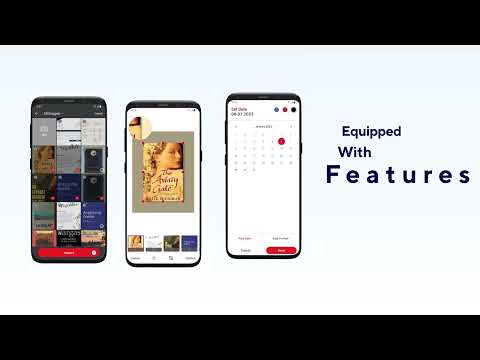
About this app
PDF Maker - Image to PDF: Your Ultimate JPG to PDF Converter App!
Are you tired of dealing with cumbersome converters that make the simplest tasks a chore? Say goodbye to those frustrations with Photo To PDF Converter & Editor, the ultimate solution for effortlessly converting your photos into documents.
📷 Image to PDF Converter App Key Features: 📄
🖼️ Powerful JPG to PDF Converter App;
📝 Easy-to-Use Photo to PDF Converter & Editor;
📑 Convert Photo to PDF Document Effortlessly;
🔒 Protect with Passwords;
🖋️ E-Sign Documents for Added Security;
📤 Share with Friends and Family;
🖼️ Image To PDF Converter App:
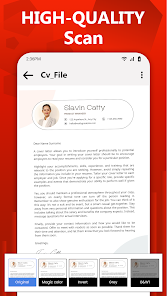
JPG To PDF Converter App - Photo To PDF Converter & Editor allows you to convert your pictures into professional-quality files with just a few taps. Whether selecting images from your gallery or capturing them directly from your camera, this app ensures a smooth conversion process. Choose your photos and let PDF Photos Editor do the rest, transforming them into polished documents ready for sharing or archiving.
🌟 Convert Photo To PDF Documents Instantly!
Whether you need to convert notes, receipts, invoices, forms, business cards, certificates, whiteboards, or any other document, this app has you covered. With its user-friendly interface and powerful features, Jpg To PDF Converter App simplifies the conversion process and offers a seamless experience for all your needs.
🔐 Protect with Passwords:
Secure your sensitive documents with PDF Photos Editor's built-in password protection feature. Set custom passwords to restrict access to your files and ensure only authorized individuals can view or edit them. With this added layer of security, you can have peace of mind knowing that your confidential information remains safe from prying eyes.
🖋️ E-Sign Documents with Ease:
Need to sign a document on the go? Convert To PDF Maker - Image To PDF Converter and Editor has you covered. With its intuitive e-signature tool, you can electronically sign files directly within the app, eliminating the need for printing, scanning, or faxing. Add your signature using your device's touchscreen, and finalize your documents confidently and conveniently.
📤 Share Documents Seamlessly:
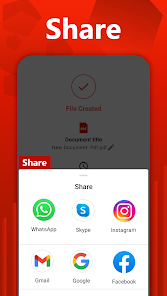
Whether collaborating on a project or sharing essential documents with friends and family, PDF Photos Editor makes it easy to distribute files with just a few taps. Share your converted docs via email, messaging apps, or cloud storage platforms, and ensure everyone can access the information they need whenever needed.
✅ Image To PDF Converter app!
With its robust features and intuitive interface, Convert To PDF Maker - Photo To PDF Converter & Editor redefines the conversion experience. Say goodbye to cumbersome converters and hello to effortless creation with PDF Photos Editor. Download the Convert Photo To PDF Document app today and discover a world of possibilities for your digital documents! 📷🔒📄
Offline PDF Converter📚
You can effortlessly convert your images to PDF without requiring cloud-based services, ensuring a secure offline conversion process.
Share PDF Files📁
Efficiently share converted pdf documents with others with one click. Share converted PDF files with your friends family and via social media, Bluetooth, Email, quick share.
Free PDF Editor📑
Convert JPG to PDF, photo to PDF, and Edit all your pdf files with the pdf Editor app. Try it now!
PDF Scanner APP🔎
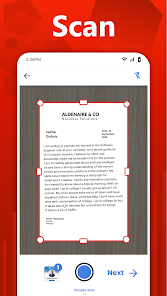
Now, you can scan, capture, import, and share right inside this portable scanner app to convert into PDF. Access everything you’ve previously scanned with the free PDF scanner app.
✅ AI Powered OCR for Enhanced Text Recognition!
PDF Scanner & Optical Character Recognition (OCR) powered by AI, our app recognizes and extracts text from scanned PDFs or image-based files. This enables you to convert image-rich documents into editable and searchable formats.Updated on
Events & offers

Safety starts with understanding how developers collect and share your data. Data privacy and security practices may vary based on your use, region, and age. The developer provided this information and may update it over time.

This app may share these data types with third parties
Device or other IDs

No data collected
Learn more about how developers declare collection

Data is encrypted in transit

Data can’t be deleted
Ratings and reviews
4.2
124K reviews

Ikssha Mahendren
- Flag inappropriate
March 24, 2026
awful, we HAVE to give it money details since it only allows free trial then. also the the fact that it doesn't ask to permit it only takes it and sends reminders later. cannot use app until you sign up for free trail which will take your money even the replies we get for the reviews aren't helpful they only say "we have free trail and then we take money to continue" this was a waste.
5 people found this review helpful
Battery Stats Saver
March 24, 2026
Hi, Payment details are necessary for the Premium subscription when appropriate and are not used when on a free trial. Upon signing up for a free trial, you are notified of the end date after which the subscription is upgraded to the Premium one. You might have missed the notification on your App. Thank you!

Ailyn Arco
- Flag inappropriate
March 21, 2026
I just used the 7 day free trial and I don't even know that after that you will need to do a premium, it auto-charged me the money and mind you it's my savings for my eye check up, I can't even be bother the blurriness of my eye because of this frustrating problem, I need a REFUND man.
7 people found this review helpful
Battery Stats Saver
March 21, 2026
Hi! Thank you for your review. Upon signing up for a free trial, you are notified of the end date after which the subscription is upgraded to the Premium one. Please, contact our Support Team by email regarding the refund so that they can assist you further.

•3•Black Thunder•3•
- Flag inappropriate
- Show review history
May 13, 2025
I used a 3-day free trial to convert an image to PDF, since the app required premium. It didn’t save files properly on my phone, so I deleted it. I expected a trial-ending reminder, but instead, it auto-charged me ₱775/week once I had money. I can’t even use the app, as PDF conversion doesn’t work on my device. The money was n allowance and enough to feed me for a week. I NEED A REFUND, man.
258 people found this review helpful
Battery Stats Saver
May 13, 2025
Hello, thank you for your review. We are sorry to hear that you are not quite happy with the App. Please, share your concerns with us at support.pdfconverter@repairbatterylife.com and we will be happy to assist you regarding the refund as well. Thank you!
What’s new
- Christmas Deals
- New tools section added
- Smoothness
- Bugs fixes
- Merge PDF
- Split PDF
- PDF to JPG
- Many more
- New tools section added
- Smoothness
- Bugs fixes
- Merge PDF
- Split PDF
- PDF to JPG
- Many more
App support
About the developer
DEEP SPARK LTD
support@repairbatterylife.com
16 Spinoza
TEL AVIV-JAFFA, 6438422
Israel
+1 701-620-4202


