
CAD Reader-View & Measure DWG
Contains adsIn-app purchases

4.0star
13.8K reviews

Everyone
info
5M+
Downloads

Everyone
Learn more


About this app
CADReader is a fast, reliable, cross-platform CAD software compatible with DWG, DXF, and PDF formats. Designed for AEC professionals, engineers, designers, site supervisor and quantity surveyors, it offers fast, accurate tools for viewing, measuring, and annotating drawings ensuring smooth, responsive performance across devices. With support for multiple languages, CADReader empowers seamless collaboration across global teams.
Supported Languages: English, Portuguese, Spanish, Indonesian, Vietnamese, Japanese, French, Russian, German, Simplified Chinese, Traditionnal Chinese and Korean.
Powerful Functions:
1. Fast Drawing Access
• Open and view multiple drawings simultaneously
• No font installation required; fully compatible with AutoCAD
• Supports DWG, DXF, and PDF formats
2. Quick Measurement Tools
• Apply custom scale settings for precise measurements
• Measure length, area, radius, angles, and arc length
• Perform continuous length measurements
• Easily measure complex and irregular polygons
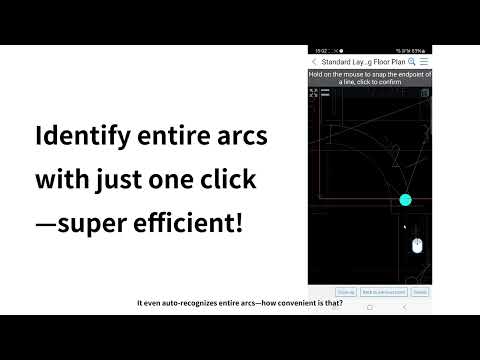
• Precision snapping with virtual mouse for accurate point selection
• Extract precise X, Y coordinates from CAD geometry
3. Efficient Collaboration & Annotations
• Add annotations including text, lines, leader line, shapes, and revision clouds
• Attach site photos and voice notes directly to drawings
• Import and export comments and markups for seamless collaboration
• Use red-flag locators for fast navigation to key areas
4. Advanced Features
• Convert between PDF and CAD formats
• Manage layers and drawing properties
• Toggle between model and layout views effortlessly
• Full-text search for fast drawing navigation
• Extract embedded text directly from CAD drawings
5. User-Friendly Interface
• Intuitive design optimized for professionals at all experience levels
Need Help?
Contact our technical support via WhatsApp or email for free 1-to-1 assistance:
Email: cadreaderservice@gmail.com
WhatsApp: https://wa.me/60167402995
Follow us for tips, tutorials, and updates:
YouTube: https://www.youtube.com/@cadreader
TikTok: https://www.tiktok.com/@cadreader_official
Facebook: https://www.facebook.com/FastCADReader
Instagram: https://www.instagram.com/cadreader/
LinkedIn:https://www.linkedin.com/company/fastcadreader/
Website: https://dwg.fastcadreader.com/
Supported Languages: English, Portuguese, Spanish, Indonesian, Vietnamese, Japanese, French, Russian, German, Simplified Chinese, Traditionnal Chinese and Korean.
Powerful Functions:
1. Fast Drawing Access
• Open and view multiple drawings simultaneously
• No font installation required; fully compatible with AutoCAD
• Supports DWG, DXF, and PDF formats
2. Quick Measurement Tools
• Apply custom scale settings for precise measurements
• Measure length, area, radius, angles, and arc length
• Perform continuous length measurements
• Easily measure complex and irregular polygons
• Precision snapping with virtual mouse for accurate point selection
• Extract precise X, Y coordinates from CAD geometry
3. Efficient Collaboration & Annotations
• Add annotations including text, lines, leader line, shapes, and revision clouds
• Attach site photos and voice notes directly to drawings
• Import and export comments and markups for seamless collaboration
• Use red-flag locators for fast navigation to key areas
4. Advanced Features
• Convert between PDF and CAD formats
• Manage layers and drawing properties
• Toggle between model and layout views effortlessly
• Full-text search for fast drawing navigation
• Extract embedded text directly from CAD drawings
5. User-Friendly Interface
• Intuitive design optimized for professionals at all experience levels
Need Help?
Contact our technical support via WhatsApp or email for free 1-to-1 assistance:
Email: cadreaderservice@gmail.com
WhatsApp: https://wa.me/60167402995
Follow us for tips, tutorials, and updates:
YouTube: https://www.youtube.com/@cadreader
TikTok: https://www.tiktok.com/@cadreader_official
Facebook: https://www.facebook.com/FastCADReader
Instagram: https://www.instagram.com/cadreader/
LinkedIn:https://www.linkedin.com/company/fastcadreader/
Website: https://dwg.fastcadreader.com/
Updated on
Safety starts with understanding how developers collect and share your data. Data privacy and security practices may vary based on your use, region, and age. The developer provided this information and may update it over time.

No data shared with third parties
Learn more about how developers declare sharing

This app may collect these data types
Personal info

Data is encrypted in transit

You can request that data be deleted
Ratings and reviews
4.1
13.4K reviews

Crash Override
- Flag inappropriate
April 23, 2024
Honestly, this is an amazing app. It has way more features than I thought it would, just the ability to snap to objects to grab things like distances was more than I anticipated. It's not meant to replace a workstation, but that's more of a limitations of mobile devices than the software itself. I'd give it six stars if I could.
172 people found this review helpful

Sk Ibrahim
- Flag inappropriate
February 6, 2026
Hello Support Team, I am experiencing a screen issue while using your application. A marked area remains visible on my screen and continues to stay as a mark even after I leave or close the app. This affects normal screen visibility and usage. please fix it as soon as possible.
4 people found this review helpful
Beijing Honghu Yuntu Technology Co., Ltd
February 11, 2026
hello,for the fastest help, please message us on WhatsApp at +60167402995 or email cadreaderservice@gmail.com.
Sorry for the inconvenience

Dennis Downs
- Flag inappropriate
February 16, 2025
I've got my entire site using this app, even the plasterers! The free version is more than enough to get you by and the paid version is well worth the money for it's features for advanced users. The only thing I would like to see added is the ability to orient the plans, mine are always skewed and makes finding a straight line difficult and it would be handy to spin the plans as I'm walking instead of turning the device. Other than that it does everything else perfectly, highly recommend.
169 people found this review helpful
What’s new
1. Add display and precision settings
2. Italian added to the interface languages
3. Optimize the drawing display
2. Italian added to the interface languages
3. Optimize the drawing display
Everyone
Learn moreApp support
About the developer
Beijing Honghu Yuntu Technology Co., Ltd.
cadreaderservice@gmail.com
中国
北京市海淀区
东北旺西路8号院23号楼4层101
邮政编码: 100193
+60 16-740 2995


