
Call Recorder - Cube ACR
Contains adsIn-app purchases

4.0star
889K reviews
10M+
Downloads

Everyone
info




About this app
The most technically advanced call recorder. Records phone calls and VoIP automatically. If you have already tried to record calls using other applications for call recording and did not get a satisfactory result, try Call Recorder - Cube ACR, it just works the best.
Whether it’s an important call, an annoying robocall you wish to complain about, or a long-awaited conversation with your loved ones, Cube ACR enables you to record incoming & outgoing calls for further re-listening and use.
Key features:
★ Automatically record incoming & outgoing phone calls in the highest quality
★ Record conversations on WhatsApp, Google Meet, Line, IMO, Viber, Facebook, WeChat, etc.
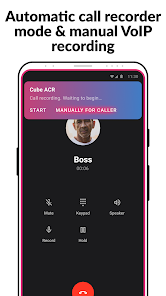
★ Switch between the automatic call recording mode & manual VoIP recording, based on your preferences
★ Easily record voice memos
★ Listen to recorded audio files directly in Cube ACR
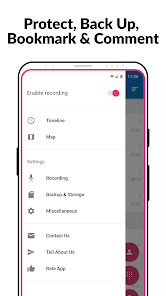
★ Star favorite phone recordings for easier re-listening
★ Save audio recordings in the cloud
NOTE
This app uses Accessibility services.
If it doesn't work on your device or you hear only yourself on playback, try changing the recording source in the Settings, or use auto-on speaker mode.
Legal notice
The legislation regarding phone call recording varies in different countries and states. Please, make sure that you're not breaking the legislation of your or your callee/caller country. Always notify the callee/caller that your conversation will be recorded and ask for their permission.
Contact us
If you have any questions or issues, please, send us a message at support@cubeacr.app
Need to record phone calls?
Then Cube ACR is exactly the call recorder you’ve been looking for.
Whether it’s an important call, an annoying robocall you wish to complain about, or a long-awaited conversation with your loved ones, Cube ACR enables you to record incoming & outgoing calls for further re-listening and use.
Key features:
★ Automatically record incoming & outgoing phone calls in the highest quality
★ Record conversations on WhatsApp, Google Meet, Line, IMO, Viber, Facebook, WeChat, etc.
★ Switch between the automatic call recording mode & manual VoIP recording, based on your preferences
★ Easily record voice memos
★ Listen to recorded audio files directly in Cube ACR
★ Star favorite phone recordings for easier re-listening
★ Save audio recordings in the cloud
NOTE
This app uses Accessibility services.
If it doesn't work on your device or you hear only yourself on playback, try changing the recording source in the Settings, or use auto-on speaker mode.
Legal notice
The legislation regarding phone call recording varies in different countries and states. Please, make sure that you're not breaking the legislation of your or your callee/caller country. Always notify the callee/caller that your conversation will be recorded and ask for their permission.
Contact us
If you have any questions or issues, please, send us a message at support@cubeacr.app
Need to record phone calls?
Then Cube ACR is exactly the call recorder you’ve been looking for.
Updated on
Safety starts with understanding how developers collect and share your data. Data privacy and security practices may vary based on your use, region, and age. The developer provided this information and may update it over time.


Ratings and reviews
4.0
883K reviews

Marky Mark
- Flag inappropriate
February 27, 2025
Although this app in the 3 day trial period I have used it in has worked far better than I would expect any recording phone application would, I am giving it 4 stars due to there being no option to truly purchase the app. That means you can only "rent" it, and you are stuck with payments forever. If there was an option to purchase this app for a reasonable price (e.g. $10-20), I would. For the devs, you could easily continue making money on the app by more and more continous downloads, for one.
179 people found this review helpful
Cube Apps Ltd
February 28, 2025
Hello, we keep working on the app and updating it for every new Android update that imposes more and more restrictions on call recording. Unfortunately, we cannot guarantee that the app version you buy will keep working for you after the next system software on your device. This is why one-time purchase is not possible

Trey Waldrop
- Flag inappropriate
- Show review history
January 31, 2026
The app only records the users side of the phone call. The other side is not recorded. I had high hopes for this app as it was listed as the #1 call recording app in the tech site I visit. I guess it only works with certain phones. It doesn't work with the LG Phoenix for sure. I tried every call record setting and none of them recorded both sides of the call. I almost bought the premium version. I'm glad I didn't.... ☹️
3 people found this review helpful
Cube Apps Ltd
February 2, 2026
Hello!
Could you please send us an email using ‘contact us’ form within Cube app menu? Use your gmail address if possible, and please, make sure that ‘system_info.txt’ file is attached to the email along with a short description of your issue.
We will check and advise a solution. Thanks.

Angie Corey (FCSweet)
- Flag inappropriate
January 30, 2026
Overall it's extremely effective & easy to use! You can access your saved recordings and transfer them via USB connection to your computer. The only issues I encountered was that when you use a wireless headset or headphones it doesn't capture the other person's side, only yours. I missed an extremely important call I thought I had because I didn't realize this limitation.
1 person found this review helpful
Cube Apps Ltd
January 30, 2026
Unfortunately, the fix we found to work around the blockage by Google of interlocutor recording on Android 9-16, will not work for calls using a headset. Sorry for the inconvenience. In the app menu, you can set to 'skip recording when the bluetooth is used'
What’s new
- Initial presets updated;
- Minor fixes and improvements.
- Minor fixes and improvements.
App support
About the developer
Cube Apps Limited
support@cubeapps.io
PROTOPAPAS BLDG, Floor 2, Flat 201, 79 Spyrou Kyprianou
Limassol 3076
Cyprus
+357 26 000379


