
CamScanner- scanner, PDF maker
Contains adsIn-app purchases
4.7star
4.97M reviews
500M+
Downloads
Editors' choice

Everyone
info
About this app
*Scan docs into clear & sharp image/PDF, to email, fax, print or save to cloud
* The choice for 400 million users all over the world
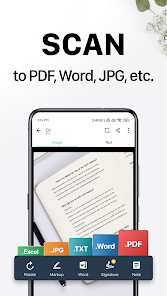
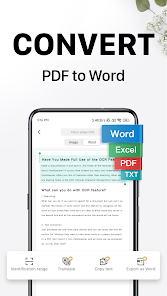
CamScanner is a scanner app that helps users scan, edit, store, and sync contents across smartphones, iPads, tablets and computers. Extract texts with OCR and convert PDF to Word, Excel, etc.
*Optimize Scan Quality
Smart cropping and auto enhancing make the texts and graphics look clear and sharp.
*E-signature
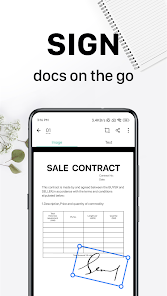
Sign contracts and share to your counter party. It is widely used among real estate agents and in government form filling.
*Advanced Editing
Making annotations or adding customized watermark on docs are made available for you.
*Extract Texts from Image
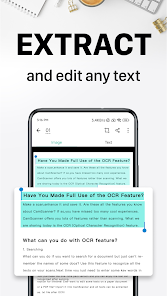
OCR (optical character recognition) feature extracts texts from single page for further editing or sharing. (Paid app only)
*Share PDF/JPEG Files
Easily share documents in PDF or JPEG format with others via social media, email attachment or sending the doc link.
*AirPrint & Fax Documents
Instantly print out docs in CamScanner with nearby printer via AirPrint; directly fax docs to over 30 countries from the app.
*Collaboration
Invite friends or colleagues to view and comment on your scans in a group. (Registrants only)
*Secure Important Docs
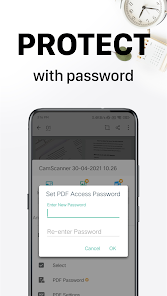
Set passcode for viewing important docs; meanwhile, when sending doc link, you can set password to protect it.
*Sync across Platforms
Sign up to sync documents on the go. Just sign in to any smartphone, tablet or computer (visit CamScanner website) you own and you can view, edit and share any document.
Premium Subscription Service:
1. Edit OCR results and notes of the doc, exporting as .txt file
2. Create Doc Collage for multiple pages
3. + 10G cloud space
4. + 40 extra collaborators
5. Send doc link with password protection and expiration date
6. Auto upload docs to Box, Google Drive, Dropbox, Evernote, One Drive and etc.
7. Batch download PDF files through web application of CS
8. Import PDF to Camscanner for editing
9. Scan academic questions to make practice tests for study
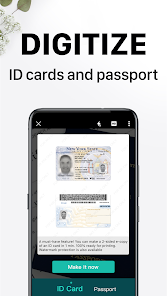
10. High Standard ID Scan
and More...
• Payment will be charged to Google Play Account at confirmation of purchase.
• Account will be charged for renewal within 24-hours prior to the end of the current subscription period.
• Subscriptions may be managed by the user and auto-renewal may be turned off by going to the user's Account Settings after purchase.
• Any unused portion of a free trial period will be forfeited when the user purchases a subscription to that publication.
CamScanner users scan and manage
* Bill, Invoice, Contract, Tax Roll, Business Card…
* Whiteboard, Memo, Script, Letter…
* Blackboard, Note, PPT, Book, Article…
* Credential, Certificate, Identity Document, Painting…
3rd Party Cloud Storage Services Supported:
-Box, Google Drive, Evernote, Dropbox, OneDrive
We’d love to hear your feedback: android_support@camscanner.com
Follow us on Twitter: @CamScanner
Like us on Facebook: CamScanner
Follow us on Google+: CamScanner
* The choice for 400 million users all over the world
CamScanner is a scanner app that helps users scan, edit, store, and sync contents across smartphones, iPads, tablets and computers. Extract texts with OCR and convert PDF to Word, Excel, etc.
*Optimize Scan Quality
Smart cropping and auto enhancing make the texts and graphics look clear and sharp.
*E-signature
Sign contracts and share to your counter party. It is widely used among real estate agents and in government form filling.
*Advanced Editing
Making annotations or adding customized watermark on docs are made available for you.
*Extract Texts from Image
OCR (optical character recognition) feature extracts texts from single page for further editing or sharing. (Paid app only)
*Share PDF/JPEG Files
Easily share documents in PDF or JPEG format with others via social media, email attachment or sending the doc link.
*AirPrint & Fax Documents
Instantly print out docs in CamScanner with nearby printer via AirPrint; directly fax docs to over 30 countries from the app.
*Collaboration
Invite friends or colleagues to view and comment on your scans in a group. (Registrants only)
*Secure Important Docs
Set passcode for viewing important docs; meanwhile, when sending doc link, you can set password to protect it.
*Sync across Platforms
Sign up to sync documents on the go. Just sign in to any smartphone, tablet or computer (visit CamScanner website) you own and you can view, edit and share any document.
Premium Subscription Service:
1. Edit OCR results and notes of the doc, exporting as .txt file
2. Create Doc Collage for multiple pages
3. + 10G cloud space
4. + 40 extra collaborators
5. Send doc link with password protection and expiration date
6. Auto upload docs to Box, Google Drive, Dropbox, Evernote, One Drive and etc.
7. Batch download PDF files through web application of CS
8. Import PDF to Camscanner for editing
9. Scan academic questions to make practice tests for study
10. High Standard ID Scan
and More...
• Payment will be charged to Google Play Account at confirmation of purchase.
• Account will be charged for renewal within 24-hours prior to the end of the current subscription period.
• Subscriptions may be managed by the user and auto-renewal may be turned off by going to the user's Account Settings after purchase.
• Any unused portion of a free trial period will be forfeited when the user purchases a subscription to that publication.
CamScanner users scan and manage
* Bill, Invoice, Contract, Tax Roll, Business Card…
* Whiteboard, Memo, Script, Letter…
* Blackboard, Note, PPT, Book, Article…
* Credential, Certificate, Identity Document, Painting…
3rd Party Cloud Storage Services Supported:
-Box, Google Drive, Evernote, Dropbox, OneDrive
We’d love to hear your feedback: android_support@camscanner.com
Follow us on Twitter: @CamScanner
Like us on Facebook: CamScanner
Follow us on Google+: CamScanner
Updated on
Events and offers


Safety starts with understanding how developers collect and share your data. Data privacy and security practices may vary based on your use, region and age. The developer provided this information and may update it over time.


Ratings and reviews
4.7
4.88M reviews

Allen Irizarry
- Flag inappropriate
8 October 2025
edit: My original review below was in 2016 and STILL appplies.. that's how amazing it is and continues to be. This app is super intuitive, easy to use, and the pictures come out amazing as if you were really scanning them. When I was forced to take online classes for the remainder of my college turn, this was a LIFE SAVER. Not only that, I could scan my homework on the go - at a diner, in the break room, in a car/bus. I couldn't have graduated without it!! I would give it more stars if I could!
3,273 people found this review helpful

Brian O'Neill
- Flag inappropriate
28 January 2026
2026 and still LOVE IT!3 MAY 2023 Still using it after about 7 years, lives up to 5 ⭐!!! Takes pics of just about anything, scans it, squares it so the pic of a receipt or a sign somewhere doesn't have to be perfect, then it cleans it and optimizes it. Then you can name, save it and/or send it somewhere via text or email. I am very impressed with it's functionality and reliability. It does what it says it can do, and it is so user friendly, I don't recall if there a help file for it. FIVE Stars.
99 people found this review helpful

Thomas Fisher (Fish1552)
- Flag inappropriate
- Show review history
21 January 2026
I've been using it for years and paid for the premium to make it permanent. Apparently someone must have bought it because now they want me to pay yearly. I get tired of apps like this when I invest in their app only to later be told I need to pay yearly. I invested in your future when you were starting out, you would figure they would appreciate that.
3 people found this review helpful
What's new
· Polishing the little things to keep your workflow seamless.
App support
About the developer
INTSIG PTE. LTD.
support@camscanner.com
151 CHIN SWEE ROAD
#14-01 MANHATTAN HOUSE
Singapore 169876
+86 177 0173 9631


