

SSH/SFTP Server - Terminal
Contains adsIn-app purchases

3.8star
1.42K reviews
100K+
Downloads

Everyone
info
About this app
A powerful application allows you to run SSH/SFTP Server on your phone with full functional terminal.
APPLICATION FEATURES
√ Use any network interfaces in your device including: Wi-Fi, Ethernet, Tethering...
√ Multiple users (anonymous user included: username=ssh without password)
• [SFTP feature] Allow each user to show hidden files or not
√ [SFTP feature] Multiple access paths for each user: Any folders in your internal storage or external sdcard
• [SFTP feature] Can set read-only or full write access on each path
√ Automatically start SSH/SFTP Server when certain WiFi is connected
√ Automatically start SSH/SFTP Server on boot
√ Has public intents to support scripting
For Tasker integration:
Add new Task Action (choose System -> Send Intent) with the following information:
• Package: net.xnano.android.sshserver
• Class: net.xnano.android.sshserver.receivers.CustomBroadcastReceiver
• Actions: either one of following actions:
- net.xnano.android.sshserver.START_SERVER
- net.xnano.android.sshserver.STOP_SERVER
APPLICATION SCREENS
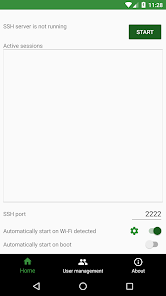
√ Home: Control the server configurations such as
• Start/stop server
• Monitor the connected clients
• Change port
• Enable automatically start on boot
• ...
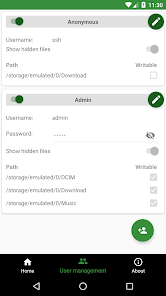
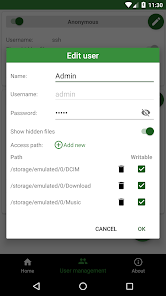
√ User management
• Manage users and access paths for each user
• Enable or disable user
√ About
• Information about SSH/SFTP Server
NOTICES
- Doze mode: Application may not work as expected if doze mode is activated. Please go to Settings -> Search for Doze mode and add this application to the white list.
PERMISSIONS NEEDED
√ WRITE_EXTERNAL_STORAGE: Mandatory permission for SSH/SFTP Server to access files in your device.
√ INTERNET, ACCESS_NETWORK_STATE, ACCESS_WIFI_STATE: Mandatory permissions to allow user to connect to SSH/SFTP Server.
√ Location (Coarse location): Only required for user who wants to automatically start server on Wi-Fi detect on Android P and above.
Please read Android P restriction about getting Wifi's connection info here: https://developer.android.com/about/versions/pie/android-9.0-changes-all#restricted_access_to_wi-fi_location_and_connection_information
Which SSH/SFTP clients are supported?
√ You can use any SSH/SFTP clients on Windows, Mac OS, Linux or even browser to access this SSH/SFTP Server.
Tested clients:
• FileZilla
• WinSCP
• Bitvise SSH client
• Finder (MAC OS)
• Any terminal/File manager on Linux
• Total Commander (Android)
• ES File Explorer (Android)
SUPPORT
If you're facing any problems, want new features or have feedback to improve this application, don't hesitate to send it to us via the support email: support@xnano.net.
NEGATIVE COMMENTS can't help the developer solve the problems!
Privacy Policy
https://xnano.net/privacy/sshserver_privacy_policy.html
APPLICATION FEATURES
√ Use any network interfaces in your device including: Wi-Fi, Ethernet, Tethering...
√ Multiple users (anonymous user included: username=ssh without password)
• [SFTP feature] Allow each user to show hidden files or not
√ [SFTP feature] Multiple access paths for each user: Any folders in your internal storage or external sdcard
• [SFTP feature] Can set read-only or full write access on each path
√ Automatically start SSH/SFTP Server when certain WiFi is connected
√ Automatically start SSH/SFTP Server on boot
√ Has public intents to support scripting
For Tasker integration:
Add new Task Action (choose System -> Send Intent) with the following information:
• Package: net.xnano.android.sshserver
• Class: net.xnano.android.sshserver.receivers.CustomBroadcastReceiver
• Actions: either one of following actions:
- net.xnano.android.sshserver.START_SERVER
- net.xnano.android.sshserver.STOP_SERVER
APPLICATION SCREENS
√ Home: Control the server configurations such as
• Start/stop server
• Monitor the connected clients
• Change port
• Enable automatically start on boot
• ...
√ User management
• Manage users and access paths for each user
• Enable or disable user
√ About
• Information about SSH/SFTP Server
NOTICES
- Doze mode: Application may not work as expected if doze mode is activated. Please go to Settings -> Search for Doze mode and add this application to the white list.
PERMISSIONS NEEDED
√ WRITE_EXTERNAL_STORAGE: Mandatory permission for SSH/SFTP Server to access files in your device.
√ INTERNET, ACCESS_NETWORK_STATE, ACCESS_WIFI_STATE: Mandatory permissions to allow user to connect to SSH/SFTP Server.
√ Location (Coarse location): Only required for user who wants to automatically start server on Wi-Fi detect on Android P and above.
Please read Android P restriction about getting Wifi's connection info here: https://developer.android.com/about/versions/pie/android-9.0-changes-all#restricted_access_to_wi-fi_location_and_connection_information
Which SSH/SFTP clients are supported?
√ You can use any SSH/SFTP clients on Windows, Mac OS, Linux or even browser to access this SSH/SFTP Server.
Tested clients:
• FileZilla
• WinSCP
• Bitvise SSH client
• Finder (MAC OS)
• Any terminal/File manager on Linux
• Total Commander (Android)
• ES File Explorer (Android)
SUPPORT
If you're facing any problems, want new features or have feedback to improve this application, don't hesitate to send it to us via the support email: support@xnano.net.
NEGATIVE COMMENTS can't help the developer solve the problems!
Privacy Policy
https://xnano.net/privacy/sshserver_privacy_policy.html
Updated on
Safety starts with understanding how developers collect and share your data. Data privacy and security practices may vary based on your use, region, and age. The developer provided this information and may update it over time.

No data shared with third parties
Learn more about how developers declare sharing

This app may collect these data types
App info and performance and Device or other IDs

Data is encrypted in transit

Data can’t be deleted
Ratings and reviews
3.9
1.3K reviews

David Bannon
- Flag inappropriate
- Show review history
May 30, 2023
Seems to accept ssh connections but cannot read the file system ("Permission denied"). So, pretty useless. Ad too intrusive so I will not keep trying .... No, sorry, it does work, it's just that it defaults to a "home" directory that's unusable. Remove the default paths, add a sensible one and it works as expected. The paid version seems less stable ....
17 people found this review helpful

Rubens Furbetta
- Flag inappropriate
November 29, 2025
Excellent app. The speed of its directory scanning and file transfers is amazing. It is a pity the app does not support root access so the clients would be able to see the entire filesystem structure.
1 person found this review helpful

A Google user
- Flag inappropriate
- Show review history
November 3, 2019
The only real problem with this app is that it eats up battery A LOT when in use (even when no users connected). I have tried other similar apps which don't eat up battery. I can't understand why. For example, i have a lot of apps on my phone but when i check the Battery area this SSH/SFTP Server app is always at the top.. After charging my phone to 100% the night before, and when i wake up the next day, prior to installing this app i woud have 98% battery left. With this app installed (and running, even when no users connected), when i wake up my battery left is below 70%...Ughh. So the only reason i may have to deinstall it and go back to alternative choices is because of this. I would prefer to use this app but not at the expense of battery even when it has no connected users. And btw, the app is already set to "Not Optimized" under battery. Doesnt help.. The app just eats battery constantly even in doze mode apparently (since my phone is always sleeping).
7 people found this review helpful
Banana Studio
November 8, 2019
Thank you for your kind feedback. We are aware of this problem and are currently working on solving it. Please update your app to the latest version when you see an option.
What’s new
New feature: Shell access for a user can be disabled. Please open user editing screen to do that.
App support
About the developer
Quân Nguyễn
support@xnano.net
Tổ 13, Thọ Quang, Sơn Trà, Đà Nẵng
Đà Nẵng 550000
Vietnam


