
Aegis Authenticator - 2FA App
star
6.29K reviews

Everyone
info
1M+
Downloads

Everyone
Learn more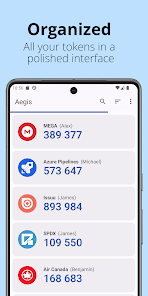


About this app
Aegis Authenticator is a free, secure and open source app to manage your 2-step verification tokens for your online services.
Compatibility
Aegis supports the HOTP and TOTP algorithms. These two algorithms are industry-standard and widely supported, making Aegis compatible with thousands of services. Any web service that supports Google Authenticator will also work with Aegis Authenticator.
Encryption and biometric unlock
All of your one-time passwords are stored in a vault. If you choose to set a password (highly recommended), the vault will be encrypted using strong cryptography. If someone with malicious intent gets a hold of the vault file, it’s impossible for them to retrieve the contents without knowing the password. Entering your password each time you need access to a one-time password can be cumbersome. Fortunately, you can also enable biometric unlock if your device has a biometrics sensor (i.e. fingerprint or face unlock).
Organization
Over time, you'll likely accumulate tens of entries in your vault. Aegis Authenticator has lots of organization options to make finding the one you need at a particular moment easier. Set a custom icon for an entry to make it easier to find. Search by account name or service name. Have a lot of one-time passwords? Add them to custom groups for easier access. Personal, Work and Social can each get their own group.
Backups
To make sure you will never lose access to your online accounts, Aegis Authenticator can create automatic backups of the vault to a location of your choosing. If your cloud provider supports the Storage Access Framework of Android (like Nextcloud does), it can even create automatic backups to the cloud. Creating manual exports of the vault is also supported.
Making the switch
To make the switch easier, Aegis Authenticator can import the entries of lots of other authenticators, including: Authenticator Plus, Authy, andOTP, FreeOTP, FreeOTP+, Google Authenticator, Microsoft Authenticator, Steam, TOTP Authenticator and WinAuth (root access is required for the apps that don't have an option to export).
Feature overview
• Free and open source
• Secure
• Encrypted, can be unlocked with a password or biometrics
• Screen capture prevention
• Tap to reveal
• Compatible with Google Authenticator
• Supports industry standard algorithms: HOTP and TOTP
• Lots of ways to add new entries
• Scan a QR code or an image of one
• Enter details manually
• Import from other popular authenticator apps
• Organization
• Alphabetic/custom sorting
• Custom or automatically generated icons
• Group entries together
• Advanced entry editing
• Search by name/issuer
• Material design with multiple themes: Light, Dark, AMOLED
• Export (plaintext or encrypted)
• Automatic backups of the vault to a location of your choosing
Open source and license
Aegis Authenticator is open source and licensed under GPLv3. The source code is available here: https://github.com/beemdevelopment/Aegis
Compatibility
Aegis supports the HOTP and TOTP algorithms. These two algorithms are industry-standard and widely supported, making Aegis compatible with thousands of services. Any web service that supports Google Authenticator will also work with Aegis Authenticator.
Encryption and biometric unlock
All of your one-time passwords are stored in a vault. If you choose to set a password (highly recommended), the vault will be encrypted using strong cryptography. If someone with malicious intent gets a hold of the vault file, it’s impossible for them to retrieve the contents without knowing the password. Entering your password each time you need access to a one-time password can be cumbersome. Fortunately, you can also enable biometric unlock if your device has a biometrics sensor (i.e. fingerprint or face unlock).
Organization
Over time, you'll likely accumulate tens of entries in your vault. Aegis Authenticator has lots of organization options to make finding the one you need at a particular moment easier. Set a custom icon for an entry to make it easier to find. Search by account name or service name. Have a lot of one-time passwords? Add them to custom groups for easier access. Personal, Work and Social can each get their own group.
Backups
To make sure you will never lose access to your online accounts, Aegis Authenticator can create automatic backups of the vault to a location of your choosing. If your cloud provider supports the Storage Access Framework of Android (like Nextcloud does), it can even create automatic backups to the cloud. Creating manual exports of the vault is also supported.
Making the switch
To make the switch easier, Aegis Authenticator can import the entries of lots of other authenticators, including: Authenticator Plus, Authy, andOTP, FreeOTP, FreeOTP+, Google Authenticator, Microsoft Authenticator, Steam, TOTP Authenticator and WinAuth (root access is required for the apps that don't have an option to export).
Feature overview
• Free and open source
• Secure
• Encrypted, can be unlocked with a password or biometrics
• Screen capture prevention
• Tap to reveal
• Compatible with Google Authenticator
• Supports industry standard algorithms: HOTP and TOTP
• Lots of ways to add new entries
• Scan a QR code or an image of one
• Enter details manually
• Import from other popular authenticator apps
• Organization
• Alphabetic/custom sorting
• Custom or automatically generated icons
• Group entries together
• Advanced entry editing
• Search by name/issuer
• Material design with multiple themes: Light, Dark, AMOLED
• Export (plaintext or encrypted)
• Automatic backups of the vault to a location of your choosing
Open source and license
Aegis Authenticator is open source and licensed under GPLv3. The source code is available here: https://github.com/beemdevelopment/Aegis
A secure 2-step authenticator to manage your one-time passwords
Updated on
Featured stories

Safety starts with understanding how developers collect and share your data. Data privacy and security practices may vary based on your use, region, and age. The developer provided this information and may update it over time.
- No data shared with third partiesLearn more about how developers declare sharing
- No data collectedLearn more about how developers declare collection


Ratings and reviews
6.1K reviews

Darth Futuza
- Flag inappropriate
August 1, 2026
My only complaint is that they don't have a Windows/Linux/Mac Desktop version available. I've used it through 2 phones for about 50 different authentication services, and the only problem I've had is while I was waiting for a new phone to ship to me, I needed to run the app without a phone, installing an android emulator for that is a bit annoying.
14 people found this review helpful

Meddle
- Flag inappropriate
April 3, 2021
Simple yet secure. Does everything you need it to do, without being bloated down by ads or unnecessary features. Best of all, you can back up your 2FA vault to an encrypted file, which you can also use to access your codes from another device if you wish to. That was exactly the functionality I had been looking for, so that my codes remain secure, yet still accessible from multiple devices just in case. UI design is very clean as well, and completely free. I definitely reccommend.
160 people found this review helpful

Michael Lynch
- Flag inappropriate
- Show review history
November 14, 2021
By and large I really like this app. The one issue I have is that my preferred login method, biometric, is hidden by the keyboard on my phone. I don't know if this is intentional or because the UI was designed for larger displays. It'd be great if there was an option to make biometric the default as well as making it so it doesn't require multiple gestures to access when it isn't the default. Edit: The developer responded and it looks like there's a way around said issue. Which is great! Going to move to 5 stars. It's a free (and great) tool so I don't want to be overly critical. It looks like other people have had this issue before as well so perhaps the UI should make it clear that this is a one time thing that will go away once you enter your pin.
86 people found this review helpful
Beem Development
November 14, 2021
Thanks for your review. You're probably seeing the password reminder. Try entering your password once. After that, Aegis will prompt for biometrics by default again until it's time for another password reminder.
What’s new
New features:
- Support for importing encrypted Proton Authenticator exports
Fixed bugs:
- A maliciously crafted icon pack could overwrite Aegis' internal files if imported, including the vault file
- Support for importing encrypted Proton Authenticator exports
Fixed bugs:
- A maliciously crafted icon pack could overwrite Aegis' internal files if imported, including the vault file
Everyone
Learn moreApp support
About the developer
Beem Development
beemdevelopment+support@gmail.com
Leerparkpromenade 363
3312 KW Dordrecht
Netherlands
+31 6 82445198


