Sectograph. Day & Time planner
In-app purchases
4.6star
98.9K reviews
5M+
Downloads

Everyone
info


About this app
🎯 Sectograph is a new, intuitive way to view your calendar and daily schedule.
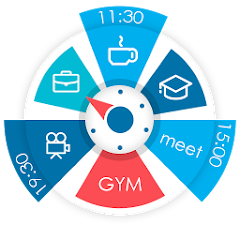
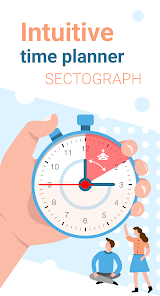
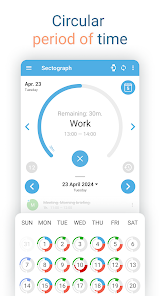
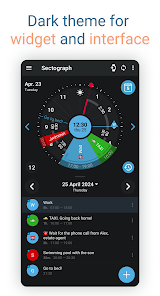
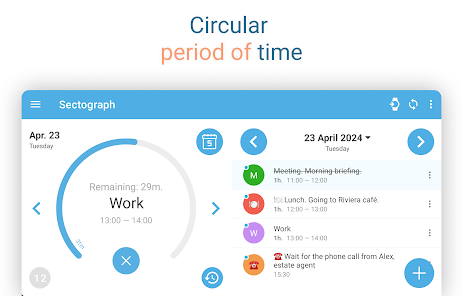
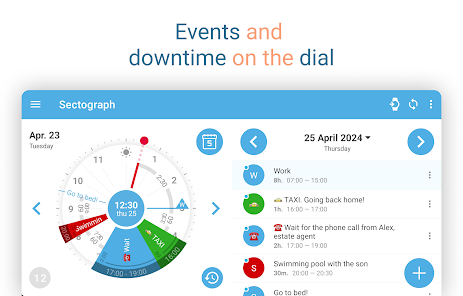
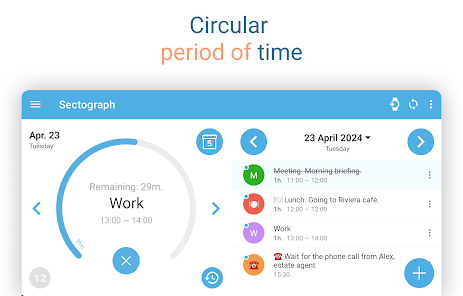
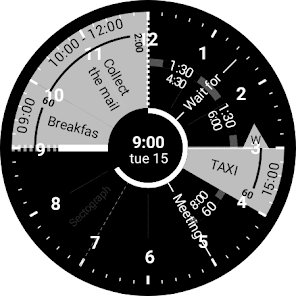
It shows your day as a circular planner — a 12-hour clock face — with events and free time between them.
A visual time planner for time blocking, time management, and a clearer sense of time.
⚙️ HOW IT WORKS
Sectograph is lightweight, privacy-friendly, and works with your existing calendars on the device.
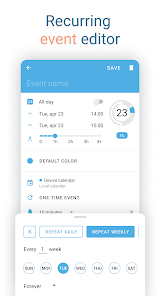
It overlays your day planner (routine, local calendar, Google Calendar) onto a clock-face timeline and automatically calculates:
• upcoming events
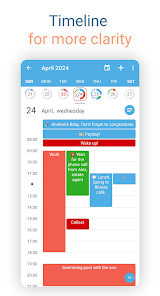
• time blocks and durations
• gaps between events and your real free time
Everything updates as time passes, keeping your schedule always current.
Not a to-do list — it’s a calendar-based schedule planner that visualizes what’s already on your calendar.
👀 HOW IT LOOKS
Like an analog clock your brain already understands — but with your day mapped onto it as sectors.
• Events appear exactly in the hours they happen (a radial / circular calendar view)
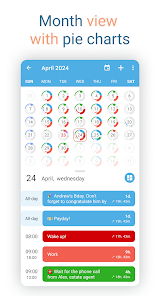
• Each sector width matches the event duration (a true pie-chart schedule)
• See gaps and the time from “now” to the next event at a glance
A clock planner / visual planner that helps you read your day instantly.
🎯 USE CASES & IDEAS
Use Sectograph as a day planner, daily planner, time planner, or routine planner for time management and daily schedule planning.
Great for time blocking (deep work, meetings, breaks), work/shift schedules, class schedules, travel itineraries, and Pomodoro planning (place focus sessions as time blocks).
If you like Chronodex, you’ll feel right at home.
🔄 SYNC & CALENDARS
Reads events from Google Calendar and your local device calendar; Microsoft Outlook calendar: beta.
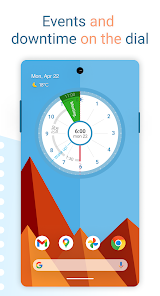
📱 HOME SCREEN CALENDAR WIDGET
Keep your schedule always visible with a calendar widget / home screen widget.
• Automatic updates (including a clock refresh once a minute)
• Tap a sector to open details and quick actions
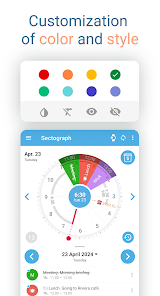
• Flexible visual settings + free widget themes: Dark / White / Gray
• Optional: light/dark app theme, 24-hour mode & extra zoom (1–12h), month/day grid views
⌚ WEAR OS (SMARTWATCH SUPPORT)
A true Wear OS calendar / smartwatch calendar at a glance:
• Watch app with an interactive widget
• Tile for quick access to the circular planner
• Watch face for continuous schedule awareness (installed separately)
• Large complication to enhance some third-party watch faces
🧠 HELPFUL FOR ADHD & “TIME BLINDNESS”
Designed to make time easier to grasp — especially if you struggle with time blindness, which is common for people with ADHD.
(Sectograph is not a medical app.)
✅ Install Sectograph and get a calm, visual overview of your day.
It shows your day as a circular planner — a 12-hour clock face — with events and free time between them.
A visual time planner for time blocking, time management, and a clearer sense of time.
⚙️ HOW IT WORKS
Sectograph is lightweight, privacy-friendly, and works with your existing calendars on the device.
It overlays your day planner (routine, local calendar, Google Calendar) onto a clock-face timeline and automatically calculates:
• upcoming events
• time blocks and durations
• gaps between events and your real free time
Everything updates as time passes, keeping your schedule always current.
Not a to-do list — it’s a calendar-based schedule planner that visualizes what’s already on your calendar.
👀 HOW IT LOOKS
Like an analog clock your brain already understands — but with your day mapped onto it as sectors.
• Events appear exactly in the hours they happen (a radial / circular calendar view)
• Each sector width matches the event duration (a true pie-chart schedule)
• See gaps and the time from “now” to the next event at a glance
A clock planner / visual planner that helps you read your day instantly.
🎯 USE CASES & IDEAS
Use Sectograph as a day planner, daily planner, time planner, or routine planner for time management and daily schedule planning.
Great for time blocking (deep work, meetings, breaks), work/shift schedules, class schedules, travel itineraries, and Pomodoro planning (place focus sessions as time blocks).
If you like Chronodex, you’ll feel right at home.
🔄 SYNC & CALENDARS
Reads events from Google Calendar and your local device calendar; Microsoft Outlook calendar: beta.
📱 HOME SCREEN CALENDAR WIDGET
Keep your schedule always visible with a calendar widget / home screen widget.
• Automatic updates (including a clock refresh once a minute)
• Tap a sector to open details and quick actions
• Flexible visual settings + free widget themes: Dark / White / Gray
• Optional: light/dark app theme, 24-hour mode & extra zoom (1–12h), month/day grid views
⌚ WEAR OS (SMARTWATCH SUPPORT)
A true Wear OS calendar / smartwatch calendar at a glance:
• Watch app with an interactive widget
• Tile for quick access to the circular planner
• Watch face for continuous schedule awareness (installed separately)
• Large complication to enhance some third-party watch faces
🧠 HELPFUL FOR ADHD & “TIME BLINDNESS”
Designed to make time easier to grasp — especially if you struggle with time blindness, which is common for people with ADHD.
(Sectograph is not a medical app.)
✅ Install Sectograph and get a calm, visual overview of your day.
Updated on
Safety starts with understanding how developers collect and share your data. Data privacy and security practices may vary based on your use, region, and age. The developer provided this information and may update it over time.

No data shared with third parties
Learn more about how developers declare sharing

No data collected
Learn more about how developers declare collection
Ratings and reviews
4.6
94.9K reviews

Christina Dungan
- Flag inappropriate
February 18, 2026
This app has the startings of something great. As a mental health therapist and neurodivergent person myself, this organizes a schedule in an easy to read method, including a widget. What can be better: 1. Alarms with a sound. Just popping up on the notifications can be easily missed or ignored. 2. Some type of list for future tasks/events. (Think Eisenhower matrix) 3. Sync option with someone else's schedule.
1 person found this review helpful

Aileen O.
- Flag inappropriate
- Show review history
January 24, 2026
Sadly, I have to change my review & I'm heartbroken. Over a month ago the app was suddenly no longer working in a myriad of ways, and although I have emailed them *several* times, I have yet to receive any response. I've told so many people about this app & now I'm stuck with something useless & absolutely zero help. I'll change my 5☆ back if they ever get back to me & fix it. Until then I paid for pro a while ago & now I'm back to paying for a new paper calendar. 😔
63 people found this review helpful

Noel Morgan
- Flag inappropriate
- Show review history
September 16, 2025
I wish it was fully 24 hour functional in free mode, but it does what I paid for. I haven't been able to find this capability anywhere else- and I've been looking for years. It requires a lot of customization to be usable, but it lets you do that. BTW you can input your own events directly into the app- you just have to allow calendar access, 'create local calendar', and then manually remove access to any calendar apps you don't want it to automatically draw from. This was not obvious enough.
30 people found this review helpful
What’s new
- Added support for new smartwatches: Galaxy Watch 7+, Google Pixel Watch 3+ and many others.
- New smartwatches received a Tile, watch face, and a functional widget app opened by tapping the Tile or watch face.
- Improved strings that display event waiting time.
- Added widget preview.
- Improved day indicator graphics.
- More exciting things ahead, stay with us ♡
- New smartwatches received a Tile, watch face, and a functional widget app opened by tapping the Tile or watch face.
- Improved strings that display event waiting time.
- Added widget preview.
- Improved day indicator graphics.
- More exciting things ahead, stay with us ♡
App support
About the developer
LAB 27 (LAB 27), TOO
27applab@gmail.com
45 ulitsa 22 Liniya
Almaty
Kazakhstan
+353 89 956 1084


