SecureKin
1K+
Téléchargements

Tout public
info

À propos de l'application
SecureKin – Parental Control & Phone Monitoring
SecureKin empowers parents to monitor and manage their children’s devices by providing real-time access to SMS and Call Logs, ensuring effective communication oversight and enhanced safety on both Android and iOS. Designed for pre-teens and teens, it offers both free and paid features to promote healthy digital habits and ensure safety.
Key Features:
Call & SMS Logs: Get detailed reports on call history and text messages for child safety.
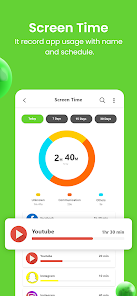
Screen Time Reports: See how long your child spends on apps.
Screen Time Limits: Set usage limits during study or bedtime.
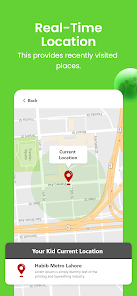
Real-Time Location Tracking: Track your child’s whereabouts and get detailed location history.
SOS Alerts: Receive instant alerts with location during emergencies.
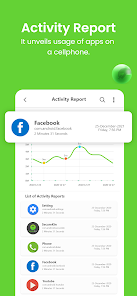
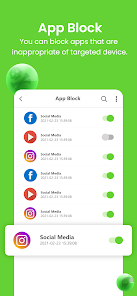
App Usage Monitoring: Track app usage and block inappropriate apps.
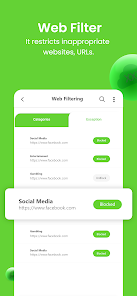
Web Filtering: Filter websites by category and monitor browsing history.
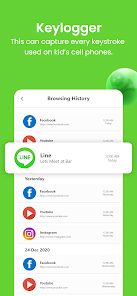
Keystroke Logging: Capture typed keystrokes for supervision.
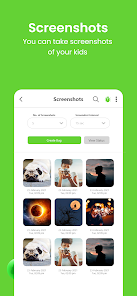
Screenshots: View periodic screenshots of the child’s phone activity.
Ambient Sound Recording: Record surroundings remotely for safety.
On-Demand Screen Recording: Capture screen activity instantly when needed.
Why SecureKin?
SecureKin acts as training wheels for digital parenting, empowering you to protect your child from cyberbullying, sexting, adult content, and unhealthy screen habits. It offers a secure way to supervise your child’s phone usage, build trust, and encourage responsible behavior.
Setup Instructions:
Install SecureKin on your child’s phone.
Create a parent account and log in.
Follow on-screen instructions to configure monitoring and restrictions.
Start viewing reports and tracking location in real time.
Block apps, limit screen time, and filter web content from your dashboard.
Permissions Notice:
Uses Accessibility API to monitor app usage, block apps, log keystrokes, and track browsing history.
Requires Call & SMS Log permissions to collect call and message data securely.
All data is handled with privacy and only accessible to authorized parent accounts.
Account Types:
Child account (on monitored phone)
Parent account (for monitoring)
Optional partner account with passcode access
Compatibility:
Android 5.0 to 15.0
iOS 10.10 to 10.14
Not available for PCs or laptops
Languages Supported: English and Urdu
Protect your child’s digital world with SecureKin – the trusted parental control app for safer, healthier tech use.
SecureKin empowers parents to monitor and manage their children’s devices by providing real-time access to SMS and Call Logs, ensuring effective communication oversight and enhanced safety on both Android and iOS. Designed for pre-teens and teens, it offers both free and paid features to promote healthy digital habits and ensure safety.
Key Features:
Call & SMS Logs: Get detailed reports on call history and text messages for child safety.
Screen Time Reports: See how long your child spends on apps.
Screen Time Limits: Set usage limits during study or bedtime.
Real-Time Location Tracking: Track your child’s whereabouts and get detailed location history.
SOS Alerts: Receive instant alerts with location during emergencies.
App Usage Monitoring: Track app usage and block inappropriate apps.
Web Filtering: Filter websites by category and monitor browsing history.
Keystroke Logging: Capture typed keystrokes for supervision.
Screenshots: View periodic screenshots of the child’s phone activity.
Ambient Sound Recording: Record surroundings remotely for safety.
On-Demand Screen Recording: Capture screen activity instantly when needed.
Why SecureKin?
SecureKin acts as training wheels for digital parenting, empowering you to protect your child from cyberbullying, sexting, adult content, and unhealthy screen habits. It offers a secure way to supervise your child’s phone usage, build trust, and encourage responsible behavior.
Setup Instructions:
Install SecureKin on your child’s phone.
Create a parent account and log in.
Follow on-screen instructions to configure monitoring and restrictions.
Start viewing reports and tracking location in real time.
Block apps, limit screen time, and filter web content from your dashboard.
Permissions Notice:
Uses Accessibility API to monitor app usage, block apps, log keystrokes, and track browsing history.
Requires Call & SMS Log permissions to collect call and message data securely.
All data is handled with privacy and only accessible to authorized parent accounts.
Account Types:
Child account (on monitored phone)
Parent account (for monitoring)
Optional partner account with passcode access
Compatibility:
Android 5.0 to 15.0
iOS 10.10 to 10.14
Not available for PCs or laptops
Languages Supported: English and Urdu
Protect your child’s digital world with SecureKin – the trusted parental control app for safer, healthier tech use.
Date de mise à jour
La sécurité, c'est d'abord comprendre comment les développeurs collectent et partagent vos données. Les pratiques concernant leur confidentialité et leur protection peuvent varier selon votre utilisation, votre région et votre âge. Le développeur a fourni ces informations et peut les modifier ultérieurement.

Cette appli peut partager ces types de données avec des tiers
Infos et performance des applis

Aucune donnée collectée
En savoir plus sur la manière dont les développeurs déclarent la collecte

Les données sont chiffrées lors de leur transfert

Vous pouvez demander la suppression des données
Nouveautés
Improvements:
- Resolved bugs
- Resolved bugs
Assistance de l'appli
À propos du développeur
OX-I-GEN
alyasir@yahoo.com
29MZ,Al Hafeez Shopping Mall
Main boulevard
Lahore, 54000
Pakistan
+92 332 4543107


