
X Icon Changer - Change Icons
Contains adsIn-app purchases
4.3star
654K reviews
10M+
Downloads

Everyone
info
About this app
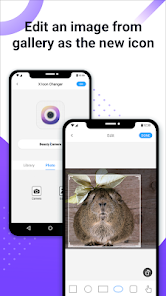
X Icon Changer is a totally free and useful app which can help you change & customize icons and names for any apps. The new icons can be chosen from gallery, other app icons and lots of personalized icon packs. Our app will create a shortcut to the new icon on your home screen. This is the easiest way to decorate your android phone.
☆ HOW TO USE ☆
1. Enter X Icon Changer.
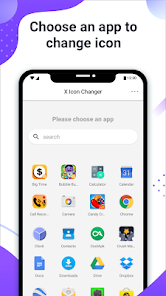
2. Choose an app.
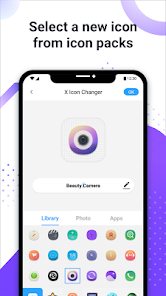
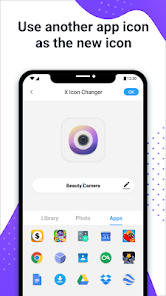
3. Select a new icon from the built-in icon packs, your gallery, other app icons or personalized third-party icon packs.
4. Edit a new name (can be null) for the app.
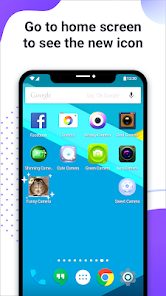
5. Go to the home screen / desktop to see the new shortcut icon.
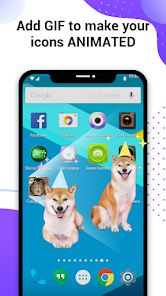
6. Add a GIF to play an interesting GIF animation when the new app icon launches.
☆ ABOUT THE WATERMARK ☆
On Android 8.0 and above, the system will automatically add a watermark to the shortcut icon. We provide a way for you to perfectly change app icons without any watermarks using widget technology:
1. Go to the home screen / desktop, long press a blank space and then click “Widgets” in the pop-up menu.
2. Find “X Icon Changer” on the widget page, long press it and drag it to your desktop.
3. The X Icon Changer widget will open automatically. After that, you can change your app icons without any watermarks.
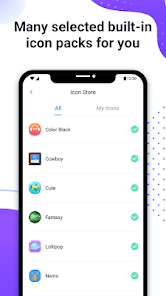
There are lots of selected personalized icon packs built into X Icon Changer. The app and those icon packs are all free to get. Just download X Icon Changer now to decorate your android phone.
☆ HOW TO USE ☆
1. Enter X Icon Changer.
2. Choose an app.
3. Select a new icon from the built-in icon packs, your gallery, other app icons or personalized third-party icon packs.
4. Edit a new name (can be null) for the app.
5. Go to the home screen / desktop to see the new shortcut icon.
6. Add a GIF to play an interesting GIF animation when the new app icon launches.
☆ ABOUT THE WATERMARK ☆
On Android 8.0 and above, the system will automatically add a watermark to the shortcut icon. We provide a way for you to perfectly change app icons without any watermarks using widget technology:
1. Go to the home screen / desktop, long press a blank space and then click “Widgets” in the pop-up menu.
2. Find “X Icon Changer” on the widget page, long press it and drag it to your desktop.
3. The X Icon Changer widget will open automatically. After that, you can change your app icons without any watermarks.
There are lots of selected personalized icon packs built into X Icon Changer. The app and those icon packs are all free to get. Just download X Icon Changer now to decorate your android phone.
Updated on
Safety starts with understanding how developers collect and share your data. Data privacy and security practices may vary based on your use, region, and age. The developer provided this information and may update it over time.


Ratings and reviews
4.3
621K reviews

MagicSillia
- Flag inappropriate
October 20, 2025
I could only get it to make one shortcut, I tried to make three others but I couldn't get them to show up on my home screen. Also, the ads are kind of ridiculous, I have several ads thrown at me for each icon I try to make, even changing pages in the customization menu would get ads thrown at me. I understand they're necessary to keep the app running, but considering the app doesn't even work properly it's not worth it.
17 people found this review helpful

Wylene Co
- Flag inappropriate
- Show review history
August 9, 2023
like five months later, I'm now changing my rating from 5 to 2 stars. a couple months ago, the app glitched, so every time I tried to click on an icon, it says that the app is "not installed." I was too lazy to fix everything, so I let it look like an eyesore until now. I go into the app -- ads. I turn off my wifi, go in, no problem. but now you have to watch a video if you want to use your own gallery to put an icon. I get that they need to make money, but the number of ads is just absolutely.
198 people found this review helpful

Lilychuga
- Flag inappropriate
October 17, 2023
Overall the app is easy to use and functional. The ads can be a bit annoying but I'm personally not too bothered by it. My only issue (I'm not sure if it's my phone or the app itself) but when I change icons, after a bit of time the text for the icon disappears. Im on android. But Im not sure why it does that and I can't seem to fix it. It's there after the change and stays there for maybe 10 minutes as I'm using my phone and the boom, text gone. Icon stays though.
90 people found this review helpful
What’s new
Performance improved.
App support
About the developer
ASTER PLAY PTE. LTD.
support@asterplay.com
180B Bencoolen Street #03-01 The Bencoolen
Singapore 189648
+86 178 1030 9530


