
WPS Office-PDF, Word, Sheet
広告が表示されますアプリ内購入あり
4.5star
581万 件のレビュー
5億+
ダウンロード

全ユーザー対象
info




このアプリについて
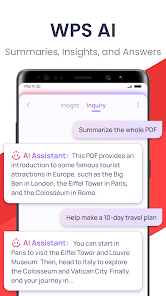
★WPS Office-Free Office suite for Word, PDF, Sheet, is an all-in-one office suite integrates Word docs, PDF, Sheet spreadsheets, PowerPoint slides, WPS AI, Forms, Cloud Storage, Online Editing, Template library and Sharing. Access various WPS Office functions through mobile devices, such as scan PDF files, edit slides, convert spreadsheets, or view documents anytime, anywhere. WPS AI revolutionizes your workflow by offering functions like AI-Powered document scanner, AI-generated content, rewriting, ChatPDFs, and more.
「Features of WPS AI 」
1. AI-Powered Document Scanner
• Digitize paper documents, extract & erase elements rapidly and accurately!
2. WPS AI-generated content (AIGC)
• Get instant and high-quality content like meeting summaries, event planning, resumes, etc, all with a prompt!
3. AI-powered rewriting
• WPS AI is here to offer professional rewriting and polishing work.
• WPS AI is committed to be a powerful writing assistant and revolutionize the writing process.
4. ChatPDFs
• Free from tedious PDF-reading workload!
• WPS AI is able to effortlessly process long PDFs and provides summaries, outlines or translations as you like.
• Engage in conversations with WPS AI and get instant answers about the PDFs.
5. AI-powered OCR
• Revolutionized OCR technology helps to deal with the data entry work.
• Ready to provide insights for any scanned document.
★As a professional word processor, WPS Office is compatible with various office softwares in core functions, more intelligent and easier.
「 Typical Features of WPS Office 」
1. Powerful Office Suite on your Android device
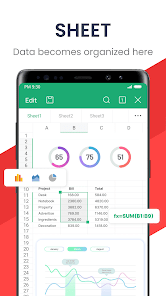
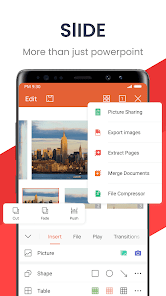
• Using templates to start editing your budget, Word, Presentations, sheet, resumes, documents and other files.
•Using tools to convert and process Document, PDF and images.
•Easy to create, edit, share files and collaborated on with others in real-time.
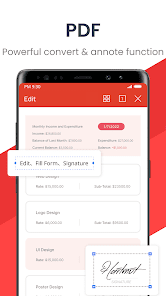
2. Scan, view, edit, convert PDF on your Android device
• Free PDF viewer that can open, view, share and comment on PDFs anywhere and on any device.
• Convert all Office documents (Word, Text, Sheet, PowerPoint, Docs, Images) to PDF.
• Scan paper documents to PDF.
• Support PDF annotation, PDF signature, PDF extraction/split, PDF merge.
• Easily add and delete watermarks in PDF.
3. Powerful cloud storage function, you are not afraid of losing documents
• Use WPS Cloud to manage all documents, synchronize in real time on mobile phones and computers, and easily and directly access and edit office documents
• Save documents to third-party clouds: Dropbox, Google Drive, Box, Evernote and Microsoft OneDrive.
4. Solutions for working remotely on Android devices
• 1G free cloud storage, support online editing and sharing of files, easy to build and join the cloud team.
• Easy to share office documents via WIFI, NFC, DLNA, email, instant messaging, WhatsApp, Telegram, Facebook and Twitter.
Now available PC and Mac for free , please visit the following link: https://www.wps.com/download/
Support page: https://www.wps.com/support/
「Features of WPS AI 」
1. AI-Powered Document Scanner
• Digitize paper documents, extract & erase elements rapidly and accurately!
2. WPS AI-generated content (AIGC)
• Get instant and high-quality content like meeting summaries, event planning, resumes, etc, all with a prompt!
3. AI-powered rewriting
• WPS AI is here to offer professional rewriting and polishing work.
• WPS AI is committed to be a powerful writing assistant and revolutionize the writing process.
4. ChatPDFs
• Free from tedious PDF-reading workload!
• WPS AI is able to effortlessly process long PDFs and provides summaries, outlines or translations as you like.
• Engage in conversations with WPS AI and get instant answers about the PDFs.
5. AI-powered OCR
• Revolutionized OCR technology helps to deal with the data entry work.
• Ready to provide insights for any scanned document.
★As a professional word processor, WPS Office is compatible with various office softwares in core functions, more intelligent and easier.
「 Typical Features of WPS Office 」
1. Powerful Office Suite on your Android device
• Using templates to start editing your budget, Word, Presentations, sheet, resumes, documents and other files.
•Using tools to convert and process Document, PDF and images.
•Easy to create, edit, share files and collaborated on with others in real-time.
2. Scan, view, edit, convert PDF on your Android device
• Free PDF viewer that can open, view, share and comment on PDFs anywhere and on any device.
• Convert all Office documents (Word, Text, Sheet, PowerPoint, Docs, Images) to PDF.
• Scan paper documents to PDF.
• Support PDF annotation, PDF signature, PDF extraction/split, PDF merge.
• Easily add and delete watermarks in PDF.
3. Powerful cloud storage function, you are not afraid of losing documents
• Use WPS Cloud to manage all documents, synchronize in real time on mobile phones and computers, and easily and directly access and edit office documents
• Save documents to third-party clouds: Dropbox, Google Drive, Box, Evernote and Microsoft OneDrive.
4. Solutions for working remotely on Android devices
• 1G free cloud storage, support online editing and sharing of files, easy to build and join the cloud team.
• Easy to share office documents via WIFI, NFC, DLNA, email, instant messaging, WhatsApp, Telegram, Facebook and Twitter.
Now available PC and Mac for free , please visit the following link: https://www.wps.com/download/
Support page: https://www.wps.com/support/
最終更新日
データの安全は、デベロッパーによるユーザーデータの収集、共有方法を理解することから始まります。データのプライバシーとセキュリティ対策は、アプリの使用方法、ユーザーの年齢やお住まいの地域によって異なることがあります。この情報はデベロッパーから提供されたもので、更新されることがあります。

第三者と共有されるデータはありません
詳しくは、デベロッパーが共有を申告する方法についての説明をご覧ください

データは収集されません
詳しくは、デベロッパーが収集を申告する方法についての説明をご覧ください

データは送信中に暗号化されます

データを削除するようリクエストできます
評価とレビュー
4.6
563万 件のレビュー

SU- D
- 不適切として報告
- レビュー履歴を表示
2025年12月2日
マクロこそ使えないが、Mictosoft Offoceと高い互換性を有するのはありがたい。ただ、無料版は編集して画面右上のフロッピーアイコンを押すと、変更内容は本体→Android→WPS Officeフォルダに格納され、編集したドキュメントには反映されない。編集したら、毎回名前を付けて保存を押し、開いたファイルのディレクトリをたどって上書き保存している。英語版、中国語版を使ってきたが、この日本語版が一番使い勝手が悪い。
22 人のユーザーが、このレビューが役立ったと評価しました

- erawan / in Bangkok
- 不適切として報告
2025年11月4日
無料バージョンは制限は有るが使いやすい。有料バージョンならMicrosoft Officeの方が良いかも。
1 人のユーザーが、このレビューが役立ったと評価しました

ゲーム用アカウント
- 不適切として報告
- レビュー履歴を表示
2025年12月12日
使い勝手はいいのですが、他のPDFのアプリの広告が明らかに詐欺手法なので、広告の管理をしていただきたいです。このアプリの信用も落としかねませんよ?更新をしないとpdfのファイルが開けなくなると言って、別のアプリをインストールさせようとします。wpsで見れるのですが、わからない方も出てくると思いますので、きちんとダークデザインの広告を排除していただきたいですね。せっかくいいアプリなのにそこだけはもったいない。
1 人のユーザーが、このレビューが役立ったと評価しました
新機能
WPS AI にアップグレードし、AI の能力をドキュメント作成、編集、翻訳、画像編集、処理など様々なシーンに適用し、オフィス効率を向上させる:
1、AI 翻訳:全文を正確に翻訳し、元の形式の照合をサポート。105 種類の目標言語をサポート。
2、スキャンナー:より鮮明なスキャン結果を提供し、手書き内容の抽出をサポートし、編集可能なドキュメントとしてエクスポートすることができる。
3、読み上げ:本当の人に似た、スムーズで、感情のある朗読体験を提供。
アプリのサポート
デベロッパーについて
WPS SOFTWARE PTE. LTD.
feedback@wps.com
C/O: SINGAPORE FOZL GROUP PTE LTD 6 Raffles Quay #14-06
Singapore 048580
+1 206-225-9862


