NotifyBuddy - Notification LED
Contains adsIn-app purchases
3.8star
54.6K reviewsinfo
5M+
Downloads

PEGI 3
info


About this app
So I was annoyed not having an LED notification light on my phone and I tried to make one of my own.
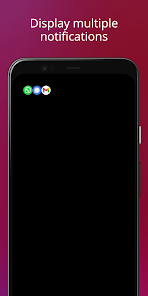
With phones having AMOLED display whenever a desired notification comes the app brings in a black screen with notification LED looking animation.
To use it:
1. Disable Ambient Display and any battery optimisation for the app.
2. Give notification access permission.
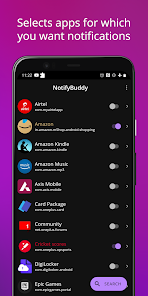
3 Select apps you want notifications for, by choosing a color
Note: On successfully selecting a color for an app the text in which the App name is written should change to that color
Thats it😇.
For MIUI 11 devices make sure that AutoStart is enabled in App Info. Also check "Show on lock screen" permission in other settings.
Settings image: https://drive.google.com/folderview?id=1yxrLd5u7kLSGBwviKhXYqM21YLC8Dhiv
Additional Features:
1. Change LED animation time.
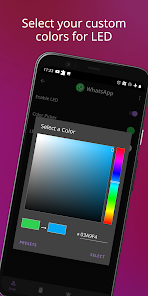
2. Change LED colours.
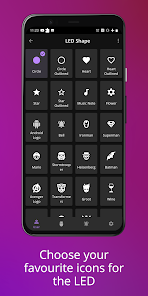
3. Change LED position.
4. Notify for missed calls.
5. Change LED size (Premium required!)
6. Add Downtime
And many more...
Premium version can be bought within the app to unlock all features!
If having problem head to : https://forum.xda-developers.com/oneplus-6t/themes/app-amoled-notification-light-t3943715/post79810512#post79810512
With phones having AMOLED display whenever a desired notification comes the app brings in a black screen with notification LED looking animation.
To use it:
1. Disable Ambient Display and any battery optimisation for the app.
2. Give notification access permission.
3 Select apps you want notifications for, by choosing a color
Note: On successfully selecting a color for an app the text in which the App name is written should change to that color
Thats it😇.
For MIUI 11 devices make sure that AutoStart is enabled in App Info. Also check "Show on lock screen" permission in other settings.
Settings image: https://drive.google.com/folderview?id=1yxrLd5u7kLSGBwviKhXYqM21YLC8Dhiv
Additional Features:
1. Change LED animation time.
2. Change LED colours.
3. Change LED position.
4. Notify for missed calls.
5. Change LED size (Premium required!)
6. Add Downtime
And many more...
Premium version can be bought within the app to unlock all features!
If having problem head to : https://forum.xda-developers.com/oneplus-6t/themes/app-amoled-notification-light-t3943715/post79810512#post79810512
Updated on
Safety starts with understanding how developers collect and share your data. Data privacy and security practices may vary based on your use, region, and age. The developer provided this information and may update it over time.


Ratings and reviews
3.8
54.2K reviews

A Google user
- Flag inappropriate
December 4, 2019
It works as intended. However, when a notification pops up, the always on display disables and I have to press the power button to turn on the fingerprint sensor, since I can't unlock the device by just pressing it. If the devs find a way to solve this it'd be a must have app, and if you don't use the always on display at all, it's one of the most convenient apps.
9 people found this review helpful

Braelyn Jae
- Flag inappropriate
February 20, 2026
When I upgraded my phone to a newer model, the thing I missed the most was the notification LED. It would flash whenever I had an unread notification, and the color would tell me what app the notification was from without waking the screen. I have used NotifyBuddy for years now and it does everything I missed about my old phone's LED and more. Honestly, it works so well that I forget that it isn't a part of my phone's factory software. Highly recommend!
2 people found this review helpful

Catt T
- Flag inappropriate
- Show review history
November 10, 2025
Customizable blinking light for different apps! Can't get it to work with Google Messages. The charging indicator didn't work. I also found that if I turn the screen on but don't interact with a notification, the LED-like light goes away. I'd like that persist until I dismiss the notification, not just turn the screen on. Battery drain seems minimal. Doesn't work at all when phone is charging and battery icon (AOD?) is active.
3 people found this review helpful
What’s new
Minor bug fixes and improvements
App support
About the developer
Harshdeep Singh Sahdev
xanderapps252@gmail.com
H No 252 Chand Nagar
New Delhi, Delhi 110018
India


