Total Commander - file manager
Contains ads
3.8star
214K reviews
10M+
Downloads

PEGI 3
info


About this app
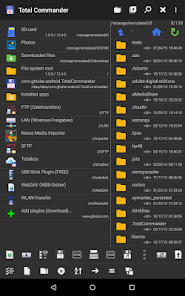
Android version of the desktop file manager Total Commander (www.ghisler.com).
Important note: This app does NOT contain any ads. However, it contains a link "Add plugins (download)" in the home folder. This is treated as an ad by the Play Store because it links to our other apps (plugins).
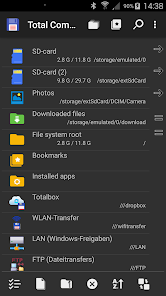
Main features:
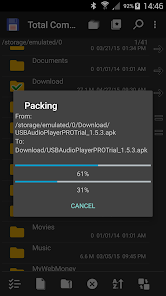
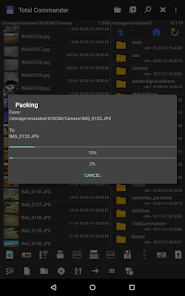
- Copy, Move whole subfolders
- Drag & Drop (long press on file icon, move icon)
- In place rename, create directories
- Delete (no recycle bin)
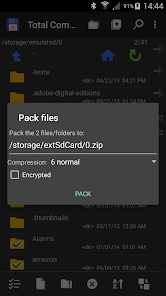
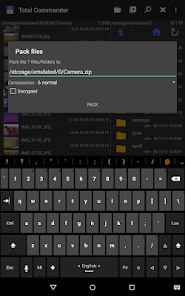
- Zip and unzip, unrar
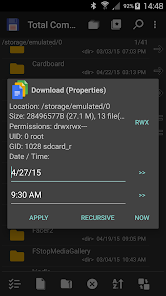
- Properties dialog, change permissions
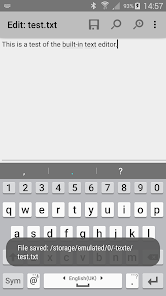
- Built-in text editor
- Search function (also for text)
- Select/unselect groups of files
- Select by tapping on file icons
- Select range: Long tap+release on icon
- Show List of installed Applications, manually backup apps (built-in plugin)
- FTP and SFTP client (plugin)
- WebDAV (Web folders) (plugin)
- LAN access (plugin)
- Plugins for cloud services: Google Drive, Microsoft Live OneDrive, Dropbox
- Root support for the main functions (optional)
- Send files via Bluetooth (OBEX)
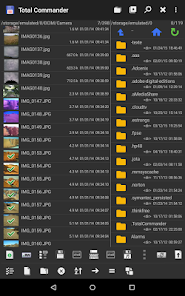
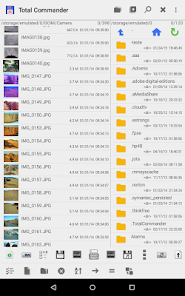
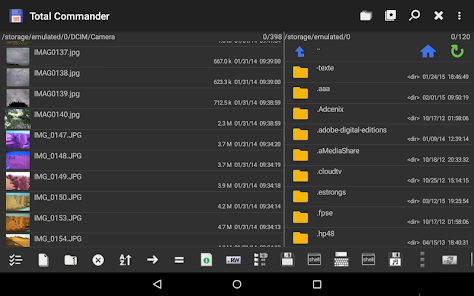
- Thumbnails for pictures
- Two panels side by side, or virtual two panel mode
- Bookmarks
- Directory history
- Save files received from other apps via share function
- Media player which can stream directly from LAN, WebDAV and cloud plugins
- Configurable button bar for changing directories, internal commands, launching apps, and sending shell commands
- Simple help function in English, German, Russian, Ukrainian and Czech
- Optimizations for visually impaired, like text for icons
- Supported languages of the main program: English, German, Bulgarian, Croatian, Czech, Danish, Dutch, French, Greek, Hebrew, Hungarian, Indonesian, Italian, Japanese, Korean, Polish, Portuguese, Romanian, Russian, Serbian, Simplified Chinese, Slovak, Slovenian, Spanish, Swedish, Traditional Chinese, Turkish, Ukrainian and Vietnamese.
- Public translation via http://crowdin.net/project/total-commander
About the new permission "SuperUser":
This permission is now requested to make Total Commander work better on rooted devices. It tells the SuperUser app that Total Commander supports root functions. It has no effect if your device is not rooted. Root functions allow Total Commander to write to system folders like /system or /data. You will be warned before anything is written if the partition is write protected.
You can find some more information here:
http://su.chainfire.eu/#updates-permission
Important note: This app does NOT contain any ads. However, it contains a link "Add plugins (download)" in the home folder. This is treated as an ad by the Play Store because it links to our other apps (plugins).
Main features:
- Copy, Move whole subfolders
- Drag & Drop (long press on file icon, move icon)
- In place rename, create directories
- Delete (no recycle bin)
- Zip and unzip, unrar
- Properties dialog, change permissions
- Built-in text editor
- Search function (also for text)
- Select/unselect groups of files
- Select by tapping on file icons
- Select range: Long tap+release on icon
- Show List of installed Applications, manually backup apps (built-in plugin)
- FTP and SFTP client (plugin)
- WebDAV (Web folders) (plugin)
- LAN access (plugin)
- Plugins for cloud services: Google Drive, Microsoft Live OneDrive, Dropbox
- Root support for the main functions (optional)
- Send files via Bluetooth (OBEX)
- Thumbnails for pictures
- Two panels side by side, or virtual two panel mode
- Bookmarks
- Directory history
- Save files received from other apps via share function
- Media player which can stream directly from LAN, WebDAV and cloud plugins
- Configurable button bar for changing directories, internal commands, launching apps, and sending shell commands
- Simple help function in English, German, Russian, Ukrainian and Czech
- Optimizations for visually impaired, like text for icons
- Supported languages of the main program: English, German, Bulgarian, Croatian, Czech, Danish, Dutch, French, Greek, Hebrew, Hungarian, Indonesian, Italian, Japanese, Korean, Polish, Portuguese, Romanian, Russian, Serbian, Simplified Chinese, Slovak, Slovenian, Spanish, Swedish, Traditional Chinese, Turkish, Ukrainian and Vietnamese.
- Public translation via http://crowdin.net/project/total-commander
About the new permission "SuperUser":
This permission is now requested to make Total Commander work better on rooted devices. It tells the SuperUser app that Total Commander supports root functions. It has no effect if your device is not rooted. Root functions allow Total Commander to write to system folders like /system or /data. You will be warned before anything is written if the partition is write protected.
You can find some more information here:
http://su.chainfire.eu/#updates-permission
Updated on
Safety starts with understanding how developers collect and share your data. Data privacy and security practices may vary based on your use, region, and age. The developer provided this information and may update it over time.

No data shared with third parties
Learn more about how developers declare sharing

This app may collect these data types
App info and performance

Data is encrypted in transit

Data can’t be deleted
Ratings and reviews
3.7
191K reviews

Ethan Wan
- Flag inappropriate
- Show review history
February 22, 2026
Actually the most efficient file explorer I've ever used. I was able to backup all my photos from two years (to an external ssd) in about 30 minutes while other file managers were predicted to finish the same transfer in about a day. It also did all this while keeping the original metadata which is another huge plus for me over other apps. The UI may look daunting at first but you could probably get used to it in like an hour Overall, I love this app and I can't recommend it enough!
4 people found this review helpful

Guillermo Caravaca
- Flag inappropriate
- Show review history
February 26, 2026
Great app. Solid, reliable, versatile. The old school interface might scare some at first, but it's actually very pleasant and practical to navigate and use. Incidentally, this is also one of the best FTP clients for Android as well. Give it a try.
4 people found this review helpful

blackb0x
- Flag inappropriate
- Show review history
January 29, 2026
This file manager is in my opinion not always the most comfortable one to do file operations with. Yet it comes with a lightweight but fully blown media player under the hood that can play virtually everything, remembers my last listening position and even sports a working in-built EQ and other audio effects at the touch of the finger. Might look simple but is robust and versatile.
8 people found this review helpful
What’s new
- Bugfixes
App support
About the developer
Christian Ghisler
cghisler@gmail.com
Switzerland


