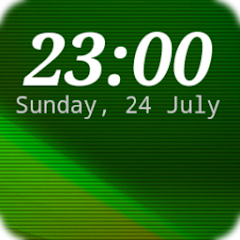
DIGI Clock Widget
Contains adsIn-app purchases
4.5star
175K reviews
10M+
Downloads

PEGI 3
info



About this app
"DIGI Clock Widget" is a set of free and highly customizable Home screen digital time and date widgets:
2x1 widget - small
4x1 and 5x1 widget - wide, optionally with seconds
4x2 widget - big
5x2 and 6x3 widget - for tablets.
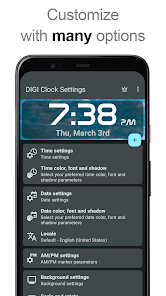
Features lots of customizations, like:
- widget preview during setup
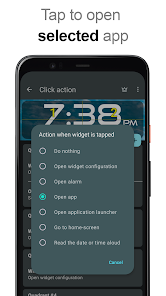
- select widget click actions: tap on widget to load alarm application, widget settings or any installed application
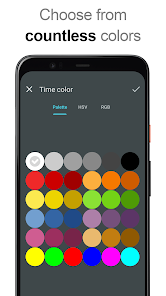
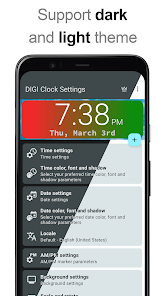
- allows you select your preferred colors for time and date
- shadow effect with selectable color
- outlines
- locale preference, set date output in your language
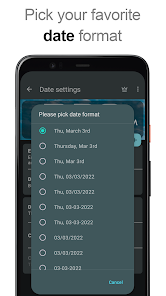
- plenty of date formats + customizable date format
- show/hide AM-PM
- 12/24 hour selection
- alarm icon
- show time with seconds option (for 4x1 and 5x1 widget)
- widget background with selectable color and opacity from 0% (transparent) to 100% (completely opaque)
- as widget background you can use single color, two colors gradient or simply use your own photo
- 40+ great fonts for time and date, hundreds of fonts available for download, or use your favorite font file from device memory
- compatible with Android 11
- tablets friendly
... and even more ...
How to use?
This is a Home screen widget, please follow this instruction on how to add the widget to your Home screen:
• Press the plus (+) button below the widget preview when available.
• Select desired widget size.
• Add widget to the Home screen from shown dialog.
or add widget manually:
• Long press empty space on your home screen.
• Click “Widgets” from shown options.
• Scroll down until you find "DIGI Clock”.
• Touch and hold the desired widget’s icon, slide your finger where you want to place it, and lift your finger.
This instruction may differ from device to device of by device manufacturer.
If there is missing "DIGI Clock" in list of widgets, try to restart your device.
NOTICE
Please exclude this widget from any task killers, this will resolve the time freezing issue in most instances.
Thanks for using DIGI Clock Widget & enjoy!
2x1 widget - small
4x1 and 5x1 widget - wide, optionally with seconds
4x2 widget - big
5x2 and 6x3 widget - for tablets.
Features lots of customizations, like:
- widget preview during setup
- select widget click actions: tap on widget to load alarm application, widget settings or any installed application
- allows you select your preferred colors for time and date
- shadow effect with selectable color
- outlines
- locale preference, set date output in your language
- plenty of date formats + customizable date format
- show/hide AM-PM
- 12/24 hour selection
- alarm icon
- show time with seconds option (for 4x1 and 5x1 widget)
- widget background with selectable color and opacity from 0% (transparent) to 100% (completely opaque)
- as widget background you can use single color, two colors gradient or simply use your own photo
- 40+ great fonts for time and date, hundreds of fonts available for download, or use your favorite font file from device memory
- compatible with Android 11
- tablets friendly
... and even more ...
How to use?
This is a Home screen widget, please follow this instruction on how to add the widget to your Home screen:
• Press the plus (+) button below the widget preview when available.
• Select desired widget size.
• Add widget to the Home screen from shown dialog.
or add widget manually:
• Long press empty space on your home screen.
• Click “Widgets” from shown options.
• Scroll down until you find "DIGI Clock”.
• Touch and hold the desired widget’s icon, slide your finger where you want to place it, and lift your finger.
This instruction may differ from device to device of by device manufacturer.
If there is missing "DIGI Clock" in list of widgets, try to restart your device.
NOTICE
Please exclude this widget from any task killers, this will resolve the time freezing issue in most instances.
Thanks for using DIGI Clock Widget & enjoy!
Updated on
Safety starts with understanding how developers collect and share your data. Data privacy and security practices may vary based on your use, region, and age. The developer provided this information and may update it over time.


Ratings and reviews
4.5
166K reviews

HECTOR QUILES
- Flag inappropriate
- Show review history
December 29, 2025
I've used this app and the pro version for many years, I have never had an issue until now! The app is not not keeping time properly, I've set battery usage to unrestricted, but it still doesn't keep time properly. In complete frustration, I've tried other like apps, but I wasn't happy with any of them. The app is also installed on my Samsung tablet, which works perfectly, but on my REVVL 6 it doesn't! Can someone please fix it!!!!! Thanks!!!!

Alana-Christina Dittrich
- Flag inappropriate
February 11, 2026
LOVE this app so much! I use it to put the time and date in the middle of the homepage on every phone I ever get! I love the customizable features, where I can choose different fonts and colors etc. I use those customizable features to make the time and date widget match my homepage wallpaper. Being able to see the time and date so clearly in the middle of my homepage is very useful. And being able to customize the style and colors help make my homepage very pretty! 💕

Peace UP
- Flag inappropriate
February 3, 2026
I use this app every time I upgrade to a different phone and have been doing so for years. It's the perfect clock widget application. The options available for customization so you can make the widget your own are insane. The widget is easy to use and the UI is upfront. I never write reviews except on the extremely rare occasions when I use an app sooo much that it deserves my praise. The dev who developed DIGI Clock is a genius.
1 person found this review helpful
What’s new
Improved color and font pickers (3.6.1).
Update to Android 16 compatibility (3.6.0).
The ability to set custom corner rounding is back (3.6.0).
Update to Android 16 compatibility (3.6.0).
The ability to set custom corner rounding is back (3.6.0).
App support
About the developer
Ing. Miroslav Michalec
foresttree.apps@gmail.com
Pod sadom 1254/79
01004 Žilina
Slovakia


