Aurora - Poweramp Skin
4.6star
846 reviews
10K+
Downloads

Everyone
info



About this app
ATTENTION
This skin only supports latest Poweramp stable version and is not compatible with Huawei devices running Android 7.0 (above is fine)
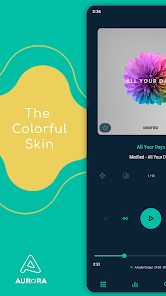
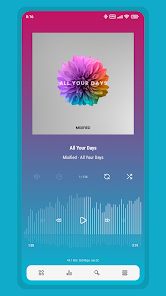
Aurora is a colorful skin for Poweramp 3 that supports Follow Day/Night Mode. You can customize almost everything to make Poweramp look material, minimalist, transparent, and stunning. This skin also supports Material You Dark and Light (Android 12 and up only). Unlike Luminous and Luminous Black, Aurora offers 2 modes: Dark and Light, along with some other unique options.
FEATURES
• Follow Day/Night Mode
• 35 Accent Colors (Aurora Dark), 34 Accent Colors (Aurora Light)
• 19 Background Colors (Aurora Dark), 16 Background Colors (Aurora Light)
• Material You (Dark, Light and Vibrant)
• 3 Player Screen Layouts
• Player Screen Track Title Alignment
• Album Art Blur Background & Overlay
• Gradient Background
• Transparent Background & Opacity
• Icon Sets and Sizes
• 42 Font Styles
• Header Overlay
• Selected Track Color
• Navigation Styles
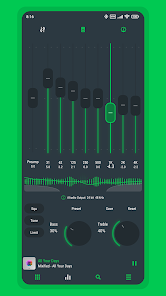
• Knob and Eq Styles
• Eq Spectrums
• Album Art Sizes and Transitions
• Pro Buttons Styles
• Poweramp Equalizer Support
• And much more
SUPPORTED LANGUAGES
Chinese (Simplified), Chinese (Traditional), Czech, English, Indonesian, Japanese, Portuguese (Brazilian), Russian, Spanish, Ukrainian
Love the skin? Want to help with translations? Head over to Skin App > Swipe right > About > Join as a Translator. Your contributions will benefit many other users, and I truly appreciate your help!
TIPS
• You can quickly access the skin settings by long-pressing the hamburger/menu button in Poweramp's navigation
• To backup skin settings, use Export Settings/Data in Poweramp
ABOUT THE DEVELOPER
I develop this skin alone, not as part of a team.
Mixified Pixel is just the name of my company, but I’m committed to offering you the best Poweramp 3 skins available on the Play Store, and I’ll continue providing updates for as long as I can.
FREQUENTLY ASKED QUESTIONS
Find answers to common questions, compatibility notes, and issue explanations.
https://sites.google.com/view/aurora-skin/faq
CONTACT SUPPORT
If you experience any issues or have a request, feel free to contact me through the 'Contact Support' option in the skin app. Kindly use the email associated with your purchase
This skin only supports latest Poweramp stable version and is not compatible with Huawei devices running Android 7.0 (above is fine)
Aurora is a colorful skin for Poweramp 3 that supports Follow Day/Night Mode. You can customize almost everything to make Poweramp look material, minimalist, transparent, and stunning. This skin also supports Material You Dark and Light (Android 12 and up only). Unlike Luminous and Luminous Black, Aurora offers 2 modes: Dark and Light, along with some other unique options.
FEATURES
• Follow Day/Night Mode
• 35 Accent Colors (Aurora Dark), 34 Accent Colors (Aurora Light)
• 19 Background Colors (Aurora Dark), 16 Background Colors (Aurora Light)
• Material You (Dark, Light and Vibrant)
• 3 Player Screen Layouts
• Player Screen Track Title Alignment
• Album Art Blur Background & Overlay
• Gradient Background
• Transparent Background & Opacity
• Icon Sets and Sizes
• 42 Font Styles
• Header Overlay
• Selected Track Color
• Navigation Styles
• Knob and Eq Styles
• Eq Spectrums
• Album Art Sizes and Transitions
• Pro Buttons Styles
• Poweramp Equalizer Support
• And much more
SUPPORTED LANGUAGES
Chinese (Simplified), Chinese (Traditional), Czech, English, Indonesian, Japanese, Portuguese (Brazilian), Russian, Spanish, Ukrainian
Love the skin? Want to help with translations? Head over to Skin App > Swipe right > About > Join as a Translator. Your contributions will benefit many other users, and I truly appreciate your help!
TIPS
• You can quickly access the skin settings by long-pressing the hamburger/menu button in Poweramp's navigation
• To backup skin settings, use Export Settings/Data in Poweramp
ABOUT THE DEVELOPER
I develop this skin alone, not as part of a team.
Mixified Pixel is just the name of my company, but I’m committed to offering you the best Poweramp 3 skins available on the Play Store, and I’ll continue providing updates for as long as I can.
FREQUENTLY ASKED QUESTIONS
Find answers to common questions, compatibility notes, and issue explanations.
https://sites.google.com/view/aurora-skin/faq
CONTACT SUPPORT
If you experience any issues or have a request, feel free to contact me through the 'Contact Support' option in the skin app. Kindly use the email associated with your purchase
Updated on
Safety starts with understanding how developers collect and share your data. Data privacy and security practices may vary based on your use, region, and age. The developer provided this information and may update it over time.

No data shared with third parties
Learn more about how developers declare sharing

No data collected
Learn more about how developers declare collection
Ratings and reviews
4.6
830 reviews

silphershadow
- Flag inappropriate
October 13, 2025
4 year user here. This is the best skins I've used. Deep, in-depth customisation backed with tons of great custom items to choose from. Fonts, knob style, buttons and icons are all customisable. There's only 1 extra option I'd love to have: minimalist (solid) icon option for pro buttons. I love the icon style for the song and category change but the play button isn't really my thing. Maybe consider adding that as an option for future update. Anyway, thanks for the great skin!
1 person found this review helpful
Mixified Pixel
October 17, 2025
Thank you so much for being a loyal user for 4 years, and for your amazing review!
I really appreciate your detailed feedback and support. I’m always working to improve the skin and deliver the best experience possible.

Prosenjit Nath
- Flag inappropriate
- Show review history
October 28, 2025
Buggy update Poweramp won't start anymore only Balck screen. Thanks for the reply, I had to reinstall Poweramp in order to get it working again, it's perfect now 🙂
Mixified Pixel
October 28, 2025
You’re welcome! If that issue occurs, just use this method: Aurora app > Info & Settings > Dark Settings/Light Settings > Disable Skin > scroll down and press Restore Defaults.
And if you need help, feel free to contact me via email. I’ve also reported that annoying issue to the Poweramp Developer. Hopefully it won’t bother anyone again

Gabe W
- Flag inappropriate
March 18, 2025
Excellent customization options that I had hoped for. However, the font style seems to be stuck to the default for the song titles? The font style changes for almost all of other text in the app except for the track title displayed on the Player Screen, Queue or when viewing an album's tracks in the library. Would appreciate help if there is a solution I'm missing!
What’s new
Aurora 10.5.5
• New Styles and Options :
[Font]
+ Font Style : Google Sans Flex
+ Lyrics Font Style : Google Sans Flex
• Improved Hide App Icon. You’ll need to reinstall the skin if the skin app icon gets stuck in the App Drawer after using that option before. Reinstalling the skin won’t remove your Skin Settings.
• Updated translations
• New Styles and Options :
[Font]
+ Font Style : Google Sans Flex
+ Lyrics Font Style : Google Sans Flex
• Improved Hide App Icon. You’ll need to reinstall the skin if the skin app icon gets stuck in the App Drawer after using that option before. Reinstalling the skin won’t remove your Skin Settings.
• Updated translations
App support
About the developer
Reiza Adimba
mixified.pixel@gmail.com
Jl.Pasar
RT 006 RW 009 Desa Mojokrapak Kecamatan Tembelang
Jombang
Jawa Timur 61452
Indonesia


