
Screen Alive - keep screen on
4.7star
10.9K reviews
500K+
Downloads

Everyone
info
About this app
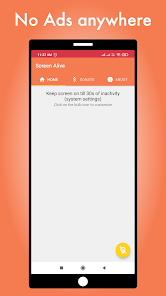
This app requires your permission to make changes to system settings.
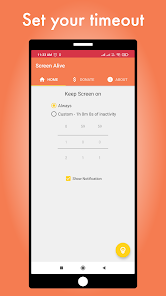
It provides an option to customize the screen lock timeout. Based on your requirements, you can choose to keep screen on always or till a specific duration of inactivity. You can toggle between the initially set timeout through system settings and the timeout chosen through app.
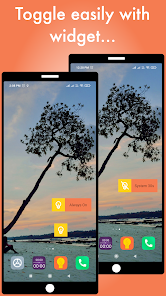
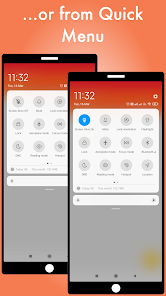
The widget and quick menu button provided with the app can also be used to do the toggle easily.
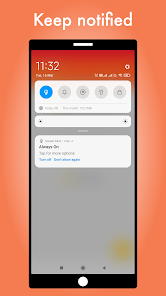
You can choose to show a notification when custom timeout is on and easily switch back to previous setting by turning off the notification.
It provides an option to customize the screen lock timeout. Based on your requirements, you can choose to keep screen on always or till a specific duration of inactivity. You can toggle between the initially set timeout through system settings and the timeout chosen through app.
The widget and quick menu button provided with the app can also be used to do the toggle easily.
You can choose to show a notification when custom timeout is on and easily switch back to previous setting by turning off the notification.
Updated on
Safety starts with understanding how developers collect and share your data. Data privacy and security practices may vary based on your use, region, and age. The developer provided this information and may update it over time.

No data shared with third parties
Learn more about how developers declare sharing

No data collected
Learn more about how developers declare collection
Ratings and reviews
4.7
9.37K reviews

Braden Arnold
- Flag inappropriate
March 31, 2024
I work from home and just wanted to keep my screen awake, without charging, so I could always have the clock app open for quick easy access to not only the time, but to the timers as well. Was a slight annoyance having to wake up screen every 30 minutes, but this app perfectly solves that problem. Was planning on using the Always On option, but it was a nice surprise to see you can make the timeout any length you want.
111 people found this review helpful

Sean Neylon
- Flag inappropriate
November 26, 2025
works well but can get mildly confused as takes a while to recognise my actual phone's screen time out when changed.
1 person found this review helpful

David 002
- Flag inappropriate
December 1, 2025
Works well but menu is a little confusing.
What’s new
• Updated dependent libraries to Android 15+ compatible versions
App support
About the developer
SNAPCORE DIGITAL SOLUTIONS LLP
contact@snapcore.in
D No 1848/7, 2nd Main, 3rd Cross, Vinayaka Extension
Vidyanagardavangere
Davanagere, Karnataka 577001
India
+91 81056 94928


