
Jabra Sound+
4.5star
2.27L reviews
50L+
Downloads

Everyone
info





About this app
For over 150 years, we've been crafting technology that makes life look and sound better. Whether you're managing a million-dollar project from your kitchen, running your first 5k in the park, or simply getting lost in your favorite tunes, we've got you covered. Download the Jabra Sound+ app to unlock the full potential of your new device.
KEY FEATURES:
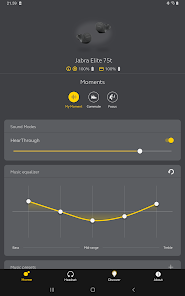
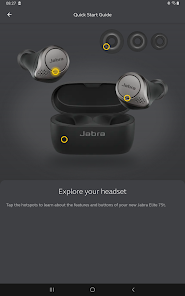
PERSONALIZED AUDIO: Customize your device effortlessly with step-by-step guidance, ensuring optimal settings for every moment.
CONTROL YOUR SURROUNDINGS: Adjust how much of the outside world you hear with intuitive controls, right from the app.
STAY UPDATED: Receive notifications about the latest updates for your product, so you're always up-to-date.
EFFORTLESS CONTROL: Access Google Assistant or Alexa with just a single touch for seamless voice command integration.
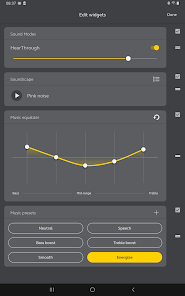
PRECISE SOUND:: Fine-tune your music with a 5-band equalizer. Choose from presets or personalize your sound for the perfect listening experience.
INSTANT MUSIC ACCESS: Set up Spotify Tap for quick and easy listening.
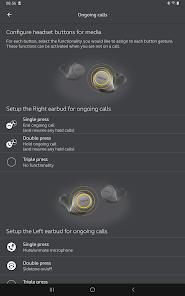
Clear Conversations: Customize call settings for crystal-clear communication.
2-YEAR WARRANTY: Register your Elite headphones for an extended warranty.
Note: Features and interface may vary depending on the specific Jabra device in use.
KEY FEATURES:
PERSONALIZED AUDIO: Customize your device effortlessly with step-by-step guidance, ensuring optimal settings for every moment.
CONTROL YOUR SURROUNDINGS: Adjust how much of the outside world you hear with intuitive controls, right from the app.
STAY UPDATED: Receive notifications about the latest updates for your product, so you're always up-to-date.
EFFORTLESS CONTROL: Access Google Assistant or Alexa with just a single touch for seamless voice command integration.
PRECISE SOUND:: Fine-tune your music with a 5-band equalizer. Choose from presets or personalize your sound for the perfect listening experience.
INSTANT MUSIC ACCESS: Set up Spotify Tap for quick and easy listening.
Clear Conversations: Customize call settings for crystal-clear communication.
2-YEAR WARRANTY: Register your Elite headphones for an extended warranty.
Note: Features and interface may vary depending on the specific Jabra device in use.
Updated on
Safety starts with understanding how developers collect and share your data. Data privacy and security practices may vary based on your use, region and age. The developer provided this information and may update it over time.

No data shared with third parties
Learn more about how developers declare sharing

This app may collect these data types
App activity, App info and performance and Device or other IDs

Data is encrypted in transit

You can request that data be deleted
Ratings and reviews
4.5
2.21L reviews

Chris England
- Flag inappropriate
2 December 2025
I use this headset primarily with a computer. I installed the software only to disable the "auto pause" feature. Not sure why I need to install a glorified web-wrapper on a smart phone to do that, but here we are. "Cookies must be enabled to use this app" indeed. The headset itself is fine, and sounds good. It took a firmware update cleanly with the app, so no issues there. I just despise having to use a smartphone app to set up PC peripherals. Stop that.
Jabra by GN Hearing A/S
2 December 2025
Hello Chris England - Thank you for taking the time to review the Sound+ application. We are glad to hear that the headset has been working and sounds good. We appreciate your feedback about the experience switching from PC to Smartphone for the App. If you have any questions, let us know: https://bit.ly/2xbNtEb. We are here for you.

Christopher Jansen
- Flag inappropriate
19 November 2025
Installing the app permanently broke my headphones. it no longer will do noise cancelling, instead it will only cycle from hear through and hear through off. used to be hear through, noise cancelling, and off. uninstalled the app, rebooted the headphones, attached to a different device... that option is just gone from the headphones now. absolutely awful. Installing an app should not change how my headphones fundamentally work.
1 person found this review helpful
Jabra by GN Hearing A/S
19 November 2025
Hello, Christopher - Thank you for your review of the Jabra Sound+ app. We are sorry to hear that you are having challenges with the availability of the noise cancellation options. We encourage you to reach out to our Online Support Team at https://bit.ly/4cUhhDj for the best possible assistance. We are happy to help!

Martin Hornsey
- Flag inappropriate
8 September 2025
Headset does various things that I cannot stop, like re-starting my audio book when I hang up a call - so not only do I get audio when there shouldn't be any (I was not listening to my audio book before the call), I also lose my place in that audiobook and have to spend effort re-locating the chapter I was in. Only solution i know of is to deliberately start some music whenever I put on the headphones. That way it tries to continue thst album rather than messing with Audible.
6 people found this review helpful
Jabra by GN Hearing A/S
8 September 2025
Hello, Martin- Thank you for your review of your Jabra device. We are sorry to hear that you were having this challenge with your audio book restarting when you end a call. We encourage you to reach out to our Online Support Team at https://bit.ly/4cUhhDj for the best possible assistance with your Jabra device. We are happy to help!
What's new
Stability and performance improvements
App support
About the developer
Gn Hearing A/S
appsupport@jabra.com
Lautrupbjerg 7
2750 Ballerup
Denmark
+45 80 70 35 79


