
Blur Video, Censor Face/Object
4.1star
1.35K reviews
1L+
Downloads

Everyone
info
About this app
Protect your privacy and blur out sensitive parts from the video before sharing it.
Used mostly for: faces, license plates, ID cards, driving licenses, official documents, trademark logos, copyright material...
How to use:
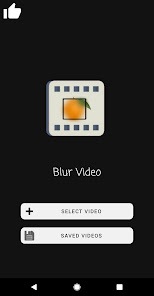
- Select a video to blur
- Blur automatically or manually
- Export video
- Share / Save to Gallery
Ways to blur:
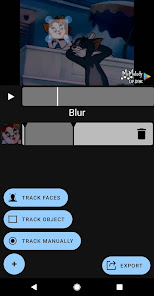
- Face Tracking - Automatically finds and follows faces
- Object Tracking - Select an object/area which will be followed automatically
- Manual Tracking - Record the movement of the area to be hidden
Used mostly for: faces, license plates, ID cards, driving licenses, official documents, trademark logos, copyright material...
How to use:
- Select a video to blur
- Blur automatically or manually
- Export video
- Share / Save to Gallery
Ways to blur:
- Face Tracking - Automatically finds and follows faces
- Object Tracking - Select an object/area which will be followed automatically
- Manual Tracking - Record the movement of the area to be hidden
Updated on
Safety starts with understanding how developers collect and share your data. Data privacy and security practices may vary based on your use, region and age. The developer provided this information and may update it over time.

No data shared with third parties
Learn more about how developers declare sharing

This app may collect these data types
App activity and App info and performance

Data is encrypted in transit

Data can’t be deleted
Ratings and reviews
4.0
1.31K reviews

Ben Blackmore
- Flag inappropriate
- Show review history
30 October 2025
Video is displayed far too small, a 2k high def video and you get a 1 inch preview. also, can't see any way to save the video one you do manage to blur a portion of it.

Sam Murphy
- Flag inappropriate
3 October 2025
So far, pretty good. Tracking automatically toom forever to load, manual works great, I tried a couple others and this seems one of the most simple and effective.

Montrell Thigpen
- Flag inappropriate
17 September 2025
not good for trying to blur a video with multiple cuts. Manually changing the blur after "tracking face" doesnt work. Trim tool is inconsistent.
App support
About the developer
KALLOSSOFT.COM S.R.L.
developers@kallossoft.com
Bld. Sanatatii bl.K31 et.3 ap.13
440175 SATU MARE
Romania
+36 30 437 7087


