
DevCheck Device & System Info
In-app purchases
4.7star
27.2K reviews
5M+
Downloads

Everyone
info


About this app
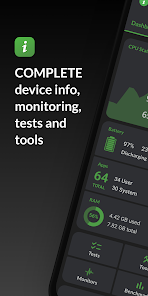
Monitor your hardware in real time and get complete information about your device, including model, CPU, GPU, memory, battery, camera, storage, network, sensors, and operating system. DevCheck presents all essential hardware and system information in a clear, accurate, and well-organized way.
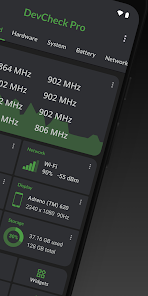
DevCheck provides some of the most detailed CPU and System-on-a-Chip (SoC) information available on Android. View specifications for Bluetooth, GPU, RAM, storage, and other hardware in your phone or tablet. See detailed Wi-Fi and mobile network information, including dual-SIM support. Monitor sensors in real time and learn about your device’s operating system and architecture. Rooted devices and Shizuku are supported for accessing additional system information on compatible devices.
Dashboard:
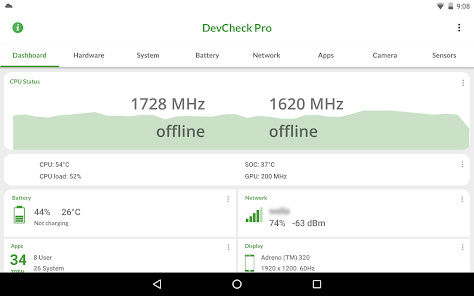
A comprehensive overview of critical device and hardware information, including real-time monitoring of CPU frequencies, memory usage, battery statistics, deep sleep, and uptime, with summaries and shortcuts to system settings.
Hardware:
Detailed specifications for your SoC, CPU, GPU, memory, storage, Bluetooth, and other hardware, including chip names and manufacturers, architecture, processor cores and configuration, manufacturing process, frequencies, governors, storage capacity, input devices, and display specifications.
System:
Complete system and software information, including device codename, brand, manufacturer, bootloader, radio, Android version, security patch level, and kernel. DevCheck can also check root, BusyBox, KNOX status, and other operating system details.
Battery:
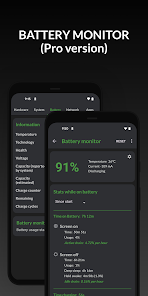
Real-time battery information including status, temperature, level, technology, health, voltage, current, power, and capacity. The Pro version adds detailed battery usage tracking with screen-on and screen-off statistics using the Battery Monitor service.
Network:
Detailed information about Wi-Fi and mobile/cellular connections, including IPv4 and IPv6 addresses, connection details, operator, phone and network type, public IP address, and one of the most complete dual-SIM implementations available.
Apps:
Detailed information and management for all installed apps.
Camera:
Advanced camera specifications including aperture, focal length, ISO range, RAW capability, 35mm equivalents, resolution (megapixels), crop factor, field of view, focus modes, flash modes, JPEG quality and image formats, and available face detection modes.
Sensors:
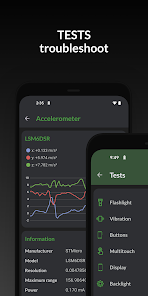
A complete list of all sensors on the device, including type, manufacturer, power usage, and resolution, with real-time graphical data for accelerometer, step detector, gyroscope, proximity, light, and more.
Tests:
Flashlight, vibrator, buttons, multitouch, display, backlight, charging, speakers, headset, earpiece, microphone, and biometric scanners (the last six tests require the Pro version).
Tools:
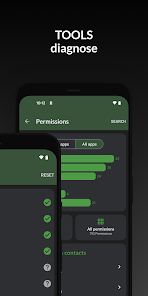
Root Check, Bluetooth Scan, CPU Analysis, Integrity Check (Pro), Permissions Summary (Pro), Wi-Fi Scan (Pro), Network Mapper (Pro), Usage Stats (Pro), GPS tools (Pro), and USB Check (Pro).
Widgets (Pro):
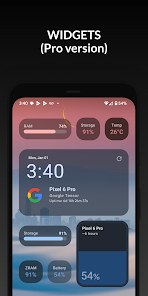
Modern, customizable widgets for your home screen. Monitor battery, RAM, storage, and other stats at a glance.
Floating Monitors (Pro):
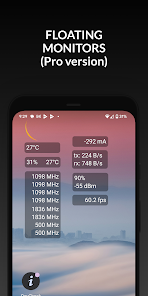
Customizable, movable, always-on-top transparent overlays that display real-time information such as CPU frequencies and temperatures, battery status, network activity, and more while using other apps.
Pro Version
Available via in-app purchase.
The Pro version unlocks all tests and tools, benchmarking, Battery Monitor, home screen widgets, floating monitors, and custom color schemes.
Permissions & Privacy
DevCheck requires various permissions to display detailed device information.
No personal data is ever collected or shared.
Your privacy is always respected.
DevCheck is completely ad-free.
DevCheck provides some of the most detailed CPU and System-on-a-Chip (SoC) information available on Android. View specifications for Bluetooth, GPU, RAM, storage, and other hardware in your phone or tablet. See detailed Wi-Fi and mobile network information, including dual-SIM support. Monitor sensors in real time and learn about your device’s operating system and architecture. Rooted devices and Shizuku are supported for accessing additional system information on compatible devices.
Dashboard:
A comprehensive overview of critical device and hardware information, including real-time monitoring of CPU frequencies, memory usage, battery statistics, deep sleep, and uptime, with summaries and shortcuts to system settings.
Hardware:
Detailed specifications for your SoC, CPU, GPU, memory, storage, Bluetooth, and other hardware, including chip names and manufacturers, architecture, processor cores and configuration, manufacturing process, frequencies, governors, storage capacity, input devices, and display specifications.
System:
Complete system and software information, including device codename, brand, manufacturer, bootloader, radio, Android version, security patch level, and kernel. DevCheck can also check root, BusyBox, KNOX status, and other operating system details.
Battery:
Real-time battery information including status, temperature, level, technology, health, voltage, current, power, and capacity. The Pro version adds detailed battery usage tracking with screen-on and screen-off statistics using the Battery Monitor service.
Network:
Detailed information about Wi-Fi and mobile/cellular connections, including IPv4 and IPv6 addresses, connection details, operator, phone and network type, public IP address, and one of the most complete dual-SIM implementations available.
Apps:
Detailed information and management for all installed apps.
Camera:
Advanced camera specifications including aperture, focal length, ISO range, RAW capability, 35mm equivalents, resolution (megapixels), crop factor, field of view, focus modes, flash modes, JPEG quality and image formats, and available face detection modes.
Sensors:
A complete list of all sensors on the device, including type, manufacturer, power usage, and resolution, with real-time graphical data for accelerometer, step detector, gyroscope, proximity, light, and more.
Tests:
Flashlight, vibrator, buttons, multitouch, display, backlight, charging, speakers, headset, earpiece, microphone, and biometric scanners (the last six tests require the Pro version).
Tools:
Root Check, Bluetooth Scan, CPU Analysis, Integrity Check (Pro), Permissions Summary (Pro), Wi-Fi Scan (Pro), Network Mapper (Pro), Usage Stats (Pro), GPS tools (Pro), and USB Check (Pro).
Widgets (Pro):
Modern, customizable widgets for your home screen. Monitor battery, RAM, storage, and other stats at a glance.
Floating Monitors (Pro):
Customizable, movable, always-on-top transparent overlays that display real-time information such as CPU frequencies and temperatures, battery status, network activity, and more while using other apps.
Pro Version
Available via in-app purchase.
The Pro version unlocks all tests and tools, benchmarking, Battery Monitor, home screen widgets, floating monitors, and custom color schemes.
Permissions & Privacy
DevCheck requires various permissions to display detailed device information.
No personal data is ever collected or shared.
Your privacy is always respected.
DevCheck is completely ad-free.
Updated on
Safety starts with understanding how developers collect and share your data. Data privacy and security practices may vary based on your use, region, and age. The developer provided this information and may update it over time.

No data shared with third parties
Learn more about how developers declare sharing

No data collected
Learn more about how developers declare collection

Data is encrypted in transit
Ratings and reviews
4.7
26.1K reviews

Darkened Absu
- Flag inappropriate
February 1, 2024
Do you have any idea how difficult it is to find a simple app that just gives me info at a glance, nowadays? Info you need to pay for when you could just as easily go into your phones' settings section and find yourself? Not this app. No ads, bling, flashing disco balls and repetitive bloatware. No. Just legit and simple information, easily organized. Thanks devs, this is a winner in the less is more war. Everything easily categorized for efficiency. Hands down, the best.
219 people found this review helpful
flar2
February 1, 2024
Thanks!

A Google user
- Flag inappropriate
April 10, 2020
Fantastically done. Shows just about everything I could think of and more, including your cpu's clock speeds per individual core and its model. It links you to hardware settings, and even has graphical representations on the output from your phone's sensors, like its gyroscope and magnetic orientation sensor (what the good compass apps use). It also gives you some information on the hardware in your device, like the focal length and aperture of your camera(s). Very well done. Thank you so much!
60 people found this review helpful

Arun
- Flag inappropriate
- Show review history
September 21, 2022
Very impressed! It's pretty arduous to find parameters directly from your phone - even something as simple as what processor your phone has isn't trivial. In a world where the same phone is offered with different chipsets or ram or storage - it becomes impossible to figure if you ended up getting a phone with a spec that it was not meant to be. Further, on camera details, no single website or manual gives you that much details re the cameras. DevCheck makes it a breeze. Kudos to you flar2!
100 people found this review helpful
flar2
September 21, 2022
Great review, thanks!
What’s new
6.17:
-improve hardware detection
-temperatures with Shizuku
-fix theme bugs
6.09:
-support new hardware and devices
-Shizuku support (battery info, CPU load, app memory usage list)
-new Task Manager (requires Shizuku and PRO)
-improve temperature, battery, GPU, vulkan and OpenGL info
-update target SDK and support 16KB page size
-modernize old stuff
-improve hardware detection
-temperatures with Shizuku
-fix theme bugs
6.09:
-support new hardware and devices
-Shizuku support (battery info, CPU load, app memory usage list)
-new Task Manager (requires Shizuku and PRO)
-improve temperature, battery, GPU, vulkan and OpenGL info
-update target SDK and support 16KB page size
-modernize old stuff
App support
About the developer
Ex Solutions Inc.
elementalxcontact@gmail.com
9093 West Ridge Line
Blenheim, ON N0P 1A0
Canada
+1 613-796-8715


