
UCO mBanking Plus
4.6star
340K reviews
10M+
Downloads

Everyone
info

About this app
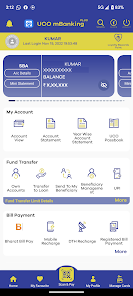
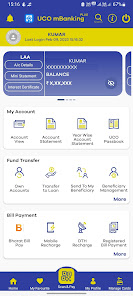
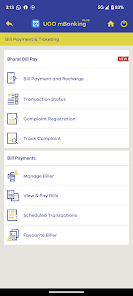
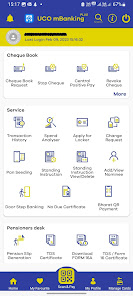
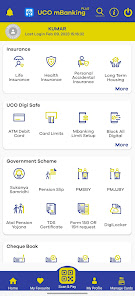
UCO Bank introduces official integrated mobile banking app which consists existing mobile banking app, UCO Secure app, UCO mPassbook, BHIM UCO UPI features.
Availability of all digital banking products in one app. Users will thus be required to access only one Mobile application for Bank’s all mobile based Banking services.
Following are the salient features of UCO mBanking Plus app:
1. Single login for multiple services.
2. Introduction of new age features such as- Touch ID login, App notifications, Favorite transactions.
3. Attractive and simplified user interface.
4. Enhanced security features and SIM binding to mobile device.
5. Touch / Face Id Login
6. Repeat Transaction
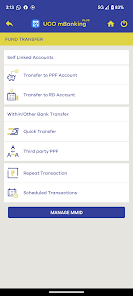
7. Single screen other bank transfers IMPS / NEFT / Schedule
8. Favorite Transaction
9. Alert for FD renewal/ Loan EMI (Pop-up based)
10. Nearby Branch / ATM Locator
The customer has to download single integrated app for Mobile banking features. It is official mobile app of UCO Bank.
Availability of all digital banking products in one app. Users will thus be required to access only one Mobile application for Bank’s all mobile based Banking services.
Following are the salient features of UCO mBanking Plus app:
1. Single login for multiple services.
2. Introduction of new age features such as- Touch ID login, App notifications, Favorite transactions.
3. Attractive and simplified user interface.
4. Enhanced security features and SIM binding to mobile device.
5. Touch / Face Id Login
6. Repeat Transaction
7. Single screen other bank transfers IMPS / NEFT / Schedule
8. Favorite Transaction
9. Alert for FD renewal/ Loan EMI (Pop-up based)
10. Nearby Branch / ATM Locator
The customer has to download single integrated app for Mobile banking features. It is official mobile app of UCO Bank.
Updated on
Safety starts with understanding how developers collect and share your data. Data privacy and security practices may vary based on your use, region, and age. The developer provided this information and may update it over time.

No data shared with third parties
Learn more about how developers declare sharing

This app may collect these data types
Location, Personal info and 3 others

Data is encrypted in transit

Data can’t be deleted
Ratings and reviews
4.6
339K reviews

Nutan Jyoti
- Flag inappropriate
- Show review history
March 14, 2026
my overall app review is good. but tell me one thing that my app is giving me this in app alert recently just after opening uco mbanking plus app, that there is a third party keyboard in my phone, but i can't find one in my phone i have tried to look at every suggestions, but the alert doesn't go away what to do? That app doesn't open further if I tap on "no" as the app closes automatically. Please find me a way to use this because it's really being frustrating not able to access my account.
10 people found this review helpful
UCO BANK
March 16, 2026
Dear Customer,
You can continue using the app without any difficulties by clicking ok on the pop-up.

Pramod Tyagi
- Flag inappropriate
- Show review history
April 6, 2026
Not able to activate the app as my debit card had expired and new one still not linked to my account for some reason.Very frustrating .Please give other options for activating the app. There is no reason why this should be the only option. You can also add internet banking credentials and aadhar authentication or OTP like many other banks. PS: The developer has responded asking me to visit the branch. Can you believe that ? He has not even read what I wrote. I have a new debit card not working .
UCO BANK
April 7, 2026
We regret the inconvenience you had to face. For better assistance please share your information with uco.mbanking@uco.bank.in. We will be happy to assist you.

tana tahi
- Flag inappropriate
- Show review history
March 18, 2026
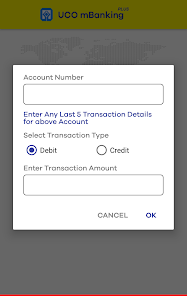
App is good but the session end pop up comes to fast and also the od unable to transfer amount from od account which is not good. while creating banking plus account first ask for the debit and credit amount because of this it's hard to create mbanking. People have to visit uco bank branch to ask the amount of debit and credit.
6 people found this review helpful
UCO BANK
March 18, 2026
Dear User, thanks for your support. With every new app version we are introducing new features and improving existing ones. We are sure that your feedback will only help us improve further.
What’s new
Pay to Contacts - Send money easily through mobile number.
Scratch cards - Unlock exciting rewards and exclusive offers within the app.
Minor enhancements for a smoother and better user experience.
Scratch cards - Unlock exciting rewards and exclusive offers within the app.
Minor enhancements for a smoother and better user experience.
App support
phone
Phone number
+9118008910
About the developer
UCO BANK
uco.mbanking@uco.bank.in
UCO House, 10, B T M Sarani
Kolkata, West Bengal 700001
India
+91 84201 11115


