

Copy Text On Screen
Contains adsIn-app purchases

100K+
Downloads

PEGI 3
info



About this app
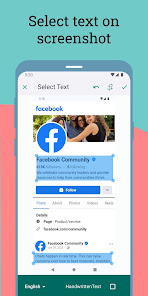
Default long press to copy text on mobile screen not works sometimes there this app helps you to extract text/words from mobile screen by just sharing your screenshot with this app.
Here OCR (Optical Character Recognition) technology is used to recognize text on the device screen.
You can also screen translate in over 100 languages.
OCR Recognizes text with 99%+ accuracy.
Gave support for 92 languages (Afrikaans, Albanian, Arabic, Azeri, Basque, Belarusian, Bengali, Bulgarian, Burmese, Catalan, Chinese (Simplified), Chinese (Traditional), Croatian, Czech, Danish, Dutch, English, Estonian, Finnish, French, Galician, German, Greek, Gujarati, Hebrew, Hindi, Hungarian, Icelandic, Indonesian, Italian, Japanese, Kannada, Khmer, Korean, Latvian, Lithuanian, Macedonian, Malay, Malayalam, Maltese, Marathi, Nepali, Norwegian, Panjabi, Persian (Farsi), Polish, Portuguese, Romanian, Russian, Sanskrit, Serbian (Latin), Slovak, Slovenian, Spanish, Swahili, Swedish, Tagalog, Tamil, Telugu, Thai, Turkish, Ukrainian, Urdu, Vietnamese and more)
Main Features:
• Copy any text on the mobile screen to your clipboard. so you don't have to type it ever again.
• Easily convert text from picture — just share image with this app to extract text from image.
• Copy text from any application: Facebook, Twitter, Instagram, Youtube, Tumblr, News Republic...
• Scans history.
• Screen translate in over 100 languages
• Recognize text from image supports 92 languages.
• Extracts phone number, email, URL .
• Options to automatically copy extracted text to the clipboard or save it as a .txt file for a faster workflow.
Video demo links:
https://www.youtube.com/watch?v=Hzv6LnmrFe4
How to use this app
1. Take a screenshot.
2. Open the screenshot and share with this app.
3. Touch and Drag on image to select text and also select language to OCR then save.
4. Please wait while the app performs OCR (Optical Character Recognition) operation to extract the text.
5. Now you may copy to clipboard, share or screen translate.
You can take screenshots by pressing and holding the 'Power button' and 'Volume-down button' at the same time for 2 seconds
if that doesn't work try pressing and holding the 'Power button' and 'Home button' at the same time for 2 seconds
Here OCR (Optical Character Recognition) technology is used to recognize text on the device screen.
You can also screen translate in over 100 languages.
OCR Recognizes text with 99%+ accuracy.
Gave support for 92 languages (Afrikaans, Albanian, Arabic, Azeri, Basque, Belarusian, Bengali, Bulgarian, Burmese, Catalan, Chinese (Simplified), Chinese (Traditional), Croatian, Czech, Danish, Dutch, English, Estonian, Finnish, French, Galician, German, Greek, Gujarati, Hebrew, Hindi, Hungarian, Icelandic, Indonesian, Italian, Japanese, Kannada, Khmer, Korean, Latvian, Lithuanian, Macedonian, Malay, Malayalam, Maltese, Marathi, Nepali, Norwegian, Panjabi, Persian (Farsi), Polish, Portuguese, Romanian, Russian, Sanskrit, Serbian (Latin), Slovak, Slovenian, Spanish, Swahili, Swedish, Tagalog, Tamil, Telugu, Thai, Turkish, Ukrainian, Urdu, Vietnamese and more)
Main Features:
• Copy any text on the mobile screen to your clipboard. so you don't have to type it ever again.
• Easily convert text from picture — just share image with this app to extract text from image.
• Copy text from any application: Facebook, Twitter, Instagram, Youtube, Tumblr, News Republic...
• Scans history.
• Screen translate in over 100 languages
• Recognize text from image supports 92 languages.
• Extracts phone number, email, URL .
• Options to automatically copy extracted text to the clipboard or save it as a .txt file for a faster workflow.
Video demo links:
https://www.youtube.com/watch?v=Hzv6LnmrFe4
How to use this app
1. Take a screenshot.
2. Open the screenshot and share with this app.
3. Touch and Drag on image to select text and also select language to OCR then save.
4. Please wait while the app performs OCR (Optical Character Recognition) operation to extract the text.
5. Now you may copy to clipboard, share or screen translate.
You can take screenshots by pressing and holding the 'Power button' and 'Volume-down button' at the same time for 2 seconds
if that doesn't work try pressing and holding the 'Power button' and 'Home button' at the same time for 2 seconds
Updated on
Safety starts with understanding how developers collect and share your data. Data privacy and security practices may vary based on your use, region, and age. The developer provided this information and may update it over time.


What’s new
1. Enhanced OCR accuracy for better text extraction.
2. Bug fixes and performance improvements.
2. Bug fixes and performance improvements.
App support
phone
Phone number
+919025359351
About the developer
APPZYS TECHNOLOGIES PRIVATE LIMITED
support@appzys.com
F4 BLOCK 3 1ST FLR ATANA ARUN EXCELLO NEAR KRISHNA COL
KARANITHANGAL KANCHEEPURAM
Kanchipuram, Tamil Nadu 602105
India
+91 90253 59351


