
Acode - code editor | FOSS
In-app purchases
3.5star
1.18K reviewsinfo
10K+
Downloads

PEGI 3
info






About this app
Welcome to Acode!
A powerful, lightweight code editor, and web IDE for Android. Now enhanced with cutting-edge features and updates to transform your coding experience.
What's New?
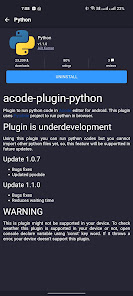
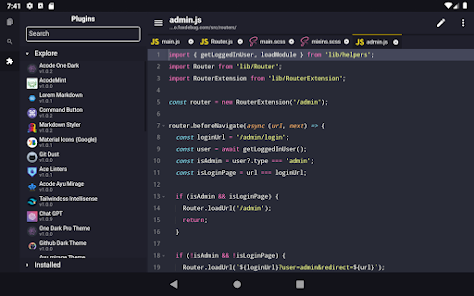
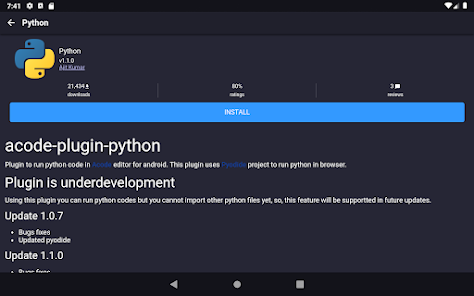
Step into the future of coding with our innovative Plugin System. This brand new feature supports a wide range of plugins, boosting the functionality of Acode to meet all your development needs. With over 30 plugins already available in the Plugin Store, the possibilities are endless.
Latest Updates Include:
- Enhanced Ace Editor: Now updated to version 1.22.0 for more efficient editing.
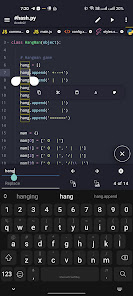
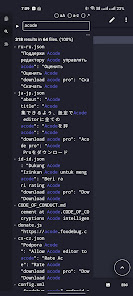
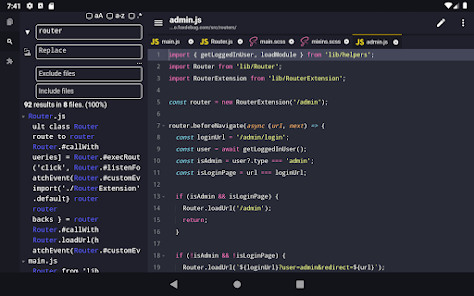
- Search in All Files: Our beta feature lets you search and replace text in all files within your opened projects.
- Customizable Quick Tools: Personalize your quick tools to enhance your workflow.
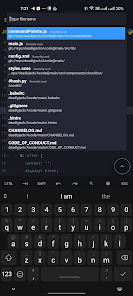
- Fast File Listing in Find Files (Ctrl + P): Acode now loads and caches files at startup, leading to faster file listing.
- Ctrl Key Functionality: Take advantage of keyboard shortcuts for actions such as save (Ctrl+S) and open command palette (Ctrl+Shift+P).
Why Choose Acode?
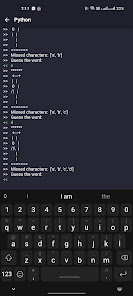
Acode lets you build and run websites directly within your browser, debug with ease using the integrated console, and edit a wide range of source files - from Python and CSS to Java, JavaScript, Dart, and more.
Key Features:
- Ad-Free Experience: Enjoy a clean, distraction-free coding environment.
- Universal File Editor: Edit any file directly from your device.
- GitHub Integration: Seamlessly sync your projects with GitHub.
- FTP/SFTP Support: Manage your files efficiently with FTP/SFTP.
- Extensive Syntax Highlighting: Supports over 100 programming languages.
- Personalized Themes: Choose from dozens of unique themes to match your style.
- User-Friendly Interface: Navigate with ease through our intuitive design.
- In-App Preview: Instantly view your HTML/MarkDown files within the app.
- Interactive JavaScript Console: Debug JavaScript code right from the console.
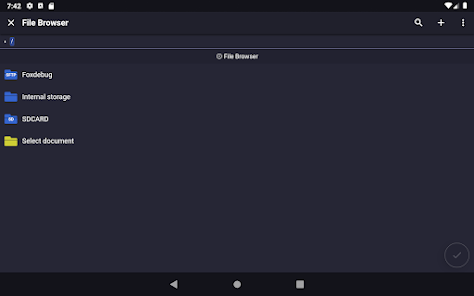
- In-App File Browser: Access your files directly within Acode.
- Open Source: Benefit from our transparent and community-driven project.
- High Performance: Supports files with over 50,000 lines, ensuring smooth workflow.
- Multi-File Support: Work on multiple files simultaneously for productive multitasking.
- Customizable Interface: Adapt Acode to your personal coding style.
- Keyboard Shortcuts: Speed up your coding with handy shortcuts.
- File Recovery: Never lose your work with our reliable file recovery feature.
- File Management: Keep your projects organized with effective file management.
Start your streamlined coding journey with Acode today. Join our ever-growing community of developers and experience the difference for yourself!
A powerful, lightweight code editor, and web IDE for Android. Now enhanced with cutting-edge features and updates to transform your coding experience.
What's New?
Step into the future of coding with our innovative Plugin System. This brand new feature supports a wide range of plugins, boosting the functionality of Acode to meet all your development needs. With over 30 plugins already available in the Plugin Store, the possibilities are endless.
Latest Updates Include:
- Enhanced Ace Editor: Now updated to version 1.22.0 for more efficient editing.
- Search in All Files: Our beta feature lets you search and replace text in all files within your opened projects.
- Customizable Quick Tools: Personalize your quick tools to enhance your workflow.
- Fast File Listing in Find Files (Ctrl + P): Acode now loads and caches files at startup, leading to faster file listing.
- Ctrl Key Functionality: Take advantage of keyboard shortcuts for actions such as save (Ctrl+S) and open command palette (Ctrl+Shift+P).
Why Choose Acode?
Acode lets you build and run websites directly within your browser, debug with ease using the integrated console, and edit a wide range of source files - from Python and CSS to Java, JavaScript, Dart, and more.
Key Features:
- Ad-Free Experience: Enjoy a clean, distraction-free coding environment.
- Universal File Editor: Edit any file directly from your device.
- GitHub Integration: Seamlessly sync your projects with GitHub.
- FTP/SFTP Support: Manage your files efficiently with FTP/SFTP.
- Extensive Syntax Highlighting: Supports over 100 programming languages.
- Personalized Themes: Choose from dozens of unique themes to match your style.
- User-Friendly Interface: Navigate with ease through our intuitive design.
- In-App Preview: Instantly view your HTML/MarkDown files within the app.
- Interactive JavaScript Console: Debug JavaScript code right from the console.
- In-App File Browser: Access your files directly within Acode.
- Open Source: Benefit from our transparent and community-driven project.
- High Performance: Supports files with over 50,000 lines, ensuring smooth workflow.
- Multi-File Support: Work on multiple files simultaneously for productive multitasking.
- Customizable Interface: Adapt Acode to your personal coding style.
- Keyboard Shortcuts: Speed up your coding with handy shortcuts.
- File Recovery: Never lose your work with our reliable file recovery feature.
- File Management: Keep your projects organized with effective file management.
Start your streamlined coding journey with Acode today. Join our ever-growing community of developers and experience the difference for yourself!
Updated on
Safety starts with understanding how developers collect and share your data. Data privacy and security practices may vary based on your use, region, and age. The developer provided this information and may update it over time.

No data shared with third parties
Learn more about how developers declare sharing

This app may collect these data types
Device or other IDs

Data is encrypted in transit

You can request that data be deleted
Ratings and reviews
3.3
1K reviews

Grayson Briggs
- Flag inappropriate
September 27, 2025
Has been great so far! one HTML feature I'd like to recommend is that you add the option that when you detect an import from a CDN you can automatically download the file locally and update the import to point to the local file so it actually works (something AIs like to do, if I'm just making it whip up a quick visual, etc.) seems like it could be great value add. maybe it highlights it and gives you the option?
3 people found this review helpful

Colonel Hacker
- Flag inappropriate
September 7, 2025
While wishing there was a version of Notepad++ for Android, I discovered Acode and read good things about it. I was happy to pay the small fee to purchase. I mostly edit config files and take notes, but it does a lot more than that. Very usefull application, thank you.
1 person found this review helpful

Nick Marchetti
- Flag inappropriate
October 8, 2025
It's remarkable how effective Acode is as a pocket sidekick. It gives strong first impressions at each step from hearing about it, reading the docs, browsing the repo, installing the app, to quick settings tweak to match your style, to downloading the plugins you need and are familiar with and installing the terminal. Acode is a blatant example of charity and brotherly love through the craft of coding. It is obvious that the goal has always been to fit any devs pocket when they need it.
1 person found this review helpful
What’s new
- Added terminal service
- Fixed sidebar file tree issue
- Fixed terminal selection handle
- Fixed sftp issue related to ED25519 keys
- Added rename, etc support for Acode's saf uri
- Terminal related quality improvements
- New plugin filter option and fixed existing one
- Improved file sharing and fixed permission issue
- Restores folds after formatting if available
- Lots of Translations improvements
- Check Changelogs for more details
- Fixed sidebar file tree issue
- Fixed terminal selection handle
- Fixed sftp issue related to ED25519 keys
- Added rename, etc support for Acode's saf uri
- Terminal related quality improvements
- New plugin filter option and fixed existing one
- Improved file sharing and fixed permission issue
- Restores folds after formatting if available
- Lots of Translations improvements
- Check Changelogs for more details
App support
phone
Phone number
+919380679572
About the developer
FOXBIZ SOFTWARE PRIVATE LIMITED
apps@foxbiz.io
Sr Hig-05, Housing Board Colony, Deo
Bilaspur, Chhattisgarh 495001
India
+91 95165 96985


