Magnifier & Microscope+ [Cozy]
4.9star
4.77K reviewsinfo
50K+
Downloads

PEGI 3
info

About this app
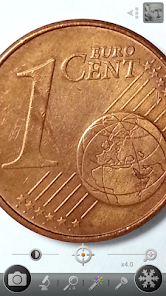
This app is a handy magnifier that helps you to see tiny things easily!
This app turns your phone into a handy and easy-to-use digital magnifier.
With this, you don't have to carry a magnifying glass anymore! =)
★ The recommended magnifying glass by various media!
★ Mother's Day Recommended Apps! - by Google Korea
* Features
⊙ Magnifier (Magnifying glass)
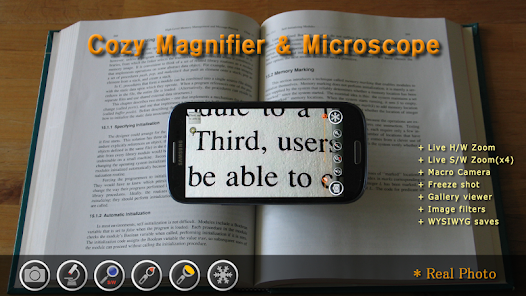
⊙ Microscope mode (x2, x4)
⊙ LED Flashlight
⊙ Macro Camera
⊙ Freezing the magnifier screen
⊙ Brightness and zoom control
⊙ Enhanced embedded gallery
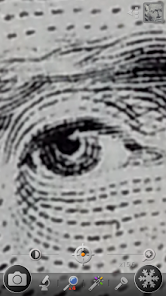
⊙ Color filters(Negative, Sepia, Mono, Text highlight)
⊙ & more
* Plus version features
★ No ads
★ More functions
★ More filters
Do you need a magnifying glass to read small prints?
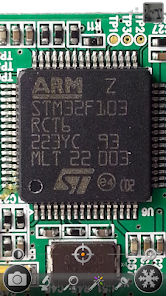
Do you use a big magnifier to read the model number of a tiny semiconductor?
Do you want to take macro pictures easily?
This app is the magnifying glass that you've been looking for!
1. Magnifier
- Easy-to-use zoom controller
- Zoom-in or out by using pinch and vertical drag gestures
- Continuous auto-focusing function
- Temporary zoom-out function to find a target
2. Freezing screen
- Freezing the magnifying screen to see it stably
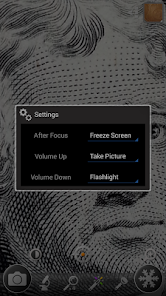
- Freezing the screen after focus by clicking the screen long
3. Microscope mode
- More zoom-in than magnifier mode
- x2, x4
4. Color filters
- Negative, Sepia, Mono color filter
- Text highlight filter
5. LED Flashlight
- Useful in the dark place
- Flashlight on or off by using the light button or volume-down key
6. Taking pictures (Macro camera)
- Taking pictures by using the camera button
- Taking pictures by using the volume-up key
* Magnifying glass pictures are saved in DCIM/CozyMag directory.
* The quality of the magnified image depends on your phone's camera capabilities.
* Some devices can't use some functions.
* This is not a real microscope. ;)
* I have no responsibility for the problems caused by using this application. =)
This app turns your phone into a handy and easy-to-use digital magnifier.
With this, you don't have to carry a magnifying glass anymore! =)
★ The recommended magnifying glass by various media!
★ Mother's Day Recommended Apps! - by Google Korea
* Features
⊙ Magnifier (Magnifying glass)
⊙ Microscope mode (x2, x4)
⊙ LED Flashlight
⊙ Macro Camera
⊙ Freezing the magnifier screen
⊙ Brightness and zoom control
⊙ Enhanced embedded gallery
⊙ Color filters(Negative, Sepia, Mono, Text highlight)
⊙ & more
* Plus version features
★ No ads
★ More functions
★ More filters
Do you need a magnifying glass to read small prints?
Do you use a big magnifier to read the model number of a tiny semiconductor?
Do you want to take macro pictures easily?
This app is the magnifying glass that you've been looking for!
1. Magnifier
- Easy-to-use zoom controller
- Zoom-in or out by using pinch and vertical drag gestures
- Continuous auto-focusing function
- Temporary zoom-out function to find a target
2. Freezing screen
- Freezing the magnifying screen to see it stably
- Freezing the screen after focus by clicking the screen long
3. Microscope mode
- More zoom-in than magnifier mode
- x2, x4
4. Color filters
- Negative, Sepia, Mono color filter
- Text highlight filter
5. LED Flashlight
- Useful in the dark place
- Flashlight on or off by using the light button or volume-down key
6. Taking pictures (Macro camera)
- Taking pictures by using the camera button
- Taking pictures by using the volume-up key
* Magnifying glass pictures are saved in DCIM/CozyMag directory.
* The quality of the magnified image depends on your phone's camera capabilities.
* Some devices can't use some functions.
* This is not a real microscope. ;)
* I have no responsibility for the problems caused by using this application. =)
Updated on
Safety starts with understanding how developers collect and share your data. Data privacy and security practices may vary based on your use, region, and age. The developer provided this information and may update it over time.

No data shared with third parties
Learn more about how developers declare sharing

No data collected
Learn more about how developers declare collection
Ratings and reviews
4.9
4.66K reviews

Suzette Susanne
- Flag inappropriate
November 14, 2025
if I'm not mistaken I think I've been using this app since mid 2017!! That's a long time to use an app almost daily and be totally happy about it. I sell things on eBay which are small and this is a perfect way for me to photograph them. I'm also an insect enthusiast and this is a great way to photograph those as well. My Samsung phone doesn't seem to have the camera capability that iPhones do but this app helps me get around that to some extent!
2 people found this review helpful

Robert (Rob)
- Flag inappropriate
November 4, 2025
I really like this app. I work with small electronic parts a lot and most of the time I use this app to read the information that is printed on these little parts. I was so impressed with the functionality that I bought the pro version as a way of saying thanks to the developers. But even with the ad supported version that I started with, the ads never seemed to be too intrusive. I highly recommend this app for anyone needing to have a closer look at the details.
2 people found this review helpful

Damien Farrell
- Flag inappropriate
November 22, 2025
One of the most useful features of this app is the ability to turn on the light and see in real time what you are magnifying. much much better than using the camera which only uses the flash. There are lots of other features like changing the colour of text to make it readable. This is a go to app for me.
What’s new
✔ Shows the status bar at the top of the screen.
✔ Supports 180-degree camera rotation.
✔ Supports text highlight color filters for the screen.
✔ Enhanced internal gallery.
- Supports rotating pictures.
- Supports advanced sharpness control.
- Supports text highlight color filters for pictures.
* Magnifying glass images are saved in the DCIM/CozyMag directory.
✔ Supports 180-degree camera rotation.
✔ Supports text highlight color filters for the screen.
✔ Enhanced internal gallery.
- Supports rotating pictures.
- Supports advanced sharpness control.
- Supports text highlight color filters for pictures.
* Magnifying glass images are saved in the DCIM/CozyMag directory.
App support
phone
Phone number
+821092923088
About the developer
김백운
hantorm89@gmail.com
동탄지성로488번길 22
영통구, 수원시, 경기도 16686
South Korea
undefined


