
Poweramp Equalizer
In-app purchases
4.1star
19.8K reviewsinfo
1M+
Downloads

PEGI 3
info




About this app
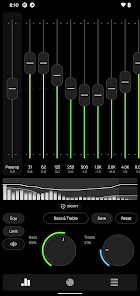
Whether you’re an audiophile, a bass lover, or just someone who wants better sound quality, Poweramp Equalizer is the ultimate tool to customize your listening experience.
Equalizer Engine
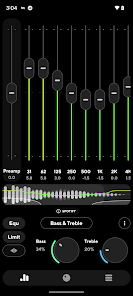
• Bass & Treble Boost – enhance low and high frequencies effortlessly
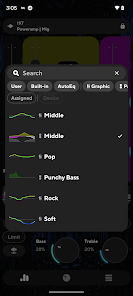
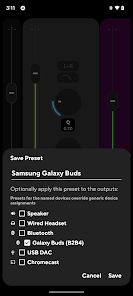
• Powerful Equalization Presets – choose from pre-made or custom settings
• DVC (Direct Volume Control) – get enhanced dynamic range and clarity
• No Root Required – works seamlessly on most Android devices
• AutoEQ presets tuned for your device
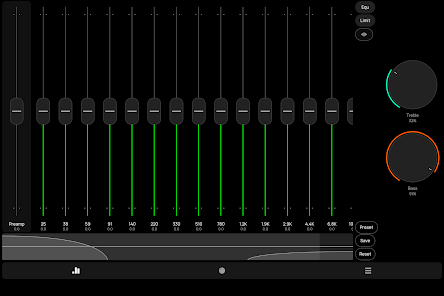
• configurable number of bands: fixed or custom 5-32 with configurable start/end frequencies
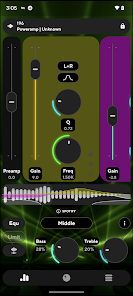
• advanced parametric equalizer mode with separately configured bands
• limiter, preamp, compressor, balance
• most 3rd party player/streaming apps supported
In some cases, equalizer should be enabled in the player app settings
• Advanced Player Tracking mode allows equalization in almost any player, but requires additional permissions
UI
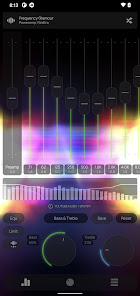
• Customizable UI & Visualizer – Choose from various themes and real-time waveforms
• .milk presets and spectrums are supported
• configurable Light and Dark skins included
• Poweramp 3rd party preset packs are supported too
Utilities
• auto-resume on headset/Bluetooth connection
• volume keys controlled resume/pause/track change
Track change requires extra permission
With Poweramp Equalizer, you get studio-grade sound customization in a simple, user-friendly app. Whether you’re listening through headphones, Bluetooth speakers, or car audio, you’ll experience richer, fuller, and more immersive sound.
Equalizer Engine
• Bass & Treble Boost – enhance low and high frequencies effortlessly
• Powerful Equalization Presets – choose from pre-made or custom settings
• DVC (Direct Volume Control) – get enhanced dynamic range and clarity
• No Root Required – works seamlessly on most Android devices
• AutoEQ presets tuned for your device
• configurable number of bands: fixed or custom 5-32 with configurable start/end frequencies
• advanced parametric equalizer mode with separately configured bands
• limiter, preamp, compressor, balance
• most 3rd party player/streaming apps supported
In some cases, equalizer should be enabled in the player app settings
• Advanced Player Tracking mode allows equalization in almost any player, but requires additional permissions
UI
• Customizable UI & Visualizer – Choose from various themes and real-time waveforms
• .milk presets and spectrums are supported
• configurable Light and Dark skins included
• Poweramp 3rd party preset packs are supported too
Utilities
• auto-resume on headset/Bluetooth connection
• volume keys controlled resume/pause/track change
Track change requires extra permission
With Poweramp Equalizer, you get studio-grade sound customization in a simple, user-friendly app. Whether you’re listening through headphones, Bluetooth speakers, or car audio, you’ll experience richer, fuller, and more immersive sound.
Updated on
Safety starts with understanding how developers collect and share your data. Data privacy and security practices may vary based on your use, region, and age. The developer provided this information and may update it over time.

No data shared with third parties
Learn more about how developers declare sharing

No data collected
Learn more about how developers declare collection
Ratings and reviews
4.1
19.2K reviews

Cindy Lankford
- Flag inappropriate
January 24, 2025
I absolutely love this app... When it works properly. There's this random horriffic loud deep bass buzzing/static noise that blades over my car speakers, on random tracks while im listening to Spotify through my android auto in my car. I've tried everything, can not fix it. Ppl are all over internet, complaining bout same problem, as well. PLEASE FIX THIS ISSUE, or I'll hv to ask for a refund and uninstall your app. The app is amazing, cept for this issue.
34 people found this review helpful
Poweramp Software Design (Max MP)
May 29, 2025
Try enabling “New Pipeline Model” and disabling DVC in settings. Also, avoid boosting bass too high. If using Android Auto, compatibility may vary. We’re working on fixes—thanks for your patience!

Darren Lai
- Flag inappropriate
November 18, 2025
I've been using Poweramp Equalizer for a long time, and it's always been one of the best audio tools on Android. Unfortunately, after updating my Oppo Find N5 to ColorOS 16, the app stopped working properly. The equalizer no longer applies its effects to the audio, and none of the presets or adjustments make any difference. I've tried reinstalling the app, clearing cache and checking all permissions but nothing helps. I hope the developers can look into this issue soon. Thanks.
3 people found this review helpful
Poweramp Software Design (Max MP)
November 18, 2025
On ColorOS 16 external audio effects are often blocked. Enable only Global Equalization, disable DVC, turn off battery optimization, and restart the device. If still no effect, switch to AIDL Mode 1 or 2. This usually restores EQ processing on Oppo devices.

Dan Okroy
- Flag inappropriate
October 24, 2025
Would give it 7 stars... when it worked. I'm a spotify, auto android, full version user and it just stopped working. Even when the eq is switched on and the bands are lit up it has no eq effect on the audio no matter how you adjust the bands or compression settings. Very frustrating since when it did work it greatly enhanced the listening experience. Anyone have any ideas of what's going on? I uninstalled, reinstalled, cleared cache, rebooted my phone etc.
3 people found this review helpful
Poweramp Software Design (Max MP)
October 25, 2025
Try enabling Global Equalization or Advanced Player Tracking (choose one only). Disable DVC or enable AIDL Mode 1/2, and turn off battery optimization for Poweramp Equalizer. This usually restores EQ effect on Android Auto and Spotify.
What’s new
• updated translations
• bug fixes and stability improvements
• bug fixes and stability improvements
App support
About the developer
POWERAMP SOFTWARE DESIGN
powerampmaxmpz@gmail.com
WS-30, Wafi Residence, Um Hurair Second
إمارة دبيّ
United Arab Emirates
+971 58 527 1041


