
MiVue Pro
3.7star
19.4K reviewsinfo
100K+
Downloads

PEGI 3
info

About this app
Sent on impact, seen on mobile!
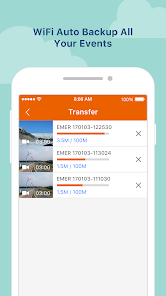
When an incident happens, the dash cam will automatically save the file to the event folder and send footage to the MiVue™ Pro app via WIFI in real-time (WIFI video backup function won’t consume your 3G/4G data, it uses point-to-point transmission technology).
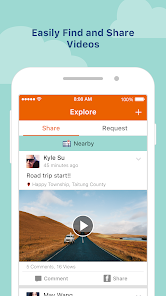
You can transmit the picture or video from Mio dash cam to your smartphone through Wi-Fi, and store the picture and video in the shared storage of smartphone.
When you open MiVue Pro app, you can review or delete the files which you’ve stored in smartphone via MiVue Pro directly.
Live View and video organizer
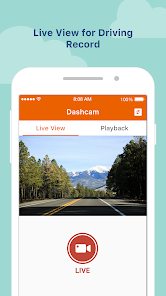
Click “Live View” to adjust horizontal level of the camera before installation. Videos will be categorized by date and type (Normal, Event or Parking mode folders).
Set up your dash cam through the MiVue™ Pro app
Change the settings and format the memory card of the dash cam directly through your smartphone.
WIFI OTA (Over-the-Air) update
Use your smartphone to download and update the firmware, speed camera data and voice versions without having to withdraw the memory card. (Downloading data will consume your 3G/4G data, the update settings may vary depending on the different dash cam models).
* APP function may vary depending on different dash cam models.
If you have any issue when you connect to app, please refer the FAQ below
https://service.mio.com/M0100/F0110_DownLoad_Faq.aspx?bullid=AllBull&faqid=131685
for trouble shooting. If the problem couldn't be solved, please provide your smartphone model, OS version, and the device model. Also, please describe your problem and scenario for us, our service team will reply you asap.
When an incident happens, the dash cam will automatically save the file to the event folder and send footage to the MiVue™ Pro app via WIFI in real-time (WIFI video backup function won’t consume your 3G/4G data, it uses point-to-point transmission technology).
You can transmit the picture or video from Mio dash cam to your smartphone through Wi-Fi, and store the picture and video in the shared storage of smartphone.
When you open MiVue Pro app, you can review or delete the files which you’ve stored in smartphone via MiVue Pro directly.
Live View and video organizer
Click “Live View” to adjust horizontal level of the camera before installation. Videos will be categorized by date and type (Normal, Event or Parking mode folders).
Set up your dash cam through the MiVue™ Pro app
Change the settings and format the memory card of the dash cam directly through your smartphone.
WIFI OTA (Over-the-Air) update
Use your smartphone to download and update the firmware, speed camera data and voice versions without having to withdraw the memory card. (Downloading data will consume your 3G/4G data, the update settings may vary depending on the different dash cam models).
* APP function may vary depending on different dash cam models.
If you have any issue when you connect to app, please refer the FAQ below
https://service.mio.com/M0100/F0110_DownLoad_Faq.aspx?bullid=AllBull&faqid=131685
for trouble shooting. If the problem couldn't be solved, please provide your smartphone model, OS version, and the device model. Also, please describe your problem and scenario for us, our service team will reply you asap.
Updated on
Safety starts with understanding how developers collect and share your data. Data privacy and security practices may vary based on your use, region, and age. The developer provided this information and may update it over time.


Ratings and reviews
3.7
19.2K reviews

Lucy B
- Flag inappropriate
September 22, 2025
Since getting the app, I cannot get the storage to work on my phone, no way to exit to the home screen, stuck on the set storage pop up. I have emailed the developer and they did not bother to reply. The app is completely useless to me.
Mio Technology
September 25, 2025
Hi Mio User!
Reinstall the app. You may also try to delete some unused Apps or files on your phone.
If you have any questions, please contact Mio Support at https://support.mio.com
→ Select Your Region → Contact Us.
Best regards,
The Mio Team

Nikola Nikolic
- Flag inappropriate
September 14, 2025
App not working! I bought the C595W car camera and it’s useless. The app crashes every time I try to transfer videos to my Samsung S24 Plus, even after updating both app and firmware. What’s the point of a dash cam if you can’t access recordings when needed? Completely unacceptable – not recommended.
Mio Technology
September 15, 2025
Hi Mio User,
Reinstall the app and ensure your Android phone software is up to date.
Try removing SD card from dashcam, connecting it directly to PC, and viewing the videos via MiVue Manager.
If you have any further questions, please contact Mio Support at https://support.mio.com
→ Select Your Region → Contact Us.
Best regards,
The Mio Team

Dan Subtirelu
- Flag inappropriate
- Show review history
February 11, 2022
The application does not work, after the last update, I think. I didn't try to connect the phone since several months ago. The camera can't be connected to the phone anymore. At the phone's connection menu appears "connected", but the application has "connecting" status. Then nothing. I've tried all the recommendations you've made for the other users and nothing happened. Hi again. I still can't connect the phone. I've tried with 2 phones so far, and the same simptoms. Solution?
5 people found this review helpful
Mio Technology
February 15, 2022
Dear Mio customer: Please check the device and APP are on their latest versions. Restart the phone, reinstall/update the APP. If any other device is connected to the phone , need to forget the connection. For further assistance, please contact us at https://support.mio.com> select Region> Contact us . Best regards,
What’s new
1.Bug fix
App support
About the developer
神達電腦股份有限公司
miomobile.android@gmail.com
新竹科學工業園區研發二路1號
寶山鄉
新竹縣, Taiwan 308008
+886 987 967 304


