
BuzzKill Notification Manager
4.5star
2.16K reviewsinfo
50K+
Downloads

PEGI 3
info



About this app
TIMES MAGAZINE - BEST INVENTIONS 2025
ANDROID AUTHORITY - "This is the notification manager Google should’ve built for Android years ago"
LIFEHACKER - "BuzzKill Is the Best Way to Manage Your Android Notifications"
BuzzKill allows you to see the notifications you need to see when you need to see them and filter out everything else you don't. Here is just a taste of what BuzzKill can do:
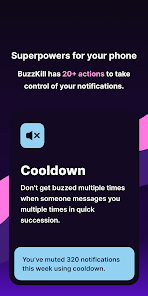
• Cooldown - Don't get buzzed multiple times when someone messages you multiple times in quick succession
• Custom alert - Set a custom sound or vibration pattern for a specific contact or phrase
• Dismiss - Automatically swipe away any notification you don't want to see, without hiding all notifications for that app
• Reply - Automatically reply to a message if you haven't seen it after a while
• Remind me - Keep reminding you until you see a notification
• Undo - Gives you a second chance to tap on a notification when you accidentally swipe it away
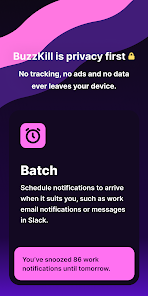
• Snooze - Receive your notifications in batches so they fit your schedule
• Alarm - Get your attention such as for a security camera notification
• Secret - Hide the content of the notification
• And many more...
FAQ: https://buzzkill.super.site/
BuzzKill is privacy first. There are no ads, no trackers and no data ever leaves your device. Unlike pretty much every app on your phone and the Play Store it doesn't have access to the internet (you can check) so you can be sure that your data is safe.
Looking for a free trial?
BuzzKill cannot connect to the internet to verify purchases, so it does not offer a free trial in the app. However if you're not happy with your purchase, please press the contact support button in the app and I'll refund your order if you're outside of Google Play's returns period.
Wear OS
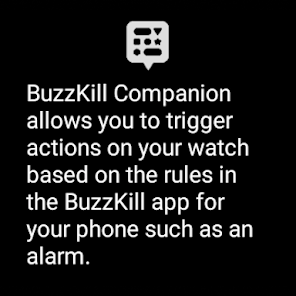
BuzzKill has a companion app for Wear OS that allows you to trigger certain actions on the watch based on the rules that the phone triggers. For example you can create a rule in BuzzKill to trigger an alarm when you receive a certain notification. With the BuzzKill companion app, you can have the alarm show up on your watch too.
Accessibility Service API
BuzzKill includes an optional accessibility service that allows it automate certain actions on your device. For example you set BuzzKill to automatically tap a button in a notification. No data is collected and no data leaves the device. You do not need to enable the accessibility service unless you create a rule that uses it.
Does BuzzKill work with phone calls?
Unfortunately phone calls work very differently to notifications and they have limited support in BuzzKill. E.g. you can't set a custom vibration or sound for a phone call, but you can use the unsilence rule to temporarily allow a phone call to unsilence your rule based on the time/location/phone number that is calling.
ANDROID AUTHORITY - "This is the notification manager Google should’ve built for Android years ago"
LIFEHACKER - "BuzzKill Is the Best Way to Manage Your Android Notifications"
BuzzKill allows you to see the notifications you need to see when you need to see them and filter out everything else you don't. Here is just a taste of what BuzzKill can do:
• Cooldown - Don't get buzzed multiple times when someone messages you multiple times in quick succession
• Custom alert - Set a custom sound or vibration pattern for a specific contact or phrase
• Dismiss - Automatically swipe away any notification you don't want to see, without hiding all notifications for that app
• Reply - Automatically reply to a message if you haven't seen it after a while
• Remind me - Keep reminding you until you see a notification
• Undo - Gives you a second chance to tap on a notification when you accidentally swipe it away
• Snooze - Receive your notifications in batches so they fit your schedule
• Alarm - Get your attention such as for a security camera notification
• Secret - Hide the content of the notification
• And many more...
FAQ: https://buzzkill.super.site/
BuzzKill is privacy first. There are no ads, no trackers and no data ever leaves your device. Unlike pretty much every app on your phone and the Play Store it doesn't have access to the internet (you can check) so you can be sure that your data is safe.
Looking for a free trial?
BuzzKill cannot connect to the internet to verify purchases, so it does not offer a free trial in the app. However if you're not happy with your purchase, please press the contact support button in the app and I'll refund your order if you're outside of Google Play's returns period.
Wear OS
BuzzKill has a companion app for Wear OS that allows you to trigger certain actions on the watch based on the rules that the phone triggers. For example you can create a rule in BuzzKill to trigger an alarm when you receive a certain notification. With the BuzzKill companion app, you can have the alarm show up on your watch too.
Accessibility Service API
BuzzKill includes an optional accessibility service that allows it automate certain actions on your device. For example you set BuzzKill to automatically tap a button in a notification. No data is collected and no data leaves the device. You do not need to enable the accessibility service unless you create a rule that uses it.
Does BuzzKill work with phone calls?
Unfortunately phone calls work very differently to notifications and they have limited support in BuzzKill. E.g. you can't set a custom vibration or sound for a phone call, but you can use the unsilence rule to temporarily allow a phone call to unsilence your rule based on the time/location/phone number that is calling.
Updated on
Safety starts with understanding how developers collect and share your data. Data privacy and security practices may vary based on your use, region, and age. The developer provided this information and may update it over time.

No data shared with third parties
Learn more about how developers declare sharing

No data collected
Learn more about how developers declare collection
Ratings and reviews
4.4
2.11K reviews

Phillipa Engels
- Flag inappropriate
January 13, 2025
I saw this app recommended on reddit and decided to get it. I was feeling overwhelmed by the sheer number of notifications I was getting, and was accidentally dismissing notifications I needed in order to remember to respond later. This app has options to immediately dismiss some kinds of notifications, to add "snooze" functions or reminders to specified apps or notification contents, or to batch notifications at specific times or intervals. I can control what I see when. It's much better
14 people found this review helpful

Rob Riccio
- Flag inappropriate
May 24, 2025
pretty good, really like the snooze until time feature, but I notice some rules don't run if another rule already applied, and it doesn't seem like there's a way to sequence the rules ourselves? buzzkill sets the sequence. would rate 5 if I could sequence the rules or set 'IF: rule A THEN, ELSE rule B THEN, ELSE rule C' logic. trying to set several rules, specific to apps and messages, then give 'snooze until' on everything else.
43 people found this review helpful

Kyle White
- Flag inappropriate
January 3, 2025
Love being able to customize notifications for individual apps and people, but the vibration pattern builder is obnoxiously unintuitive. It would be great if we could copy/paste, save presets, drag and drop, or edit the beginning part of a pattern without starting over. Otherwise, love that custom vibration pattern functionality can be brought to Pixels, I missed it from my Samsung!
26 people found this review helpful
What’s new
Various fixes for unsilence, tasker, summary and other rules
App support
About the developer
Sam Ruston
samrustonhelp@gmail.com
Butlers House
Church Drive, Wentworth
ROTHERHAM
S62 7TW
United Kingdom
undefined


