
Star Quick Setup Utility
50K+
Downloads

PEGI 3
info

About this app
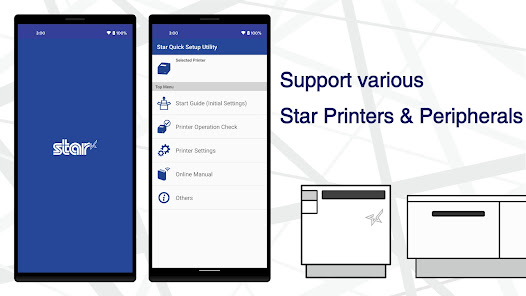
Star Quick Setup Utility enables you to quickly set up Star POS printers and these peripheral devices provided by Star Micronics.
Moreover, it is helpful to check printers and peripheral devices' operation or to change various parameters.
There are links to online manuals, so it also helps to trouble.
[Supported Printers and Peripheral devices]
- mC-Label3
- mC-Label2
- mC-Print3
- mC-Print2
- mPOP
- TSP100IV
- TSP100III
- Wireless LAN Unit
[Features]
** Initial Settings **
- Search Printer
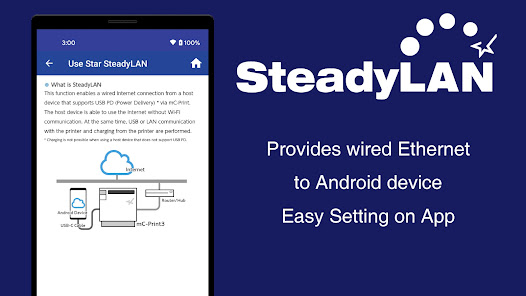
- Use Star SteadyLAN
- Use Star Wireless LAN Unit
- Use Star Micronics Cloud Services
- Check Available Functions
** Printer Operation Check **
- Printer Test (Print sample receipt / Print photo)
- Printer Status
- Printer Self Printing
- Print Job
- Cash Drawer / Buzzer Test
- Barcode Reader / HID Device Test
- Customer Display Test
- Melody Speaker Test
** Printer Settings **
- Memory Switch Settings / Advanced Settings
- Star Configuration Export / Import
- Logo Settings
- Interface Settings (Bluetooth / Network / USB)
- Cloud Settings (Star CloudPRNT / Star Micronics Cloud Service)
- Peripheral Settings (Wireless LAN Unit / Barcode Reader)
- Label Settings (One Touch Label / Print Media / Parts Cleaning / Parts Replacing)
- Firmware Update
** Online Manual **
Open the online manual
Moreover, it is helpful to check printers and peripheral devices' operation or to change various parameters.
There are links to online manuals, so it also helps to trouble.
[Supported Printers and Peripheral devices]
- mC-Label3
- mC-Label2
- mC-Print3
- mC-Print2
- mPOP
- TSP100IV
- TSP100III
- Wireless LAN Unit
[Features]
** Initial Settings **
- Search Printer
- Use Star SteadyLAN
- Use Star Wireless LAN Unit
- Use Star Micronics Cloud Services
- Check Available Functions
** Printer Operation Check **
- Printer Test (Print sample receipt / Print photo)
- Printer Status
- Printer Self Printing
- Print Job
- Cash Drawer / Buzzer Test
- Barcode Reader / HID Device Test
- Customer Display Test
- Melody Speaker Test
** Printer Settings **
- Memory Switch Settings / Advanced Settings
- Star Configuration Export / Import
- Logo Settings
- Interface Settings (Bluetooth / Network / USB)
- Cloud Settings (Star CloudPRNT / Star Micronics Cloud Service)
- Peripheral Settings (Wireless LAN Unit / Barcode Reader)
- Label Settings (One Touch Label / Print Media / Parts Cleaning / Parts Replacing)
- Firmware Update
** Online Manual **
Open the online manual
Updated on
Safety starts with understanding how developers collect and share your data. Data privacy and security practices may vary based on your use, region, and age. The developer provided this information and may update it over time.

No data shared with third parties
Learn more about how developers declare sharing

This app may collect these data types
App activity and App info and performance

Data is encrypted in transit

Data can’t be deleted
What’s new
Improved the UI of the "Firmware Update" feature.
App support
phone
Phone number
+81542637111
About the developer
STAR MICRONICS CO., LTD.
sp_gmc@star-m.jp
20-10, NAKAYOSHIDA, SURUGA-KU
SHIZUOKA, 静岡県 422-8001
Japan
+81 54-263-1111


