
Multi Counter
Contains adsIn-app purchases

4.6star
1.6K reviewsinfo
100K+
Downloads

PEGI 3
info


About this app
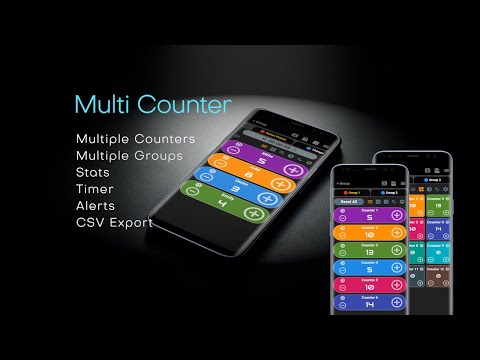
Multi Counter makes it easy to track inventory, scores, habits, or anything you need to count. Create counters, organize them into groups, and see instant group stats. Export your data anytime, and use the built-in scoreboard with timer to keep track of games or events. Organize smarter, tally faster, and never lose track again.
Multi Counter is a clean and easy-to-use app with multiple counters for all counting purposes. You can create groups to organize your counters in categories. Set counters with your preferred settings such as name, reset value, value, increment, decrement, color, periodic sound alert, show alert box, etc.
◾ Click and count
◾ Set individual counter preferences
◾ Change counter font
◾ Manually change counter values
◾ Export data as CSV
◾ View last change time
◾ Different view modes: list, single, stats, and grid
◾ Built-in scoreboard with timer
◾ Built-in calculator
◾ Volume buttons support
◾ You can enable count sound and vibration if you want
◾ Rename and reorder counters
◾ Rename and reorder groups
◾ Simple stats view with group total, pie chart, and bar chart
◾ You can set periodic sound notifications and message box alerts for each counter
◾ Many color options to choose from
◾ Set reset value
◾ You can reset all counters at once
◾ Dark and light backgrounds
◾ Left hand mode
Multi Counter is a clean and easy-to-use app with multiple counters for all counting purposes. You can create groups to organize your counters in categories. Set counters with your preferred settings such as name, reset value, value, increment, decrement, color, periodic sound alert, show alert box, etc.
◾ Click and count
◾ Set individual counter preferences
◾ Change counter font
◾ Manually change counter values
◾ Export data as CSV
◾ View last change time
◾ Different view modes: list, single, stats, and grid
◾ Built-in scoreboard with timer
◾ Built-in calculator
◾ Volume buttons support
◾ You can enable count sound and vibration if you want
◾ Rename and reorder counters
◾ Rename and reorder groups
◾ Simple stats view with group total, pie chart, and bar chart
◾ You can set periodic sound notifications and message box alerts for each counter
◾ Many color options to choose from
◾ Set reset value
◾ You can reset all counters at once
◾ Dark and light backgrounds
◾ Left hand mode
Updated on
Safety starts with understanding how developers collect and share your data. Data privacy and security practices may vary based on your use, region, and age. The developer provided this information and may update it over time.

This app may share these data types with third parties
Location, App activity and 2 others

No data collected
Learn more about how developers declare collection

Data is encrypted in transit

Data can’t be deleted
Ratings and reviews
4.6
1.54K reviews

Aaron
- Flag inappropriate
November 12, 2025
Great app, lots of different useful options. my only complaint is that the home button at the bottom of the screen is hidden. This means you have to swipe up at the bottom each time you want to close the app or switch to another, which can be annoying if you are switching back and forth between it through the day. I imagine it has been set up this way so that you are more likely to accidentally click the advertiser, which is also at the bottom. Hoped the paid version would change this, but no.
1 person found this review helpful
Umit YILMAZ
November 17, 2025
Thank you for your feedback. The app now works in fullscreen mode because people requested more space to see more counters at once. I will try to make it optional. Thanks again.

Tinizsi Gadegbeku
- Flag inappropriate
July 21, 2025
Excellent app! It's straight forward and to the point, without being bloated with unnecessary features. It functions smoothly and its usability is very intuitive. It's priced well, so I purchased the pro version without hesitation. *In a future update, please consider making the counter entries in the Settings tab draggable, the same way the groups are in the Reorder Groups section. Clicking up and down arrows each time becomes tedious when there are a lot of entries.
8 people found this review helpful
Umit YILMAZ
July 24, 2025
Thank you very much for your 5-star review, I will try to add drag future in near future. Thanks for the feedback.

SeattleDan R
- Flag inappropriate
October 16, 2025
Simple, yet flexible. Suits my needs fine. Free with non-intrusive ads or pay a reasonable amount to go ad-free. If it's hard to figure out how to set up at first, follow the tutorial. It may not be intuitive at first run, but it's easy once you do it once.
3 people found this review helpful
What’s new
Now you can export counter history and performance improvements.
App support
About the developer
Ümit YILMAZ
umityilmazdev@gmail.com
Vişnelik Mah. Atatürk Bul. No:205 D:8
26020 Odunpazarı/Eskişehir
Türkiye
undefined


