Gesture Control - Pro Key
4.6star
295 reviews
10K+
Downloads

Everyone
info
About this app
Get the maximum out of your android device!
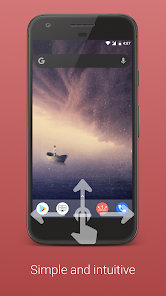
There was never before, a more natural way, to control your smartphone.
This application provides additional features for the free version of Gesture Control. This is not a stand-alone app but an extension. The free version must be installed additionally.
Note that not all features are supported on every device and Android version. After installation, please check if all functions that are important to you are working properly. If it doesn't, uninstall the app within Google Play's return period and get a refund.
The following features are provided by the pro version:
▶ Adjust the horizontal orientation of the indicator
▶ Adjust the width of the indicator to fit your needs
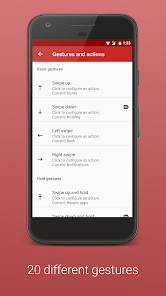
The following gestures are provided by the pro version
▶ Double click on the indicator
▶ Long click on the indicator
▶ Click on indicator and hold
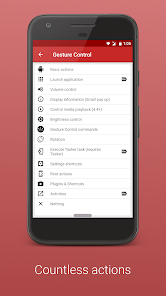
The following actions are provided by the pro version:
▶ Launch apps
▶ Volume actions (show volume control, activate silent mode, increase/reduce media volume, mute alarm, maximize alarm volume, mute and maximize ringing tone)
▶ Show information (Time, date, battery, used and available memory )
▶ Media control (pause, play/pause, next track, Previous track, stop)
▶ Brightness control (max, min, auto/max, auto/min, reduce und increase)
Media control requires at least Android 4.4 (Kitkat) and a supported music player (e.g. Phonograph, Eleven).
Thank you for supporting my work. If you have any questions, contact me (info@conena.com).
There was never before, a more natural way, to control your smartphone.
This application provides additional features for the free version of Gesture Control. This is not a stand-alone app but an extension. The free version must be installed additionally.
Note that not all features are supported on every device and Android version. After installation, please check if all functions that are important to you are working properly. If it doesn't, uninstall the app within Google Play's return period and get a refund.
The following features are provided by the pro version:
▶ Adjust the horizontal orientation of the indicator
▶ Adjust the width of the indicator to fit your needs
The following gestures are provided by the pro version
▶ Double click on the indicator
▶ Long click on the indicator
▶ Click on indicator and hold
The following actions are provided by the pro version:
▶ Launch apps
▶ Volume actions (show volume control, activate silent mode, increase/reduce media volume, mute alarm, maximize alarm volume, mute and maximize ringing tone)
▶ Show information (Time, date, battery, used and available memory )
▶ Media control (pause, play/pause, next track, Previous track, stop)
▶ Brightness control (max, min, auto/max, auto/min, reduce und increase)
Media control requires at least Android 4.4 (Kitkat) and a supported music player (e.g. Phonograph, Eleven).
Thank you for supporting my work. If you have any questions, contact me (info@conena.com).
Updated on
Safety starts with understanding how developers collect and share your data. Data privacy and security practices may vary based on your use, region, and age. The developer provided this information and may update it over time.

No data shared with third parties
Learn more about how developers declare sharing

No data collected
Learn more about how developers declare collection
Ratings and reviews
4.6
279 reviews

Brian Mc
- Flag inappropriate
- Show review history
November 9, 2021
Great app, but I got it to try to have some way to do a back gesture from the bottom of the screen instead of the side {because of the idiotic decision of OnePlus to get rid of the back gesture at the bottom of the screen), but could never figure out how to do this without invoking Google assistant instead. If this is possible, please let me know how and I will repurchase the pro version.
5 people found this review helpful
Conena
November 9, 2021
Thanks for the feedback. The app can do that. You just have to turn off the gesture for Google Assistant in the system. See here:
https://nerdschalk.com/how-to-disable-google-assistant-swipe-gesture-on-android-12/

A Google user
- Flag inappropriate
- Show review history
September 13, 2018
I bought this key to support the developer. Sadly when it's killed by the system (orero) the gestures app stays in a loop to search for it and one cannot use pro futures, so it always need to stay app and out of battery management software. ..boomer. As for the gestures it self. Well there is a setting in settings that is permited only with the pro key. Boommer, it does not work, it asks for 1.0.5 version, at least. There is no version 1.0.5
1 person found this review helpful
Conena
September 16, 2018
The Pro version is "awakened" for a maximum of 10 seconds for each check. The battery consumption is as high as that of two gestures --> not noticeable.
These "1.0.5 settings" are for error handling only. Version 1.0.5 is still under test and will soon be available to all users.
A Google user
- Flag inappropriate
March 12, 2019
I have purchased and and tested 3 other major gestures type apps on my Pixel 2 for the last week and this one is by far the very best for my setup. My Pixel 2 may have been the problem for the other apps. This app is about 95% perfect for my use. This the first to be able to fully ignore taps while the keyboard is up. I'm running it in combination with "egde gestures" for the sides. Absolute perfect combo. Highly customizable, making the setup a bit long but now its just perfect. Thanks guys.
37 people found this review helpful
What’s new
- Material 3 UI
- Optimization for Android 15
- Icon hidden
- Optimization for Android 15
- Icon hidden
App support
About the developer
Fabian Andera
info@conena.com
Wiesenweg 3
96479 Weitramsdorf
Germany


