
Permission Manager X
4.5star
125 reviews
1K+
Downloads

Everyone
info


About this app
▶ Features:
Using eXtended Permission Manager, for each installed app, on single screen, you can:
● View, grant or revoke manifest permissions
● View AppOps permissions and choose one of multiple modes
● Set your desired reference value for every changeable permission
Manifest permissions are those normally called permissions e.g. Storage, Camera etc. AppOps (app operations) is a robust framework Android uses at back end for access control. They provide a fine-grained control over many of the manifest permissions. Plus it provides additional controls like background execution, vibration, clipboard access etc.
With every Android release manifest permissions are becoming more dependent on AppOps. So it's fun to control both simultaneously and see how they relate to each other.
When you reinstall an app, or change your device, or upgrade your ROM, it's a time-taking process to review all installed apps for granted permissions and revoke the unnecessary ones (after all privacy matters). PMX provides you the solution. Set reference states of permissions, which can be quickly backed up and restored, and colored bars at left make it quite easy to review packages and permissions at a glance.
▶ Need help?
We are here to explain.
Guide / FAQs: https://mirfatif.github.io/PermissionManagerX/help/help
It answers the basic questions including:
● What is PMX?
● Why do I need to use PMX?
● What are manifest permissions and AppOps?
● What are Permission References?
Are you concerned about Performance, Privacy and Control?
You can control, which apps:
- Run in background
- Keep your device awake
- Know about your location
- Can send SMS and make calls
- Read your contacts and logs
- Are aware of your accounts
- Are making sounds and vibrations
- Use camera and mic
- Access your files
- Can read and write to clipboard
- Can install other apps
And many more, depending on your device and Android version.
▶ Paid Features:
● Sort apps and permissions by different parameters
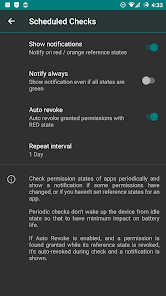
● Scheduled Checks to notify bad reference states
● Auto Revoke granted permissions with RED states
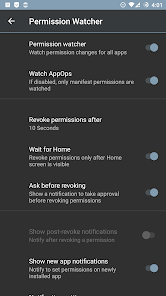
● Permission Watcher to remove unwanted permissions quickly
● Make changes to critical apps and permissions
● Multi-users / work profile support
● Auto create backup file on changes
● Permissions description
● Search suggestions
● Theming options
● Permission summary view
● Batch operations (profiles)
Permission Watcher removes permissions as soon as you stop using an app. For details please see the help / guide linked above.
▶ Required Privileges / Permissions:
● In order to let Permission Manager X serve you fully, either the device must be ROOTED or you need to enable ADB over network. Otherwise, very limited information is available.
● Internet permission is required to use ADB over network. We respect your privacy. No data is collected.
▶ Note:
● You need to uninstall the app installed from other sources before installing this one.
● The app is tested on stock Android 7-16. Some highly customized ROMs may behave unexpectedly.
And yes, the basic functionality of Permission Manager X is completely free and open-source. No ads, no trackers, no analytics. You are encouraged and requested to support the development.
Source code: https://github.com/mirfatif/PermissionManagerX
Translations: https://crowdin.com/project/pmx
Want to get instant updates, test beta builds, and get direct support from the developer?
Join our Telegram support group: https://t.me/PermissionManagerX
Using eXtended Permission Manager, for each installed app, on single screen, you can:
● View, grant or revoke manifest permissions
● View AppOps permissions and choose one of multiple modes
● Set your desired reference value for every changeable permission
Manifest permissions are those normally called permissions e.g. Storage, Camera etc. AppOps (app operations) is a robust framework Android uses at back end for access control. They provide a fine-grained control over many of the manifest permissions. Plus it provides additional controls like background execution, vibration, clipboard access etc.
With every Android release manifest permissions are becoming more dependent on AppOps. So it's fun to control both simultaneously and see how they relate to each other.
When you reinstall an app, or change your device, or upgrade your ROM, it's a time-taking process to review all installed apps for granted permissions and revoke the unnecessary ones (after all privacy matters). PMX provides you the solution. Set reference states of permissions, which can be quickly backed up and restored, and colored bars at left make it quite easy to review packages and permissions at a glance.
▶ Need help?
We are here to explain.
Guide / FAQs: https://mirfatif.github.io/PermissionManagerX/help/help
It answers the basic questions including:
● What is PMX?
● Why do I need to use PMX?
● What are manifest permissions and AppOps?
● What are Permission References?
Are you concerned about Performance, Privacy and Control?
You can control, which apps:
- Run in background
- Keep your device awake
- Know about your location
- Can send SMS and make calls
- Read your contacts and logs
- Are aware of your accounts
- Are making sounds and vibrations
- Use camera and mic
- Access your files
- Can read and write to clipboard
- Can install other apps
And many more, depending on your device and Android version.
▶ Paid Features:
● Sort apps and permissions by different parameters
● Scheduled Checks to notify bad reference states
● Auto Revoke granted permissions with RED states
● Permission Watcher to remove unwanted permissions quickly
● Make changes to critical apps and permissions
● Multi-users / work profile support
● Auto create backup file on changes
● Permissions description
● Search suggestions
● Theming options
● Permission summary view
● Batch operations (profiles)
Permission Watcher removes permissions as soon as you stop using an app. For details please see the help / guide linked above.
▶ Required Privileges / Permissions:
● In order to let Permission Manager X serve you fully, either the device must be ROOTED or you need to enable ADB over network. Otherwise, very limited information is available.
● Internet permission is required to use ADB over network. We respect your privacy. No data is collected.
▶ Note:
● You need to uninstall the app installed from other sources before installing this one.
● The app is tested on stock Android 7-16. Some highly customized ROMs may behave unexpectedly.
And yes, the basic functionality of Permission Manager X is completely free and open-source. No ads, no trackers, no analytics. You are encouraged and requested to support the development.
Source code: https://github.com/mirfatif/PermissionManagerX
Translations: https://crowdin.com/project/pmx
Want to get instant updates, test beta builds, and get direct support from the developer?
Join our Telegram support group: https://t.me/PermissionManagerX
Updated on
Safety starts with understanding how developers collect and share your data. Data privacy and security practices may vary based on your use, region, and age. The developer provided this information and may update it over time.

No data shared with third parties
Learn more about how developers declare sharing

No data collected
Learn more about how developers declare collection
Ratings and reviews
4.5
118 reviews

Ben Cheadle
- Flag inappropriate
August 29, 2025
Allowed me to disable volume control permission on an app without root access. Instructions for using adb over wireless debugging port were clear and easy to follow. Very pleased, thank you!
Irfan Latif
August 29, 2025
Thank you so much for the kind words.

Christina Smith
- Flag inappropriate
- Show review history
September 2, 2025
downloaded exclusively to prevent an app from taking audio focus. I'm trying to prevent the Jillian Michaels app from ducking the audio on other music apps while I'm working out. it doesn't work, I can mute the sound from the JM app but it still lowers the music volume from other apps when there normally would have been audio playing regardless of setting focus to ignore/deny which makes it useless. no option to refund despite uninstalling immediately because it doesn't work as I need it to.
1 person found this review helpful
Irfan Latif
September 3, 2025
Since Android 15 TAKE_AUDIO_FOCUS does not work for outdated apps: https://github.com/mirfatif/PermissionManagerX/issues/54

Just “nowhere” me
- Flag inappropriate
November 4, 2025
best, can see which apps have constant access to Location (coarse) & Location (fine).
What’s new
v1.31:
- Fixed a crash
v1.30:
- Big localization: 25+ languages
v1.28, v1.29:
- Target Android 16
- Fixed crashes
- Updated translations
- Minor fixes and improvements
v1.25:
- Target Android 14
- Make Perm Watcher more aggressive
- Add Turkish translation
- Bug fixes and improvements
v1.22, v1.23:
- Added 'Batch Operations' / 'Permission Profiles'
v1.16:
- Permission View
- Pretty permission names
Detailed changelog: https://github.com/mirfatif/PermissionManagerX/releases
- Fixed a crash
v1.30:
- Big localization: 25+ languages
v1.28, v1.29:
- Target Android 16
- Fixed crashes
- Updated translations
- Minor fixes and improvements
v1.25:
- Target Android 14
- Make Perm Watcher more aggressive
- Add Turkish translation
- Bug fixes and improvements
v1.22, v1.23:
- Added 'Batch Operations' / 'Permission Profiles'
v1.16:
- Permission View
- Pretty permission names
Detailed changelog: https://github.com/mirfatif/PermissionManagerX/releases
App support
About the developer
Muhammad Irfan Latif
mirfatif@gmail.com
Chak 394 JB Jaja, Tahsil and District
Toba Tek Singh, 36050
Pakistan


