Word Counter Note CountablePad
Contains adsIn-app purchases
4.2star
1.68K reviews
100K+
Downloads

Everyone
info



About this app
It’s a free Notepad (Notes) app to count words which enumerates as soon as you write.
In addition to "word count", "character count", "sentence count", "paragraph count" and "byte count" are also available.
It’s useful for writing with limitations on number of words or characters, such as reports, essays, columns, speech manuscripts, novels, etc.
☆★ Auto save ★☆
Auto save works when you move to a different screen.
· When keys such as "Home", "Return", "Power" etc. are pressed
· When interrupts such as incoming calls or alarms happen
(*It will be auto saved on a regular basis even during input)
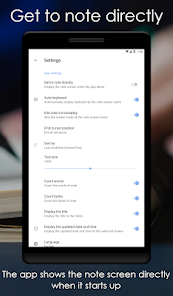
☆★ Take a note directly ★☆
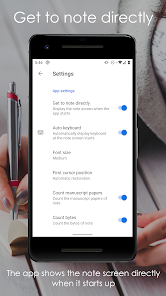
By setting the "Get to note directly" on the setting to ON, the app shows the note screen directly when it starts up.
(* When it is set to "OFF" as default, the notes list screen is displayed.)
☆★ Find your notes ★☆
Please enter keywords in the search bar to find notes.
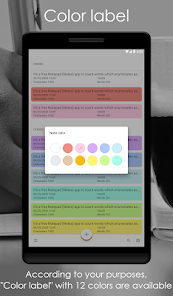
☆★ Color label ★☆
According to your purposes, "Color label" with 12 colors are available.
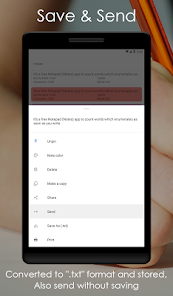
☆★ Share ★☆
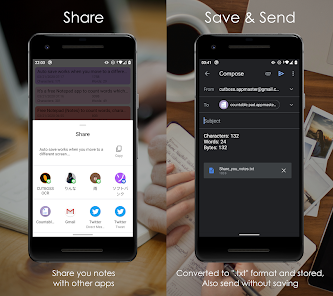
Share you notes with other apps. They can be converted to ".txt" format and stored in your device. You can also send without saving.
☆★ Register notes from other apps ★☆
You can register notes directly from the "Share" menu of another apps.
☆★ Register notes from text file ★☆
You can register notes directly from text files included in mail attachments, file managers, drives, etc. by "Open with" operation.
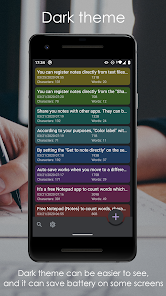
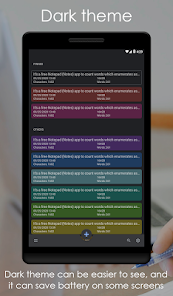
☆★ Dark theme (Night mode) ★☆
Dark theme (Night mode) can be easier to see, and it can save battery on some screens.
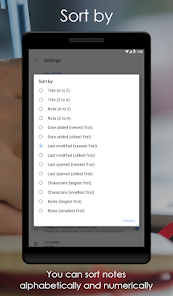
☆★ Sort by ★☆
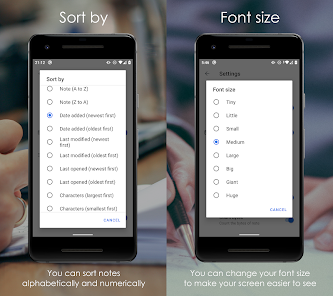
You can sort notes alphabetically and numerically.
☆★ Font size ★☆
You can change your font size to make your screen easier to see.
☆★ Customize ★☆
You can customize the app by changing font size, or displaying update date and time.
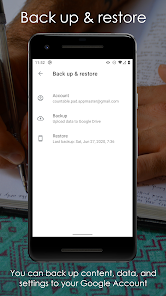
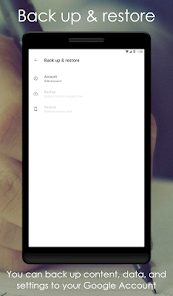
☆★ Back up & restore ★☆
You can back up content, data, and settings to your Google Account. You can restore your backed-up information to the original phone or to some other Android phones.
Here’s the main functions.
- Count "number of words" as soon as you write
Ex. 1) Word Count in Notes → 4
Ex. 2) i'm you. → 2
Ex. 3) do you live in real-time ??? → 5
- Count "total number" of entered characters as soon as you write
Ex. 1) apple → 5
Ex. 2) Word Counter in Notes → 21
Ex. 3) i am a pen. → 11
*) Line breaks aren't included in number of characters
- Count "number of bytes" as soon as you write
- Auto save of your notes
- Undo / Redo input of notes
- Share your notes with other apps
- Convert your notes to ".txt" format
- Delete your notes whenever you like
- The input characters’ limit is due to your android device, there is no limit set by the app
Note:
・Installing is free.
SETTINGS
・Get to note directly: ON / OFF
・Auto keyboard: ON / OFF
・Sort by: Title / Note / Date added / Last modified / Last opened / Characters / Bytes
・Font size: Tiny / Little / Small / Medium / Large / Big / Giant / Huge
・First cursor position: Beginning of sentence / End of sentence / Automatic restoration
・Count words: ON / OFF
・Count sentences: ON / OFF
・Count paragraphs: ON / OFF
・Count bytes: ON / OFF
・Display the title: ON / OFF
・Display the updated date and time: ON / OFF
・Language: English / Japanese / Korean / Chinese (Simplified) / Chinese (Traditional) / Indonesian
・Theme: Light / Dark / System default
・Back up & restore
・Specify characters and lines: ON / OFF
・Count line breaks: ON / OFF
・Count space: ON / OFF
・Character encoding: ISO-2022-JP (JIS) / SHIFT_JIS (SJIS) / EUC-JP / UTF-8 / UTF-16BE / UTF-16LE / UTF-32BE / UTF-32LE / ISO-2022-KR / EUC-KR / ISO-2022-CN / BIG5 / EUC-TW / GB18030
・Get Premium: Activate Ad-free & Premium settings
・Line spacing: 0.0 - 3.0
・Auto capitalize
・Link web URLs: ON / OFF
・Link email address: ON / OFF
・Link phone numbers: ON / OFF
・Align button right: ON / OFF
In addition to "word count", "character count", "sentence count", "paragraph count" and "byte count" are also available.
It’s useful for writing with limitations on number of words or characters, such as reports, essays, columns, speech manuscripts, novels, etc.
☆★ Auto save ★☆
Auto save works when you move to a different screen.
· When keys such as "Home", "Return", "Power" etc. are pressed
· When interrupts such as incoming calls or alarms happen
(*It will be auto saved on a regular basis even during input)
☆★ Take a note directly ★☆
By setting the "Get to note directly" on the setting to ON, the app shows the note screen directly when it starts up.
(* When it is set to "OFF" as default, the notes list screen is displayed.)
☆★ Find your notes ★☆
Please enter keywords in the search bar to find notes.
☆★ Color label ★☆
According to your purposes, "Color label" with 12 colors are available.
☆★ Share ★☆
Share you notes with other apps. They can be converted to ".txt" format and stored in your device. You can also send without saving.
☆★ Register notes from other apps ★☆
You can register notes directly from the "Share" menu of another apps.
☆★ Register notes from text file ★☆
You can register notes directly from text files included in mail attachments, file managers, drives, etc. by "Open with" operation.
☆★ Dark theme (Night mode) ★☆
Dark theme (Night mode) can be easier to see, and it can save battery on some screens.
☆★ Sort by ★☆
You can sort notes alphabetically and numerically.
☆★ Font size ★☆
You can change your font size to make your screen easier to see.
☆★ Customize ★☆
You can customize the app by changing font size, or displaying update date and time.
☆★ Back up & restore ★☆
You can back up content, data, and settings to your Google Account. You can restore your backed-up information to the original phone or to some other Android phones.
Here’s the main functions.
- Count "number of words" as soon as you write
Ex. 1) Word Count in Notes → 4
Ex. 2) i'm you. → 2
Ex. 3) do you live in real-time ??? → 5
- Count "total number" of entered characters as soon as you write
Ex. 1) apple → 5
Ex. 2) Word Counter in Notes → 21
Ex. 3) i am a pen. → 11
*) Line breaks aren't included in number of characters
- Count "number of bytes" as soon as you write
- Auto save of your notes
- Undo / Redo input of notes
- Share your notes with other apps
- Convert your notes to ".txt" format
- Delete your notes whenever you like
- The input characters’ limit is due to your android device, there is no limit set by the app
Note:
・Installing is free.
SETTINGS
・Get to note directly: ON / OFF
・Auto keyboard: ON / OFF
・Sort by: Title / Note / Date added / Last modified / Last opened / Characters / Bytes
・Font size: Tiny / Little / Small / Medium / Large / Big / Giant / Huge
・First cursor position: Beginning of sentence / End of sentence / Automatic restoration
・Count words: ON / OFF
・Count sentences: ON / OFF
・Count paragraphs: ON / OFF
・Count bytes: ON / OFF
・Display the title: ON / OFF
・Display the updated date and time: ON / OFF
・Language: English / Japanese / Korean / Chinese (Simplified) / Chinese (Traditional) / Indonesian
・Theme: Light / Dark / System default
・Back up & restore
・Specify characters and lines: ON / OFF
・Count line breaks: ON / OFF
・Count space: ON / OFF
・Character encoding: ISO-2022-JP (JIS) / SHIFT_JIS (SJIS) / EUC-JP / UTF-8 / UTF-16BE / UTF-16LE / UTF-32BE / UTF-32LE / ISO-2022-KR / EUC-KR / ISO-2022-CN / BIG5 / EUC-TW / GB18030
・Get Premium: Activate Ad-free & Premium settings
・Line spacing: 0.0 - 3.0
・Auto capitalize
・Link web URLs: ON / OFF
・Link email address: ON / OFF
・Link phone numbers: ON / OFF
・Align button right: ON / OFF
Updated on
Safety starts with understanding how developers collect and share your data. Data privacy and security practices may vary based on your use, region, and age. The developer provided this information and may update it over time.

No data shared with third parties
Learn more about how developers declare sharing

No data collected
Learn more about how developers declare collection

Data is encrypted in transit

Data can’t be deleted
Ratings and reviews
4.2
1.56K reviews

Sane One
- Flag inappropriate
- Show review history
September 7, 2025
Great little app that I've been using for a few years now. The only thing that I would change is to be able to keep the keyboard hidden instead of constantly needing to hide it every time I move through the paragraph. It's still worth 5 stars, though. UPDATE: Dropping my rating. The keyboard popping up EVERY TIME you move through the paragraph, and even worse, it automatically scrolling to the bottom by itself, forcing you to search to find where you were after you type something is too annoying
1 person found this review helpful

Jake Wheeler
- Flag inappropriate
- Show review history
December 24, 2021
This app was exactly what I was looking for in an android note taking app. It isn't heavy.it just has what I need. An always on word count and a simple, get out of the way writing experience. Not as slick as the Pages app in IOS, but easy to type on and edit and the always visible word count really encourage me to write and journal on it every day. I looked at several apps. This is the one for me so long as they don't muck it up with "improvements." Typed 500+ words at a time, no problems.
22 people found this review helpful

GamingWithLisa 1
- Flag inappropriate
- Show review history
March 29, 2025
honestly this is really good for writing if you need the word count, paragraph, and any of those relating to it since usually when I'm writing fanfics I need it to be above 1k words so this is definitely helpful and I love how there are folders to keep things organized. although i know there's a back up&restore but I wish we could make an account to keep all our writing that way we don't end up losing everything. overall I love using the app so far. 4.8 stars, would be 5 stars if that's possible
6 people found this review helpful
What’s new
• Bug fixes and other improvements.
If you have any request, feel free to send feedback! And if you enjoy our app, we would really appreciate it if you would leave us a review.
If you have any request, feel free to send feedback! And if you enjoy our app, we would really appreciate it if you would leave us a review.
App support
About the developer
土屋義規
cutboss.appmaster@gmail.com
城東区中央1丁目1−35
302
大阪市, 大阪府 536-0005
Japan


