Digital Notepad,Notebook Diary
বিজ্ঞাপনযুক্ত
১ হাজাৰ+
ডাউনল’ড

সকলো
info
এই এপ্টোৰ বিষয়ে
Now you don’t need to carry your physical notepad or sticky notes. We make awesome applications Digital Notepad 🗒️ & Digital Notebook 📝. Using our Digital Notebook 📘, you can create your digital notes anywhere and anytime very quickly and easily with the help of Notebook Diary . You can easily save your thoughts and notes in the Personal Notebook 📝 .
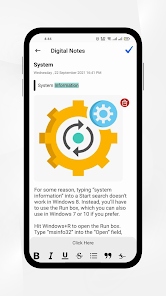
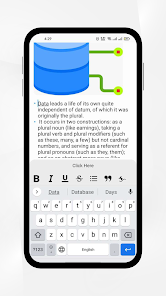
Date 📅 and time ⌚ are automatically selected in Digital Notepad when you write🖋️ your notes. You can set the title for your digital notes and then set the subtitle. After adding this, you can write your notes 🗒️. Multiple text 🖋️ editing options are available in the Easy Notes 📝 app. You can bold your text underline and many other options.
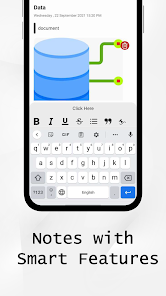
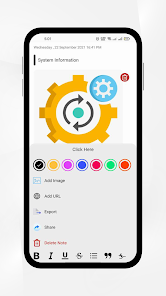
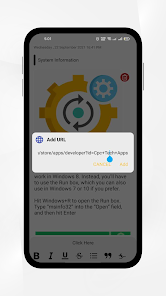
In the Digital Notebook 📘 app, you can add an image in your digital notes and add Url. Colour 🎨 options are also available in Master Notes, and the Smart Notes 🗒️ application best editing option is available in the Easy Notes application.
You can share your digital 📝 notes on all social media platforms with the help of the Notebook Diary 📘 application.
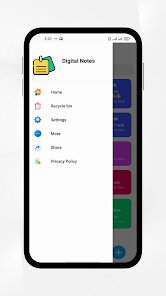
Delete feature is also available with recycle bin. If your want to delete any note from the Easy Notes & My Notes application, you can easily move it to recycle bin, and if you want to restore it, you can also restore your digital notes with the help of recycle bin.
If you have too many notes , then we also provide a search option. Using this option, you can easily search your notes with the help of the title of your notes using my Notebook Diary 📘 application; the best search AI is used for quickly get the result in Notebook Diary 🗒️ Application.
You can also use this application as your Personal Notebook 🗒️ because your all digital notes are safe and completely secure. In the Smart Notes 📝 application best security 🔑 feature is available. You can set your security pin for your app and use fingerprint authentication for Digital notes security, so your all personal notes are safe and secured.
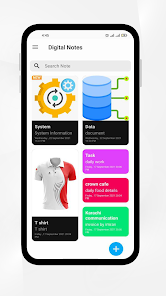
The graphical interface of Diary Journal 📝 and Personal Diary is very attractive and user-friendly. Your all smart notes are showing on the home screen with the best graphical interface design; the Digital notebook 🗒️ is amazing and easy to use.
Applications Hub develops Easy Notes 📝 and My Notebook application
We always love to hear from you regarding the My Notebook application.
If you have any suggestions or queries regarding Digital Notepad 📘 & Notebook Diary, please email us at
--------------------
-------------------
Date 📅 and time ⌚ are automatically selected in Digital Notepad when you write🖋️ your notes. You can set the title for your digital notes and then set the subtitle. After adding this, you can write your notes 🗒️. Multiple text 🖋️ editing options are available in the Easy Notes 📝 app. You can bold your text underline and many other options.
In the Digital Notebook 📘 app, you can add an image in your digital notes and add Url. Colour 🎨 options are also available in Master Notes, and the Smart Notes 🗒️ application best editing option is available in the Easy Notes application.
You can share your digital 📝 notes on all social media platforms with the help of the Notebook Diary 📘 application.
Delete feature is also available with recycle bin. If your want to delete any note from the Easy Notes & My Notes application, you can easily move it to recycle bin, and if you want to restore it, you can also restore your digital notes with the help of recycle bin.
Search🔎
If you have too many notes , then we also provide a search option. Using this option, you can easily search your notes with the help of the title of your notes using my Notebook Diary 📘 application; the best search AI is used for quickly get the result in Notebook Diary 🗒️ Application.
You can also use this application as your Personal Notebook 🗒️ because your all digital notes are safe and completely secure. In the Smart Notes 📝 application best security 🔑 feature is available. You can set your security pin for your app and use fingerprint authentication for Digital notes security, so your all personal notes are safe and secured.
Main Features available in Diary 📘 Journal and My Notebook 🗒️
- Easily write notes
- Rich Text Editor
- Share Digital Notes
- Search Digital notes quickly
- Delete notes
- Add your notes to favourite
- Fingerprint Authentication
The graphical interface of Diary Journal 📝 and Personal Diary is very attractive and user-friendly. Your all smart notes are showing on the home screen with the best graphical interface design; the Digital notebook 🗒️ is amazing and easy to use.
Applications Hub develops Easy Notes 📝 and My Notebook application
We always love to hear from you regarding the My Notebook application.
If you have any suggestions or queries regarding Digital Notepad 📘 & Notebook Diary, please email us at
appshub42@gmail.com
--------------------
Applications Hub
-------------------
আপডে’ট কৰা তাৰিখ
বিকাশকৰ্তাসকলে আপোনাৰ ডেটা কেনেকৈ সংগ্ৰহ আৰু শ্বেয়াৰ কৰে সেয়া বুজি পোৱাৰ জৰিয়তে সুৰক্ষা আৰম্ভ হয়। ডেটাৰ গোপনীয়তা আৰু সুৰক্ষা প্ৰণালী আপোনাৰ ব্যৱহাৰ, অঞ্চল আৰু বয়সৰ ওপৰত ভিত্তি কৰি ভিন্ন হ’ব পাৰে। বিকাশকৰ্তাগৰাকীয়ে এই তথ্যখিনি প্ৰদান কৰিছে আৰু সময়ৰ লগে লগে এয়া আপডে’ট কৰিব পাৰে।

এই এপ্টোৱে এই ধৰণৰ ডেটাৰ প্ৰকাৰ তৃতীয় পক্ষৰ সৈতে শ্বেয়াৰ কৰিব পাৰে
এপৰ তথ্য আৰু কাৰ্যদক্ষতা আৰু ডিভাইচ অথবা অন্য আইডি

কোনো ডেটা সংগ্ৰহ কৰা হোৱা নাই
বিকাশকৰ্তাই ডেটা সংগ্ৰহ কৰাৰ বিষয়ে কেনেকৈ ঘোষণা কৰে সেই বিষয়ে অধিক জানক

ডেটা ট্ৰেনজিটত এনক্ৰিপ্ট কৰা হয়

ডেটা মচিব নোৱাৰি
নতুন কি আছে
Fixed Small Crashes
Add New Features
Improved Graphical Interface
Add New Features
Improved Graphical Interface
এপৰ সমৰ্থন
বিকাশকৰ্তাৰ বিষয়ে
Zubair Ahmed
appshub42@gmail.com
House No # 398-C ,Street # 27
Sector G-6/1-2 Islamabad, 44000
Pakistan


