
PhotoMarker-Text,Image,Exif or
Sadržava oglase
1 hilj.+
Preuzimanja

Svako
info



O aplikaciji
Try it for Free!
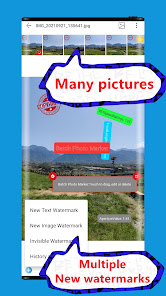
Add the same or different watermarks (visible and invisible watermark) to batch photos. Invisible watermark, visually visible watermark: text, picture, sticker, EXIF...; invisible watermark, visually invisible watermark.
Purpose: Use visible and invisible watermarks to protect the copyright of works; mark the shooting address, time of taking pictures...etc. for travel photos; share shooting parameters; add text to batches of pictures; add textures to batches of pictures; add digital watermarks to batches of photos; digital signatures for pictures ...
FEATURES:
[Batch processing]
Add the same or different watermarks to thousands of photos at once.
[Create Watermark]
Create a new watermark (text, image, Exif data, hidden watermark); use historical watermark to create.
[Edit watermark]: preview, move, delete, transparency, angle, position, mode, content, font, bold, italic, size, color, background color, watermark width, watermark and background margin, single line and multiple Line and so on
[Exif watermark]
Shooting time, shooting location, exposure time, focal length... and other shooting parameters; automatic latitude and longitude to address.
[Invisible Watermark]
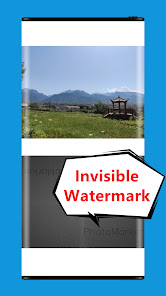
Add visually invisible watermarks through mathematical transformation of pictures, also called: blind watermarks, dark watermarks, digital watermarks...
[Batch selection of photos]
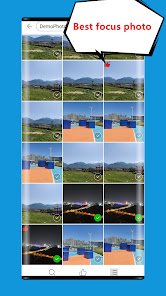
Compare photos and select the focused photos, image search function, image cropping according to proportion...
[New watermark image]
Save the original image, or compress it, support custom compression, support the retention of EXIF, support the inverse geocoding function...
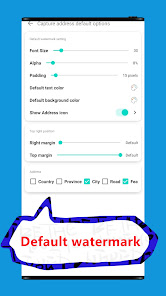
[Default watermark]
Customize the watermark added to the picture by default, you can choose to add or not add the default text watermark, shooting address, shooting time; there are various settings for the default watermark.
------------------------------------------------
Tips:
#Batch photos add watermark
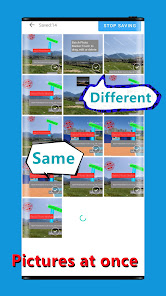
You can set a unique watermark for each photo. During batch processing, the edited watermark will not be overwritten; for photos that have not been edited, you can use the currently previewed photo watermark and add exactly the same watermark to each photo. , Including position, color, size, transparency... or use the default watermark; Exif watermark processing, when batch photo processing, add the same Exif item to each photo as the preview photo, but each photo will be used Own exif value.
#Invisible watermark
When compressing, if the quality of the photo is reduced, the visibility of the decoded hidden watermark will be reduced.
#Tile mode watermark
The watermark in tiled mode cannot be selected by touching, but can be edited when viewing through all watermark layers, and there are hints in the application.
#Batch processing of photos of different sizes
When images of different sizes are processed together in batches, the watermark position may shift.
#MIUI Special Tips
On Android Q and above, MIUI may fail to obtain the new permission ACCESS_MEDIA_LOCATION to a certain extent, which may cause the function of the image Exif longitude and latitude conversion address to fail.
------------------------------------------------
Note: The upper limit of application watermarking is 10,000 pictures at a time. The actual number of pictures that can be processed at one time is also related to the size of the phone's memory.
Feedback or suggestions: zhfaddr@outlook.com
Add the same or different watermarks (visible and invisible watermark) to batch photos. Invisible watermark, visually visible watermark: text, picture, sticker, EXIF...; invisible watermark, visually invisible watermark.
Purpose: Use visible and invisible watermarks to protect the copyright of works; mark the shooting address, time of taking pictures...etc. for travel photos; share shooting parameters; add text to batches of pictures; add textures to batches of pictures; add digital watermarks to batches of photos; digital signatures for pictures ...
FEATURES:
[Batch processing]
Add the same or different watermarks to thousands of photos at once.
[Create Watermark]
Create a new watermark (text, image, Exif data, hidden watermark); use historical watermark to create.
[Edit watermark]: preview, move, delete, transparency, angle, position, mode, content, font, bold, italic, size, color, background color, watermark width, watermark and background margin, single line and multiple Line and so on
[Exif watermark]
Shooting time, shooting location, exposure time, focal length... and other shooting parameters; automatic latitude and longitude to address.
[Invisible Watermark]
Add visually invisible watermarks through mathematical transformation of pictures, also called: blind watermarks, dark watermarks, digital watermarks...
[Batch selection of photos]
Compare photos and select the focused photos, image search function, image cropping according to proportion...
[New watermark image]
Save the original image, or compress it, support custom compression, support the retention of EXIF, support the inverse geocoding function...
[Default watermark]
Customize the watermark added to the picture by default, you can choose to add or not add the default text watermark, shooting address, shooting time; there are various settings for the default watermark.
------------------------------------------------
Tips:
#Batch photos add watermark
You can set a unique watermark for each photo. During batch processing, the edited watermark will not be overwritten; for photos that have not been edited, you can use the currently previewed photo watermark and add exactly the same watermark to each photo. , Including position, color, size, transparency... or use the default watermark; Exif watermark processing, when batch photo processing, add the same Exif item to each photo as the preview photo, but each photo will be used Own exif value.
#Invisible watermark
When compressing, if the quality of the photo is reduced, the visibility of the decoded hidden watermark will be reduced.
#Tile mode watermark
The watermark in tiled mode cannot be selected by touching, but can be edited when viewing through all watermark layers, and there are hints in the application.
#Batch processing of photos of different sizes
When images of different sizes are processed together in batches, the watermark position may shift.
#MIUI Special Tips
On Android Q and above, MIUI may fail to obtain the new permission ACCESS_MEDIA_LOCATION to a certain extent, which may cause the function of the image Exif longitude and latitude conversion address to fail.
------------------------------------------------
Note: The upper limit of application watermarking is 10,000 pictures at a time. The actual number of pictures that can be processed at one time is also related to the size of the phone's memory.
Feedback or suggestions: zhfaddr@outlook.com
Ažurirano dana
Sigurnost počinje razumijevanjem na koji način programeri prikupljaju i dijele vaše podatke. Privatnost podataka i sigurnosne prakse se mogu razlikovati ovisno o korištenju, regiji i dobi. Programer je naveo ove informacije i može ih s vremenom ažurirati.

Podaci se ne dijele s trećim stranama
Saznajte više o načinu na koji programeri pružaju izjavu o dijeljenju

Podaci se ne prikupljaju
Saznajte više o načinu na koji programeri pružaju izjavu o prikupljanju
Što je novo
1 Adapted to the international version.
2 Improved the watermark template feature, allowing previously used watermark combinations to be directly applied in the future.
3 Optimized the watermark application prompt when saving.
4 Enhanced the speed of batch saving.
5 Added a local font import feature, allowing users to change fonts when adding text to images.
6 Optimized the decoding speed of invisible watermarks.
2 Improved the watermark template feature, allowing previously used watermark combinations to be directly applied in the future.
3 Optimized the watermark application prompt when saving.
4 Enhanced the speed of batch saving.
5 Added a local font import feature, allowing users to change fonts when adding text to images.
6 Optimized the decoding speed of invisible watermarks.
Podrška za aplikaciju
phone
Telefonski broj
+8613379273782
Informacije o programeru
张峰
zhfaddr@outlook.com
引镇街道
龙渠村李家庄14号
长安区, 西安市, 陕西省
China
710103


