
Flickwrite


Svako
info
10+
Preuzimanja

Svako
Saznajte više


O aplikaciji
Flick is a writing assistant that fixes your text directly in any app.
How it works:
Select text in any app, tap the floating Flick bubble, and tell it what you want. The result replaces your text in place, so there is no copy and paste, no switching apps, and no menus.
Key features:
* One bubble, every app: Flick floats over messages, email, notes, browsers, and social apps. Wherever you can select or type text, Flick is one tap away.
* Say it or type it: Type a quick instruction, or hold the bubble and speak. Flick turns your voice into a command.
* Knows reply from rewrite: Flick drafts a reply when you are reading something, and polishes what you wrote when you are writing something. It reads the moment, so you do not have to pick a mode.
What people use it for:
* Fix grammar, spelling, and tone in one tap.
* Make a message shorter, warmer, or more professional.
* Reply to a chat or email without leaving it.
* Translate or rephrase on the fly.
* Turn a rough note into a clear, structured message.
Customization and privacy:
* Save your own commands for the fixes you do most.
* Matches each app automatically, so a work email and a group chat come out sounding right.
* Fast, private, and out of your way.
Pricing:
Flick is free to use every day. Upgrade to Pro for higher quality results and unlimited use.
Accessibility Service: what Flick uses it for
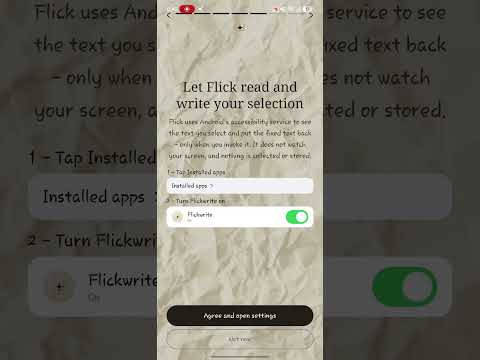
Flick uses Android's Accessibility Service to deliver its core feature: reading the text you have selected in the app you are using, and writing the improved text back in place. Android provides no other way for an app to read a selection inside another app and replace it, so this permission is required for Flick to work at all.
How and when it is used
- Only when you act. Flick reads text when you tap the floating bubble, or when you send a command from the bubble. It does nothing while you are not using it.
- Only the selected text. Flick reads the text you have selected and the focus state of the field you are in, so it knows whether to reply or rewrite. It does not log your keystrokes, record your screen, or capture audio calls.
- The selected text is sent over an encrypted connection to the Flick service so the AI can process it, then the result is written back into the same field.
- Flick never changes your device settings, never blocks you from uninstalling it, and never hides or alters other apps' interfaces.
You grant this permission yourself in Android Settings, and you can turn it off at any time in Settings, Accessibility, Flick. Full details are in our privacy policy at https://flickwrite.com/privacy
Stop switching apps to fix your words. Get Flick and write better everywhere.Flick is a writing assistant that works directly in any app. You can select text, tap the floating Flick bubble, and tell it what you want. It then replaces your text in place, eliminating the need for copy and paste or switching between apps.
Key features:
* **Universal access:** Flick floats over any app you are using, including messages, email, notes, browsers, and social apps.
* **Flexible input:** You can type a quick instruction or hold the bubble to speak your command.
* **Contextual understanding:** Flick automatically detects whether you are reading or writing and drafts a reply or polishes your text accordingly.
* **Common uses:** People use Flick to fix grammar, spelling, and tone, make messages shorter or warmer, reply to chats or emails, translate or rephrase text, and turn rough notes into clear messages.
* **Customizable and smart:** You can save your own commands and Flick automatically matches the tone to each app. It is also fast, private, and unobtrusive.
Flick offers a free version for daily use, with an option to upgrade to Pro for higher quality results and unlimited use. Stop switching apps to fix your words and get Flick to write better everywhere.
How it works:
Select text in any app, tap the floating Flick bubble, and tell it what you want. The result replaces your text in place, so there is no copy and paste, no switching apps, and no menus.
Key features:
* One bubble, every app: Flick floats over messages, email, notes, browsers, and social apps. Wherever you can select or type text, Flick is one tap away.
* Say it or type it: Type a quick instruction, or hold the bubble and speak. Flick turns your voice into a command.
* Knows reply from rewrite: Flick drafts a reply when you are reading something, and polishes what you wrote when you are writing something. It reads the moment, so you do not have to pick a mode.
What people use it for:
* Fix grammar, spelling, and tone in one tap.
* Make a message shorter, warmer, or more professional.
* Reply to a chat or email without leaving it.
* Translate or rephrase on the fly.
* Turn a rough note into a clear, structured message.
Customization and privacy:
* Save your own commands for the fixes you do most.
* Matches each app automatically, so a work email and a group chat come out sounding right.
* Fast, private, and out of your way.
Pricing:
Flick is free to use every day. Upgrade to Pro for higher quality results and unlimited use.
Accessibility Service: what Flick uses it for
Flick uses Android's Accessibility Service to deliver its core feature: reading the text you have selected in the app you are using, and writing the improved text back in place. Android provides no other way for an app to read a selection inside another app and replace it, so this permission is required for Flick to work at all.
How and when it is used
- Only when you act. Flick reads text when you tap the floating bubble, or when you send a command from the bubble. It does nothing while you are not using it.
- Only the selected text. Flick reads the text you have selected and the focus state of the field you are in, so it knows whether to reply or rewrite. It does not log your keystrokes, record your screen, or capture audio calls.
- The selected text is sent over an encrypted connection to the Flick service so the AI can process it, then the result is written back into the same field.
- Flick never changes your device settings, never blocks you from uninstalling it, and never hides or alters other apps' interfaces.
You grant this permission yourself in Android Settings, and you can turn it off at any time in Settings, Accessibility, Flick. Full details are in our privacy policy at https://flickwrite.com/privacy
Stop switching apps to fix your words. Get Flick and write better everywhere.Flick is a writing assistant that works directly in any app. You can select text, tap the floating Flick bubble, and tell it what you want. It then replaces your text in place, eliminating the need for copy and paste or switching between apps.
Key features:
* **Universal access:** Flick floats over any app you are using, including messages, email, notes, browsers, and social apps.
* **Flexible input:** You can type a quick instruction or hold the bubble to speak your command.
* **Contextual understanding:** Flick automatically detects whether you are reading or writing and drafts a reply or polishes your text accordingly.
* **Common uses:** People use Flick to fix grammar, spelling, and tone, make messages shorter or warmer, reply to chats or emails, translate or rephrase text, and turn rough notes into clear messages.
* **Customizable and smart:** You can save your own commands and Flick automatically matches the tone to each app. It is also fast, private, and unobtrusive.
Flick offers a free version for daily use, with an option to upgrade to Pro for higher quality results and unlimited use. Stop switching apps to fix your words and get Flick to write better everywhere.
Rewrite, fix and reply to text in any app. Just tap the floating bubble.
Ažurirano dana
Istaknute priče

Sigurnost počinje razumijevanjem na koji način programeri prikupljaju i dijele vaše podatke. Privatnost podataka i sigurnosne prakse se mogu razlikovati ovisno o korištenju, regiji i dobi. Programer je naveo ove informacije i može ih s vremenom ažurirati.
- Podaci se ne dijele s trećim stranamaSaznajte više o načinu na koji programeri pružaju izjavu o dijeljenju
- Ova aplikacija može prikupljati ove vrste podatakaLične informacije i Aktivnost aplikacija
- Podaci se šifriraju tokom prenosa
- Možete zatražiti da se podaci izbrišu


Svako
Saznajte višePodrška za aplikaciju
Informacije o programeru
IGNITE AI SYSTEM LTD
seif@igniteaisystem.com
124-128 City Road
LONDON
EC1V 2NX
United Kingdom
+44 7414 261879


