
CCTV Cloud
1 hilj.+
Preuzimanja

Svako
info
O aplikaciji
Looking for a hassle-free way to monitor your property remotely? Look no further than CCTV Cloud - the mobile app for VideoSurveillance.Cloud. This app empowers you to receive event alerts, and manage your ip camera devices from your fingertips. Whether you want to keep tabs on your home, office, or other properties, CCTV Cloud makes it effortless and convenient. Download the app today and experience the ease of remote monitoring for yourself!
Here are some of the features of the CCTV Cloud app:
1. Remote Access: With the CCTV Cloud app, you can remotely access your surveillance cameras from anywhere in the world using your mobile device. This allows you to keep an eye on your property even when you're away.
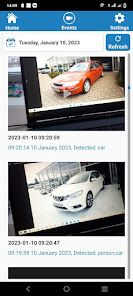
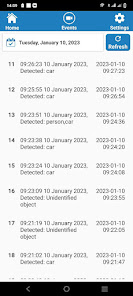
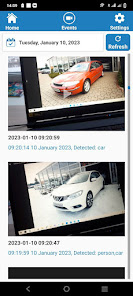
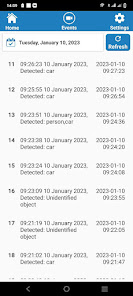
2. Easy Event Viewing: The Events section of the app displays events as text descriptions along with corresponding video clips for easy viewing. This helps you quickly identify which events you need to investigate.
3. Notifications: The app sends you notifications when new events are recorded, so you can stay up-to-date with what's happening on your property.
4. User-Friendly Interface: The CCTV Cloud app has a user-friendly interface that makes it easy to navigate and use. This ensures that even users with little to no technical experience can use the app with ease.
In summary, the CCTV Cloud app is a useful tool for users of the VideoSurveillance.Cloud service. With its remote access, easy event viewing, notifications, and user-friendly interface, it helps users monitor their property and stay informed of any suspicious activities.
Step-by-Step Guide to Using the CCTV Cloud Mobile App for VideoSurveillance.Cloud
1. Download and Install the App: Visit the app store on your Android device and search for "CCTV Cloud". Download and install the app onto your mobile device.
2. Login to Your Account: Open the CCTV Cloud app and login to your VideoSurveillance.Cloud account by entering your email address and password.
3. Access Events Section: Once you've logged in, you will be directed to the Events section where you can view all the events recorded by your surveillance cameras.
4. Watch Recorded Videos: Scroll through the list of events to find the one you want to view. When you find the event, click on it to view the corresponding recorded video.
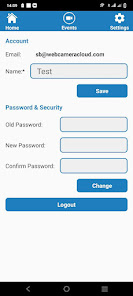
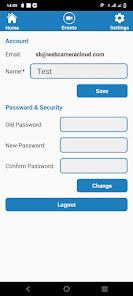
5. Access Settings Section: To access the settings section, click on the gear icon at the top right corner of the app. This section allows you to change your account settings and preferences.
6. Change Settings: In the settings section, you can adjust your notification preferences, update your email and password, and configure other settings related to your account.
That's it! You are now fully equipped to use the CCTV Cloud app for VideoSurveillance.Cloud.
Here are some of the features of the CCTV Cloud app:
1. Remote Access: With the CCTV Cloud app, you can remotely access your surveillance cameras from anywhere in the world using your mobile device. This allows you to keep an eye on your property even when you're away.
2. Easy Event Viewing: The Events section of the app displays events as text descriptions along with corresponding video clips for easy viewing. This helps you quickly identify which events you need to investigate.
3. Notifications: The app sends you notifications when new events are recorded, so you can stay up-to-date with what's happening on your property.
4. User-Friendly Interface: The CCTV Cloud app has a user-friendly interface that makes it easy to navigate and use. This ensures that even users with little to no technical experience can use the app with ease.
In summary, the CCTV Cloud app is a useful tool for users of the VideoSurveillance.Cloud service. With its remote access, easy event viewing, notifications, and user-friendly interface, it helps users monitor their property and stay informed of any suspicious activities.
Step-by-Step Guide to Using the CCTV Cloud Mobile App for VideoSurveillance.Cloud
1. Download and Install the App: Visit the app store on your Android device and search for "CCTV Cloud". Download and install the app onto your mobile device.
2. Login to Your Account: Open the CCTV Cloud app and login to your VideoSurveillance.Cloud account by entering your email address and password.
3. Access Events Section: Once you've logged in, you will be directed to the Events section where you can view all the events recorded by your surveillance cameras.
4. Watch Recorded Videos: Scroll through the list of events to find the one you want to view. When you find the event, click on it to view the corresponding recorded video.
5. Access Settings Section: To access the settings section, click on the gear icon at the top right corner of the app. This section allows you to change your account settings and preferences.
6. Change Settings: In the settings section, you can adjust your notification preferences, update your email and password, and configure other settings related to your account.
That's it! You are now fully equipped to use the CCTV Cloud app for VideoSurveillance.Cloud.
Ažurirano dana
Sigurnost počinje razumijevanjem na koji način programeri prikupljaju i dijele vaše podatke. Privatnost podataka i sigurnosne prakse se mogu razlikovati ovisno o korištenju, regiji i dobi. Programer je naveo ove informacije i može ih s vremenom ažurirati.

Podaci se ne dijele s trećim stranama
Saznajte više o načinu na koji programeri pružaju izjavu o dijeljenju

Ova aplikacija može prikupljati ove vrste podataka
Lične informacije

Podaci se šifriraju tokom prenosa

Možete zatražiti da se podaci izbrišu
Što je novo
API 33 level added
Podrška za aplikaciju
Informacije o programeru
Sergey Korchinskiy
support@smartvision.dev
Kestel Mah. Sahil Cad.,
Demirağ-2 SITESI.BINA NO:169A/10
07450 Alanya/Antalya
Türkiye


