
HOME THEATER CONTROLLER
3,5star
3,19 t anmeldelser
1 mio.+
Downloads

Alle
info
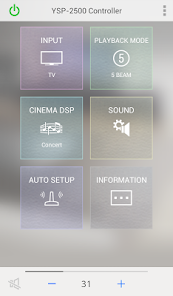

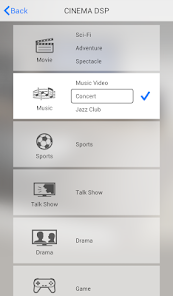
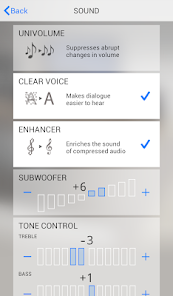

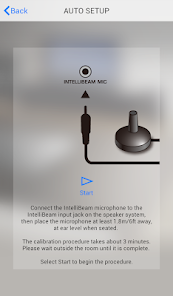
Om denne app
Denne Home Theater CONTROLLER app gør det let at betjene udvalgte Yamaha Home Theater Systems ved hjælp af din Android-enhed.
If the app is crashing, or won't open, respond, or work properly, uninstall and reinstall it.
Then change app settings as described below (open the app > Press INFORMATION).
ATS-1080,YAS-108
1) "YAS−108,ATS−1080 only" "ON"
2) "other model" ”OFF"
3) Press ”forget current Bluetooth Connection”
ATS-1520,ATS-1030,ATS-1050,ATS-1060,ATS-1070,ATS-2070,YAS-152,YAS-103,YAS-203,YAS-105,YAS-106,YAS-107,YAS-207,YSP-1400,YSP-2500,SRT-1000,SRT-700,SBS-100,HTY-250,YRS-1500,YRS-2500
1) "YAS−108,ATS−1080 only" "OFF"
2) "other model" ”ON"
3) Press ”forget current Bluetooth Connection”
Vigtige funktioner:
- Basic -funktion kontrol, såsom volume op / ned , kildevalg og indstilling
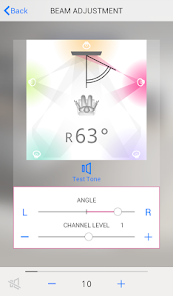
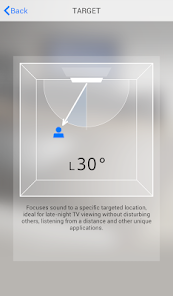
- Automatisk/manuel lydstråle justering (for YSP-2500)
- Præcis lydstråle justering (til YSP -1400 og SRT-1000)
Appen kræver en aktiv trådløs BLUETOOTH forbindelse mellem din Yamaha soundbar og din mobile enhed. Sørg for at oprette en forbindelse først.
[ Understøttede modeller ]
ATS-1520,ATS-1030,ATS-1050,ATS-1060,ATS-1070,ATS-2070,ATS-1080,YAS-152,YAS-103,YAS-203,YAS-105,YAS-106,YAS-107,YAS-207,YAS-108,YSP-1400,YSP-2500,SRT-1000,SRT-700,SBS-100,HTY-250,YRS-1500,YRS-2500
[ AndroidOS Version Krav ]
* Denne applikation understøtter AndroidOS 6.0 eller derover.
[Privacy Policy]
This application will never collect nor externally transfer personal data stored in your smartphone / tablet.
This application performs following functions for purposes described below.
- Making a connection under BLUETOOTH wireless technology enabled environment
The application uses BLUETOOTH function on your smartphone / tablet for the purpose of controlling BLUETOOTH enabled devices
If the app is crashing, or won't open, respond, or work properly, uninstall and reinstall it.
Then change app settings as described below (open the app > Press INFORMATION).
ATS-1080,YAS-108
1) "YAS−108,ATS−1080 only" "ON"
2) "other model" ”OFF"
3) Press ”forget current Bluetooth Connection”
ATS-1520,ATS-1030,ATS-1050,ATS-1060,ATS-1070,ATS-2070,YAS-152,YAS-103,YAS-203,YAS-105,YAS-106,YAS-107,YAS-207,YSP-1400,YSP-2500,SRT-1000,SRT-700,SBS-100,HTY-250,YRS-1500,YRS-2500
1) "YAS−108,ATS−1080 only" "OFF"
2) "other model" ”ON"
3) Press ”forget current Bluetooth Connection”
Vigtige funktioner:
- Basic -funktion kontrol, såsom volume op / ned , kildevalg og indstilling
- Automatisk/manuel lydstråle justering (for YSP-2500)
- Præcis lydstråle justering (til YSP -1400 og SRT-1000)
Appen kræver en aktiv trådløs BLUETOOTH forbindelse mellem din Yamaha soundbar og din mobile enhed. Sørg for at oprette en forbindelse først.
[ Understøttede modeller ]
ATS-1520,ATS-1030,ATS-1050,ATS-1060,ATS-1070,ATS-2070,ATS-1080,YAS-152,YAS-103,YAS-203,YAS-105,YAS-106,YAS-107,YAS-207,YAS-108,YSP-1400,YSP-2500,SRT-1000,SRT-700,SBS-100,HTY-250,YRS-1500,YRS-2500
[ AndroidOS Version Krav ]
* Denne applikation understøtter AndroidOS 6.0 eller derover.
[Privacy Policy]
This application will never collect nor externally transfer personal data stored in your smartphone / tablet.
This application performs following functions for purposes described below.
- Making a connection under BLUETOOTH wireless technology enabled environment
The application uses BLUETOOTH function on your smartphone / tablet for the purpose of controlling BLUETOOTH enabled devices
Opdateret
For at du kan beskytte dine data, er det vigtigt at sætte sig ind i, hvordan udviklere indsamler og deler disse data. Databeskyttelses- og sikkerhedsprocedurer kan variere afhængigt af din brug, din region og din alder. Udvikleren har leveret disse oplysninger og kan løbende opdatere dem.

Der deles ikke data med tredjeparter
Få flere oplysninger om, hvordan udviklere angiver, at de deler data

Der blev ikke indsamlet data
Få flere oplysninger om, hvordan udviklere angiver, at de indsamler data
Bedømmelser og anmeldelser
3,5
3 t anmeldelser
Nyheder
Please download and use MusicCast CONTROLLER (not HT CONTROLLER) for following models.
- YSP-1600, YSP-5600, SRT-1500
Andre forbedringer og fejlrettelser
- YSP-1600, YSP-5600, SRT-1500
Andre forbedringer og fejlrettelser
Support til app
Om udvikleren
YAMAHA CORPORATION
ycmk-mobileappdesk-SMB@music.yamaha.com
10-1, NAKAZAWACHO, CHUO-KU
HAMAMATSU, 静岡県 430-0904
Japan
+81 53-460-3384


