
Sound Bar Controller
4.3star
11.3K reviews
500K+
Downloads

Everyone
info

About this app
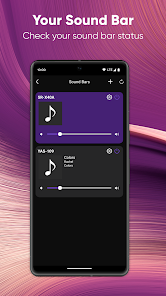
The Sound Bar Controller app provides easy operation for select Yamaha Sound Bars using your Android device.
Key Features:
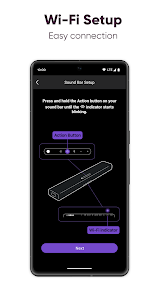
- Initial setup of built-in Alexa voice control settings
- Basic control functions such as volume up/down and input selection
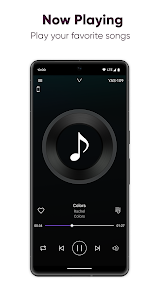
- Play audio files stored on your phone or NAS drive through Wi-Fi
- Volume control for wireless surround speakers and wireless subwoofer (Only SR-X40A, SR-X50A, ATS-X500)
[Supported Models]
YAS-109, YAS-209
ATS-1090, ATS-2090
SR-X40A, SR-X50A, ATS-X500
[AndroidOS Version Requirement]
* This application supports AndroidOS 7.1 or above.
- A wireless Local Area Network (LAN) and a compatible Yamaha Network product(s)* residing within the same LAN.
Key Features:
- Initial setup of built-in Alexa voice control settings
- Basic control functions such as volume up/down and input selection
- Play audio files stored on your phone or NAS drive through Wi-Fi
- Volume control for wireless surround speakers and wireless subwoofer (Only SR-X40A, SR-X50A, ATS-X500)
[Supported Models]
YAS-109, YAS-209
ATS-1090, ATS-2090
SR-X40A, SR-X50A, ATS-X500
[AndroidOS Version Requirement]
* This application supports AndroidOS 7.1 or above.
- A wireless Local Area Network (LAN) and a compatible Yamaha Network product(s)* residing within the same LAN.
Updated on
Safety starts with understanding how developers collect and share your data. Data privacy and security practices may vary based on your use, region, and age. The developer provided this information and may update it over time.

No data shared with third parties
Learn more about how developers declare sharing

This app may collect these data types
App info and performance

Data is encrypted in transit

Data can’t be deleted
Ratings and reviews
4.2
10.8K reviews

Telstar 2112
- Flag inappropriate
June 29, 2025
No longer works. Worked fine for over a year then I stupidly allowed it to take a firmware update and now it is terrible. Cannot connect app using Galaxy S22 ultra. Sees soundbar and i can add password but then never connects. Often says I am on another network even when I only have one and have disabled 5g on eero. I'm. Tried everything, resets, reloading firmware, reloading app. no go. We all expect better from Yamaha!
2 people found this review helpful

Philip McBrain
- Flag inappropriate
September 11, 2021
Ricidulous! I've already added my YAS-209 to my Bluetooth connections. This app keeps asking me to add it. Even though it's added and connected to Bluetooth this app can't find it for some unknown reason. This is such basic programming. How can Yamaha fail at such a basic task. If they provide some guidance perhaps I'll actually be able to fully rate the app. As it stands, I can't even access the rest of the app because it thinks my soundbar isn't connected. There should be a way around this.
20 people found this review helpful

Andrew Cullen
- Flag inappropriate
May 1, 2022
This app is just trash. Everytime I open it it never recognize the sound bar and ask me tonreset upbthe sound bar. Have double checked, have the right internet. Have uninstalled and reinstalled, nothing. Unplug sounds bar. Same issue. Factory reset and nothing. I have looked all over the internet and nothing. I would love to use this app instead of getting up everytime I need to change the sound. I'll have to buy another remote (first one I had broke). Sound bar great, the app is not.
26 people found this review helpful
What’s new
- Bug fixes
App support
About the developer
YAMAHA CORPORATION
ycmk-mobileappdesk-SMB@music.yamaha.com
10-1, NAKAZAWACHO, CHUO-KU
HAMAMATSU, 静岡県 430-0904
Japan
+81 53-460-3384


