
Glooko - Track Diabetes Data
2.9star
2.19K reviews
100K+
Downloads

Everyone
info


About this app
Glooko is a comprehensive diabetes management platform that helps people with diabetes quickly and easily understand and control their blood glucose levels and well-being. People with diabetes looking to take the next step with their diabetes management can track their blood glucose, insulin, weight, exercise, food, and medications in one place to make more informed decisions around their health. Designed to enhance the relationship between people with diabetes and their healthcare providers, the free and secure Glooko Mobile App helps users stay connected and collaborate remotely with their care teams between visits, identify trends, share reports, and keep their diabetes and related health data in a single app.
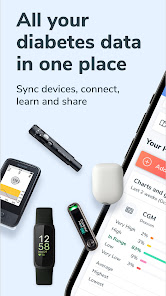
The clinically proven Glooko platform syncs data from more than 200 diabetes and health monitoring devices, including blood glucose meters (BGM), insulin pump, continuous glucose monitors (CGM), smart scales, fitness apps, and activity trackers. Health data can be synced from compatible connected devices and third party diabetes and health monitoring apps, or manually inputted. For a complete list of compatible devices and apps, visit www.glooko.com/compatibility.
POPULAR FEATURES:
• Automatically share health data with care teams through unique ProConnect codes.
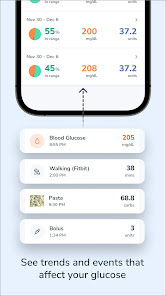
• View glucose trends in multiple ways, using the same easy-to-understand reports and charts as care teams.
• Use a digital logbook to automatically track activities and events in one place.
• Sync data from BGMs, insulin pumps and pens, and CGMs.
• Integrate data from popular activity trackers, including Apple Health, Fitbit, and Strava.
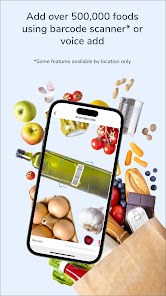
• Add food and nutrition intake using the built-in barcode scanner, search functionality, or voice activated database.
Glooko does not measure, interpret,or make decisions on the data it conveys nor is it intended to provide automated treatment decisions or be used as a substitute for professional judgment. All medical diagnosis and treatment are to be performed under the supervision and oversight of an appropriate healthcare provider. Not all product features are available in all countries.
If you have concerns with your current diabetes diagnosis and treatment, please contact your healthcare provider.
The clinically proven Glooko platform syncs data from more than 200 diabetes and health monitoring devices, including blood glucose meters (BGM), insulin pump, continuous glucose monitors (CGM), smart scales, fitness apps, and activity trackers. Health data can be synced from compatible connected devices and third party diabetes and health monitoring apps, or manually inputted. For a complete list of compatible devices and apps, visit www.glooko.com/compatibility.
POPULAR FEATURES:
• Automatically share health data with care teams through unique ProConnect codes.
• View glucose trends in multiple ways, using the same easy-to-understand reports and charts as care teams.
• Use a digital logbook to automatically track activities and events in one place.
• Sync data from BGMs, insulin pumps and pens, and CGMs.
• Integrate data from popular activity trackers, including Apple Health, Fitbit, and Strava.
• Add food and nutrition intake using the built-in barcode scanner, search functionality, or voice activated database.
Glooko does not measure, interpret,or make decisions on the data it conveys nor is it intended to provide automated treatment decisions or be used as a substitute for professional judgment. All medical diagnosis and treatment are to be performed under the supervision and oversight of an appropriate healthcare provider. Not all product features are available in all countries.
If you have concerns with your current diabetes diagnosis and treatment, please contact your healthcare provider.
Updated on
Safety starts with understanding how developers collect and share your data. Data privacy and security practices may vary based on your use, region, and age. The developer provided this information and may update it over time.

No data shared with third parties
Learn more about how developers declare sharing

This app may collect these data types
Personal info, Health and fitness and 4 others

Data is encrypted in transit

You can request that data be deleted
Ratings and reviews
2.8
2.08K reviews

Kendra Leurquin
- Flag inappropriate
January 12, 2026
I'm really disappointed since it's update, I started my journey 1 year ago with this app, was amazing syncing all my data. able to see all my average tests results etc, but since its update. I have uninstalled, reinstalled the app and my glucose meter numerous times! I can't get anything to sync, the only thing I can get to sync is just my glucose readings. but it's not syncing my average testings for the "week" and someone who needs repetition it's making it difficult to keep up on her stuff!
2 people found this review helpful

Stephen Woodward
- Flag inappropriate
December 4, 2025
new update is atrocious. This update took a clear and easy to use app and added 2 more steps to add food, now I have to designate which meal it is and build a meal instead of adding individual food item, I can see the time of day to tell me that already. I do not eat the same things together so I will have a lot of different meals. I also lost all of of my custom foods I had put in over time.
5 people found this review helpful

Cherie Gullickson
- Flag inappropriate
- Show review history
November 26, 2025
Got Premier Blu because it was financially more affordable...only to find out the app it's linked to just doesn't know how to stay connected. The instructions are missing steps and I've given it every permission under the sun including turning off power save for it to basically not work...guess I'll just go back to my old meter because this thing is as reliable as 2 ply toilet paper.
1 person found this review helpful
What’s new
- Improved Device Management: We have enhanced the user experience for finding, adding and managing connected devices.
- Wider Device Compatibility: This release includes extended support for:
- Neon GK+ BG meter (via BLE)
- GlucoSmart Salsa Connect BG meter (via BLE)
- Wider Device Compatibility: This release includes extended support for:
- Neon GK+ BG meter (via BLE)
- GlucoSmart Salsa Connect BG meter (via BLE)
App support
About the developer
Glooko, Inc.
support@glooko.com
579 University Ave
Palo Alto, CA 94301
United States
+1 408-658-0659


