
Clock Widget
Contains adsIn-app purchases
4.1star
1.41K reviews
100K+
Downloads

Everyone
info




About this app
Clock Widget: Your Perfect Timepiece, Right on Your Home Screen
Searching for the ideal clock widget to personalize your Android home screen? Look no further! Clock Widget offers a beautiful and functional collection of both analog and digital clocks, customizable to perfectly match your style.
A Clock for Every Taste:
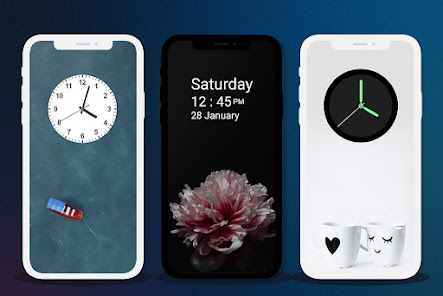
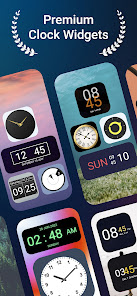
* Classic Analog: Choose from elegant round or square analog clock faces, reminiscent of traditional timepieces. Customize the hands and background to create a timeless look.
* Modern Digital: Prefer a sleek, modern feel? Our digital clock widgets display time and date in a clear, easy-to-read format. Personalize colors, fonts, and even toggle between 12/24-hour formats.
Effortless Customization:
Tailor your clock widget to perfectly complement your home screen theme. Adjust colors for hours, minutes, weekdays, and months. Choose your preferred date format, and resize the widget to fit your layout.
Key Features:
* At-a-Glance Time & Date: Quickly check the time and date without opening any other apps.
* Highly Customizable: Personalize colors, fonts, and formats to match your style.
* Analog & Digital Options: Choose the clock style that suits you best.
* Resizable Widgets: Fit your clock perfectly onto your home screen.
* Offline Functionality: Enjoy uninterrupted timekeeping, no internet connection required.
* Premium Design: Experience a beautifully crafted clock widget, designed for seamless integration with your Android device.
Transform your home screen with Clock Widget. Download now and experience the perfect blend of style and functionality!
Searching for the ideal clock widget to personalize your Android home screen? Look no further! Clock Widget offers a beautiful and functional collection of both analog and digital clocks, customizable to perfectly match your style.
A Clock for Every Taste:
* Classic Analog: Choose from elegant round or square analog clock faces, reminiscent of traditional timepieces. Customize the hands and background to create a timeless look.
* Modern Digital: Prefer a sleek, modern feel? Our digital clock widgets display time and date in a clear, easy-to-read format. Personalize colors, fonts, and even toggle between 12/24-hour formats.
Effortless Customization:
Tailor your clock widget to perfectly complement your home screen theme. Adjust colors for hours, minutes, weekdays, and months. Choose your preferred date format, and resize the widget to fit your layout.
Key Features:
* At-a-Glance Time & Date: Quickly check the time and date without opening any other apps.
* Highly Customizable: Personalize colors, fonts, and formats to match your style.
* Analog & Digital Options: Choose the clock style that suits you best.
* Resizable Widgets: Fit your clock perfectly onto your home screen.
* Offline Functionality: Enjoy uninterrupted timekeeping, no internet connection required.
* Premium Design: Experience a beautifully crafted clock widget, designed for seamless integration with your Android device.
Transform your home screen with Clock Widget. Download now and experience the perfect blend of style and functionality!
Updated on
Safety starts with understanding how developers collect and share your data. Data privacy and security practices may vary based on your use, region, and age. The developer provided this information and may update it over time.

This app may share these data types with third parties
Personal info and Device or other IDs

No data collected
Learn more about how developers declare collection

Data is encrypted in transit

Data can’t be deleted
Ratings and reviews
4.1
1.38K reviews

Peach ST
- Flag inappropriate
December 23, 2025
I've used this one for a long time and love it,but starting a few days ago it no longer opens my alarms, only the setting screen. The list of apps to open doesn't include system clock or alarms.
5 people found this review helpful
Atomdev Labs
December 23, 2025
Thanks for your feedback. We’d like to know the details of the problem you mentioned. Please send the details or screenshot to support@atomdev.in. We'll pass it along to our development team and see if there is any way we can improve it.

Fred McIntyre
- Flag inappropriate
January 1, 2026
Nice clock widgets, but it no longer has the option to open the system clock to access alarms, I hope this can be sorted out, probably Googles fault
11 people found this review helpful
Atomdev Labs
January 5, 2026
Thank you for your support, we will fix this issue soon.

AnderWriter
- Flag inappropriate
March 27, 2024
The developer clearly spent a lot of time on this, so 4⭐ for good effort. Sadly, though there are many design choices, they have no options—you get that design, and that's it. I simply want the time without a leading zero (8:00, not "08:00") and a concise date format like "Wed 25 Mar". (I don't need to remind myself what year it is, or spell everything out.) But that's not among the choices. Oh well, thanks anyway!
23 people found this review helpful
Atomdev Labs
March 28, 2024
Hello sir, thank you for your feedback. In customisation screen you can set "Hour as always two digit" for your choices. And for year, we will surely work on this. Thank you again.
What’s new
Minor bug fixes
App support
About the developer
ATOMDEV LABS
support@atomdev.in
E-1103, Ganesh Glory 11, Jagatpur, Near BSNL Office
SG Highway
Ahmedabad, Gujarat 382481
India
+91 96874 83843


