
Battery Meter Overlay
Contains adsIn-app purchases
4.1star
3.11K reviews
500K+
Downloads

Everyone
info

About this app
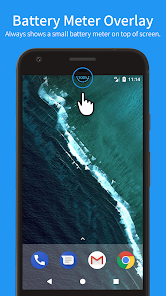
Battery Meter Overlay always shows the battery percentage at the top of screen.
With Battery Meter Overlay, You can see if your battery is charged enough to play a game, a movie, or to browse the web.
* FEATURES
✓ Shows battery information in percent (%)
✓ Shows battery meter on top of other apps
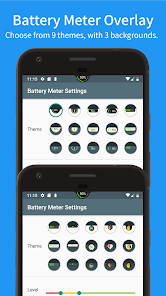
✓ Support themes for meter colors and backgrounds
✓ Control notification show / hide
✓ Overlap on top of the statusbar
✓ [NEW!] Show meter on the lock screen with notification (Android 8.0 and later)
* PRO FEATURES (Need Pro Key (Unlocker)
✓ No ads
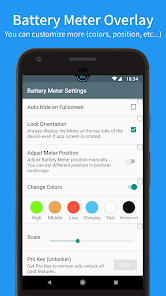
✓ Auto hide on fullscreen
✓ Can adjust meter positiion manually (respect screen oriantation)
✓ Can change meter colors (levels/charging/text/background)
✓ Can adjust meter size (x0.5 ~ x2.0)
If you like this app, Please cosider to buy Pro key.
[Special access permission]
In order to display the battery meter on top of other apps, confirm the special access of "Draw over other apps" at the first time.
[Restrictions for Android Oreo (8.0) users]
Due to Android OS security improvement, It is not possible to show Batter Meter Overlay on top of the status bar. So Battery Meter is always shown below the status bar.
[Others]
We plan to add more themes and functions, Please feel free to contact us on the comments or e-mail if you have any requests.
With Battery Meter Overlay, You can see if your battery is charged enough to play a game, a movie, or to browse the web.
* FEATURES
✓ Shows battery information in percent (%)
✓ Shows battery meter on top of other apps
✓ Support themes for meter colors and backgrounds
✓ Control notification show / hide
✓ Overlap on top of the statusbar
✓ [NEW!] Show meter on the lock screen with notification (Android 8.0 and later)
* PRO FEATURES (Need Pro Key (Unlocker)
✓ No ads
✓ Auto hide on fullscreen
✓ Can adjust meter positiion manually (respect screen oriantation)
✓ Can change meter colors (levels/charging/text/background)
✓ Can adjust meter size (x0.5 ~ x2.0)
If you like this app, Please cosider to buy Pro key.
[Special access permission]
In order to display the battery meter on top of other apps, confirm the special access of "Draw over other apps" at the first time.
[Restrictions for Android Oreo (8.0) users]
Due to Android OS security improvement, It is not possible to show Batter Meter Overlay on top of the status bar. So Battery Meter is always shown below the status bar.
[Others]
We plan to add more themes and functions, Please feel free to contact us on the comments or e-mail if you have any requests.
Updated on
Safety starts with understanding how developers collect and share your data. Data privacy and security practices may vary based on your use, region and age. The developer provided this information and may update it over time.

No data shared with third parties
Learn more about how developers declare sharing

No data collected
Learn more about how developers declare collection

Data is encrypted in transit

Data can’t be deleted
Ratings and reviews
4.2
3K reviews

John Lee
- Flag inappropriate
13 June 2025
I like the app and was considering buying the pro version however no price is given and you have to accept that there is no refund. For that reason alone I give it one star. If the app develops want to give me some more information including the price then I would be happy to change the review. As it is I will not buy when I don't know how much it is and cannot get a refund it I believe it is too expensive
3 people found this review helpful

Neva Kindsvatter
- Flag inappropriate
- Show review history
28 October 2025
Does exactly what it's supposed to do and the colors go well with my home screen theme. It's a bummer Nokia's auto-immune disease task killers keep knocking it out in spite of battery settings, dev ops settings, & notifications settings adjustments. Goodness forbid phone manufacturers actually try putting better batteries in phones instead of handicapping them all with system bloatware & task killers. 😤

A Google user
- Flag inappropriate
- Show review history
28 November 2023
Just amazing ! You can actually manually move/position the icon on the status bar where you want. no need to enter numbers. You can therefore use the space left by android to place your icon on the status bar. Many thanks to the brilliant developer. I recommend the paid version, it makes a world of difference. I did not think you could do that on the status bar! In color too !
6 people found this review helpful
What's new
- You can now adjust the meter's vertical offset independently for portrait and landscape modes.
- Fixed minor bugs.
- Fixed minor bugs.
App support
About the developer
原田和高
simple.easy.usefull@gmail.com
美浜区真砂4丁目1−11
千葉市, 千葉県 261-0011
Japan
undefined


