
Countdown: Days Until
4.1star
40 reviews
1K+
Downloads

Everyone
info
About this app
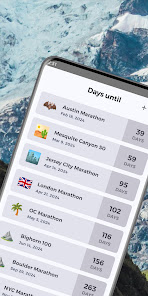
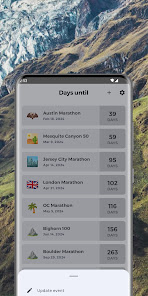
Countdown: Days Until, the ultimate app to track all your special events and occasions! Whether it's a birthday, anniversary, vacation, or any other important date, Countdown helps you stay organized and excited by displaying the exact number of days remaining until each event.
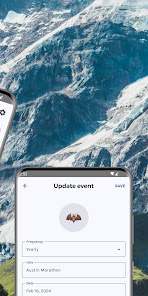
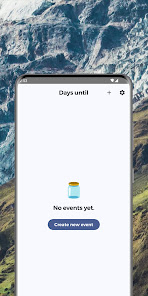
With Countdown, you can create an unlimited number of events and customize each one with a title, date, and optional notes. Simply add your event, set the date, and let Countdown do the rest! The intuitive interface makes it easy to manage all your countdowns in one place, so you never miss an important moment.
Key features:
Create unlimited countdown events: Birthdays, anniversaries, holidays, vacations, and more.
Customize each event: Add a title, choose a date, and include optional notes.
Beautiful countdown timer: Watch the days, hours, minutes, and seconds tick away until your event.
Personalized reminders: Receive notifications as your event date approaches, so you're always prepared.
Share your countdowns: Spread the excitement with friends and family by sharing your countdowns via social media, email, or messaging apps.
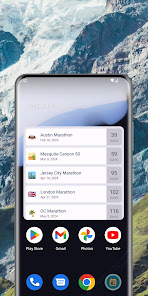
Widget support: View your upcoming events right from your device's home screen with customizable widgets.
Whether you're counting down to a wedding, graduation, or just a weekend getaway, Countdown: Days Until is the perfect companion to help you stay organized and excited about all your upcoming events. Download now and start counting down to your next unforgettable moment!
With Countdown, you can create an unlimited number of events and customize each one with a title, date, and optional notes. Simply add your event, set the date, and let Countdown do the rest! The intuitive interface makes it easy to manage all your countdowns in one place, so you never miss an important moment.
Key features:
Create unlimited countdown events: Birthdays, anniversaries, holidays, vacations, and more.
Customize each event: Add a title, choose a date, and include optional notes.
Beautiful countdown timer: Watch the days, hours, minutes, and seconds tick away until your event.
Personalized reminders: Receive notifications as your event date approaches, so you're always prepared.
Share your countdowns: Spread the excitement with friends and family by sharing your countdowns via social media, email, or messaging apps.
Widget support: View your upcoming events right from your device's home screen with customizable widgets.
Whether you're counting down to a wedding, graduation, or just a weekend getaway, Countdown: Days Until is the perfect companion to help you stay organized and excited about all your upcoming events. Download now and start counting down to your next unforgettable moment!
Updated on
Safety starts with understanding how developers collect and share your data. Data privacy and security practices may vary based on your use, region and age. The developer provided this information and may update it over time.

No data shared with third parties
Learn more about how developers declare sharing

No data collected
Learn more about how developers declare collection

Data is encrypted in transit

Data can’t be deleted
Ratings and reviews
4.1
38 reviews

Ashlyn Pearce
- Flag inappropriate
15 December 2025
Better than any other apps that I've tried, but I wish there were a few additional features, such as (1) a backup/cloud option so I can have the same dates on multiple devices without entering them individually on each device, (2) background widget updating - so I don't have to open the app each day to update date counts, and (3) ability to set a preferred/default emoji or no emoji for countdowns

Gregory Torbenson
- Flag inappropriate
29 September 2025
The widget does not update when time passes, only when you open the app itself. Opening the app, meanwhile, causes the 1x1 widget to replace itself with a squished down version of the screen-width widget, which can't be fixed without removing and re-adding the widget.
workoutnotes
3 October 2025
We have not had this issue reported to us before, and we'd certainly like to work this through for you. Could you share the details at hi@workoutnotes.com? And any relevant screenshots would be immensely valuable. Thank you.

Jesse Jones
- Flag inappropriate
2 February 2025
A simple list widget with monet colours and no bloat, ads, or subscriptions. Exactly what I've been looking for, but I do have a few nitpicks: Monet colours don't apply to the days/weeks segment, the widget colours and font don't match the app, and tapping the widget doesn't open the app. I'd also like to be able to make the widget more condensed so I can see more events at once, and importing events from my calendar would be convenient. If most of these were adressed, it'd be an easy 5 stars.
workoutnotes
14 April 2025
Thanks so much for the detailed feedback! In the latest update, you can now open the app by tapping the widget and import events from your calendar. I'm also working on improving the widget colors and layout — stay tuned!
What's new
🎉 New Feature: Customizable Date Formats!
• Choose your preferred date format from 9 different options in Settings > Events > Date format
• Includes formats with day of week (e.g., "Mon, Jan 1, 2024")
• Your selected format is applied consistently across the entire app - event lists, widgets, and forms
• Makes it easier to read dates the way you prefer!
• Choose your preferred date format from 9 different options in Settings > Events > Date format
• Includes formats with day of week (e.g., "Mon, Jan 1, 2024")
• Your selected format is applied consistently across the entire app - event lists, widgets, and forms
• Makes it easier to read dates the way you prefer!
App support
About the developer
Manuel Rebollo Báez
hi@mrebollob.com
C. Alejo Fernández, 11, Portal D, 3B
41003 Sevilla
Spain


