

Categorizr: Receipt Scanner

4.2star
162 reviews
10K+
Downloads

Everyone
info



About this app
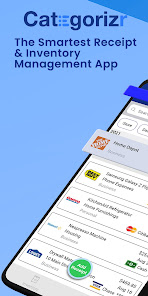
Looking for a smart receipt scanner and inventory management app? Look no further than Categorizr – the all-in-one receipt organizer, spending tracker, and inventory management app – Download and try it now!
Simply scan your smart receipts, and let the app do the rest. Introducing a cutting-edge solution for managing your expenses seamlessly. With this innovative receipt app, keeping track of your spending has never been easier. Its intuitive interface allows you to categorize expenses effortlessly, ensuring that every transaction is accurately recorded. No more forgotten expenses; with our app, you can scan receipts and stay on top of your finances with ease. Whether you're a business owner needing to track QSR inventory or an individual looking to manage personal finances, this app is simply wise. With the receipt maker, everything is digitized and organized for you. So why wait? Requeue your old methods and embrace the future of expense tracking with the receipt tracker.
With this application, you can:
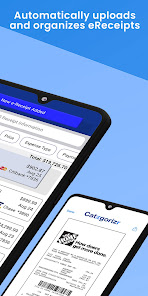
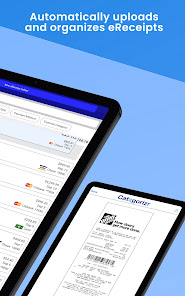
🧾 Automatically upload eReceipts to the App by creating your own @categorizr email account
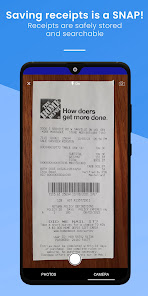
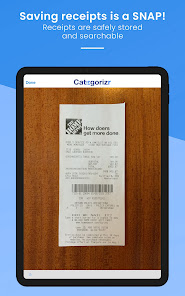
💾 Scan, organize, and save all your receipts, and never lose or misplace another one again
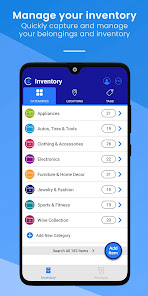
🏠 Track details of your personal belongings and small business inventory
💰Keep track of your insurance policies and maintain a record of your assets
📝 Capture specific information for warranty claims
💸Tag items to sell, donate, repair, and more
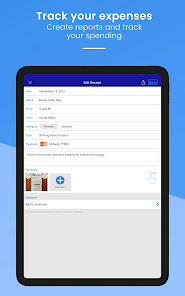
📊 Generate PDF expense reports with digital copies of your receipts (your accountant will like this!) and create a PDF backup of your inventory
Plus, it's not just a receipt scanner - it also serves as a handy money manager, helping you budget effectively and stay within your means. Great for individuals, self-employed workers, contractors, consultants, freelancers, and small business owners who want to keep a digital copy of their receipts and track and analyze their spending. Take control of your finances today and download the smartest expense management program available in the palm of your hands.
As the smartest all-in-one receipt organizer and inventory management app, Categorizr’s features include:
• FREE @categorizr email account that allows stores to send eReceipts via email to the App automatically
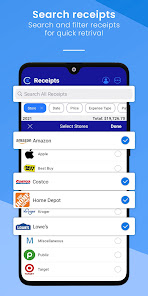
• Quick “Add Receipt” feature that allows you to save store receipts by taking a photo and automatically converting them into searchable digital copies
• Add Item feature that allows you to add items in a snap
• Predefined Categories, Locations, and Tags that allow you to get started right away and create reports
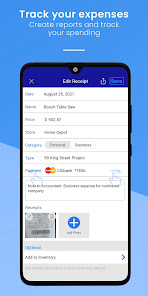
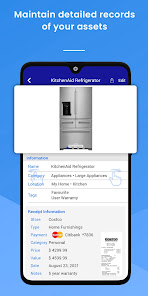
• Customizable Categories and item descriptions, allowing you to include details such as serial number, purchase date, warranty, and other information you feel is important to save
• Add multiple photos and save important documents such as warranty information, owner manuals, and product registrations to any item
• Add photos of your NFT and any digital assets in your portfolio
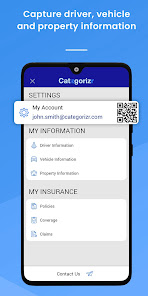
• Store Driver, Vehicle, and Property Information for quick reference
• Email, print, and share item photos and important documents
• Filter your information and create PDF reports with digital copies of your receipts
• View summary and detailed item lists, including item count and total purchase price
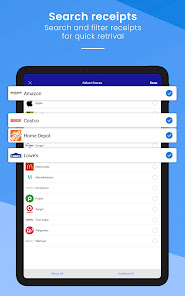
• Powerful searching and sorting tools so that you can retrieve information quickly
• Export data as a PDF or CSV file and send it to your accountant when it’s tax time
• and many more features!
Organize your life by downloading Categorizr today – the smartest all-in-one receipt organizer and inventory management app!
Simply scan your smart receipts, and let the app do the rest. Introducing a cutting-edge solution for managing your expenses seamlessly. With this innovative receipt app, keeping track of your spending has never been easier. Its intuitive interface allows you to categorize expenses effortlessly, ensuring that every transaction is accurately recorded. No more forgotten expenses; with our app, you can scan receipts and stay on top of your finances with ease. Whether you're a business owner needing to track QSR inventory or an individual looking to manage personal finances, this app is simply wise. With the receipt maker, everything is digitized and organized for you. So why wait? Requeue your old methods and embrace the future of expense tracking with the receipt tracker.
With this application, you can:
🧾 Automatically upload eReceipts to the App by creating your own @categorizr email account
💾 Scan, organize, and save all your receipts, and never lose or misplace another one again
🏠 Track details of your personal belongings and small business inventory
💰Keep track of your insurance policies and maintain a record of your assets
📝 Capture specific information for warranty claims
💸Tag items to sell, donate, repair, and more
📊 Generate PDF expense reports with digital copies of your receipts (your accountant will like this!) and create a PDF backup of your inventory
Plus, it's not just a receipt scanner - it also serves as a handy money manager, helping you budget effectively and stay within your means. Great for individuals, self-employed workers, contractors, consultants, freelancers, and small business owners who want to keep a digital copy of their receipts and track and analyze their spending. Take control of your finances today and download the smartest expense management program available in the palm of your hands.
As the smartest all-in-one receipt organizer and inventory management app, Categorizr’s features include:
• FREE @categorizr email account that allows stores to send eReceipts via email to the App automatically
• Quick “Add Receipt” feature that allows you to save store receipts by taking a photo and automatically converting them into searchable digital copies
• Add Item feature that allows you to add items in a snap
• Predefined Categories, Locations, and Tags that allow you to get started right away and create reports
• Customizable Categories and item descriptions, allowing you to include details such as serial number, purchase date, warranty, and other information you feel is important to save
• Add multiple photos and save important documents such as warranty information, owner manuals, and product registrations to any item
• Add photos of your NFT and any digital assets in your portfolio
• Store Driver, Vehicle, and Property Information for quick reference
• Email, print, and share item photos and important documents
• Filter your information and create PDF reports with digital copies of your receipts
• View summary and detailed item lists, including item count and total purchase price
• Powerful searching and sorting tools so that you can retrieve information quickly
• Export data as a PDF or CSV file and send it to your accountant when it’s tax time
• and many more features!
Organize your life by downloading Categorizr today – the smartest all-in-one receipt organizer and inventory management app!
Updated on
Safety starts with understanding how developers collect and share your data. Data privacy and security practices may vary based on your use, region, and age. The developer provided this information and may update it over time.

No data shared with third parties
Learn more about how developers declare sharing

No data collected
Learn more about how developers declare collection

Data isn’t encrypted

You can request that data be deleted
Ratings and reviews
4.2
159 reviews

Jan Anderson
- Flag inappropriate
May 30, 2022
I'm having trouble finding the information I've entered in your app. Your app is also crashing. I tried logging into another device & it's crashing on it too but it also didn't save any information that I've entered. Is there a way to retrieve the info I entered & can it be used across other devices? As a reseller, It would be even better if it could have the option to have 1 more user on the app to scan inventory& receipts from our sources. I have not been able to test the exporting to Office.
8 people found this review helpful
Categorizr
May 31, 2022
Hi Jan, I have our technical team looking into the problem. I also responded to your email earlier and happy to connect through that channel for more direct dialogue. In regard to your question on accessing across devices, we don't have that feature at this time but is on our list for future development. We also don't have Office export feature.

Daniel R Hope (M0b1us)
- Flag inappropriate
- Show review history
August 7, 2023
Doesn't let you turn receipts into inventory like it says (& despite what they replied, only the entire receipt as a single item or purchase). You have to manually input each individual receipt item. It would be nice if the OCR would automatically do this, but this app only talks big and under delivers. The only thing I like better is that you can put store logos for easier recognition. Beyond that, everything is more clunky and complicated than other apps and it under delivers its promises.
14 people found this review helpful
Categorizr
August 8, 2023
Hi Daniel - not sure we follow your amended response/concern. If you tap "Add Receipt" and hold your phone over a paper receipt the App automatically takes an image and with the OCR auto populate the text it is able to read from the image. If you want to send us a video (at contactus@categorizr.com) of your issue we can see the issue you have.

janet weinbrecht
- Flag inappropriate
- Show review history
December 13, 2025
I added 10 receipts and had to manually edit every one. Some it read the amount wrong, most didn't accept the merchant, most of the dates were wrong and missed the tax on every one. I think this is because it is designed to read American format dates, and deal with American tax only, so doesn't work so well in Australia. It was very easy to use though and I was impressed that it found the logos for every merchant I added. Just disappointing that I had to manually edit every one.
Categorizr
December 13, 2025
Hi Janet - we are continuously updating our OCR feature so that it reads receipts better each time. We hope you continue to find the overall app experience positive including the dynamic functionality and ease of use. If you have any suggestions let us know at contactus@categorizrapp.com.
What’s new
We’ve enhanced Categorizr to make managing receipts and expenses faster, smarter, and more intuitive – so you can stay organized with less effort.
• Performance upgrades: Bug fixes and overall improvements to ensure a smoother experience.
Categorizr is your all-in-one tool for receipt management, asset tracking and expense reporting – designed to simplify your workflow.
• Performance upgrades: Bug fixes and overall improvements to ensure a smoother experience.
Categorizr is your all-in-one tool for receipt management, asset tracking and expense reporting – designed to simplify your workflow.
App support
About the developer
Miluka Ventures Inc
receipts@categorizrapp.com
2208 Blackbird Crt
Oakville, ON L6M 5E6
Canada
+1 647-234-9051


