
UniPatcher

4.0star
8.35K reviews
1M+
Downloads

Everyone
info

About this app
UniPatcher allows you to apply patches to game ROMs.
What is a patch?
A file with the modified data of the game. For example, a game translated from Japanese to English. You download the patch containing the translation. It must be applied to the Japanese version to make an English version of it.
This program will not help you hack native Android games, it was created for the old console games (SNES, PS1, GBA, N64, SMD\Genesis etc.)
Features:
* Supported formats of patches: IPS, IPS32, UPS, BPS, APS (GBA), APS (N64), PPF, DPS, EBP, XDelta3
* Create XDelta patches
* Fix the checksum in SMD\Genesis ROMs
* Remove the SMC header from SNES ROMs
How to use?
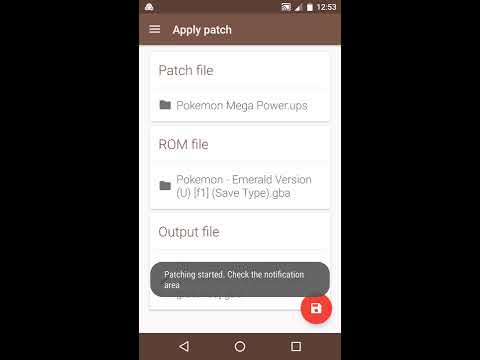
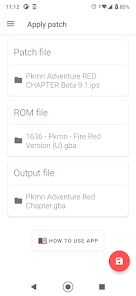
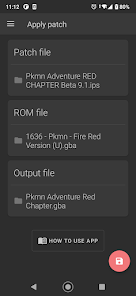
You have to select a ROM file, a patch and choose which file to save, then click on the red round button. Files are selected through the standard Files application (or through one of the file managers you have installed). The application will show a message when the file is patched. Do not close the application until the file is patched.
Very important:
If the game and patch is compressed (ZIP, RAR, 7z or other), they first need to be unzipped.
What is a patch?
A file with the modified data of the game. For example, a game translated from Japanese to English. You download the patch containing the translation. It must be applied to the Japanese version to make an English version of it.
This program will not help you hack native Android games, it was created for the old console games (SNES, PS1, GBA, N64, SMD\Genesis etc.)
Features:
* Supported formats of patches: IPS, IPS32, UPS, BPS, APS (GBA), APS (N64), PPF, DPS, EBP, XDelta3
* Create XDelta patches
* Fix the checksum in SMD\Genesis ROMs
* Remove the SMC header from SNES ROMs
How to use?
You have to select a ROM file, a patch and choose which file to save, then click on the red round button. Files are selected through the standard Files application (or through one of the file managers you have installed). The application will show a message when the file is patched. Do not close the application until the file is patched.
Very important:
If the game and patch is compressed (ZIP, RAR, 7z or other), they first need to be unzipped.
Updated on
Safety starts with understanding how developers collect and share your data. Data privacy and security practices may vary based on your use, region, and age. The developer provided this information and may update it over time.

No data shared with third parties
Learn more about how developers declare sharing

No data collected
Learn more about how developers declare collection
Ratings and reviews
4.1
7.64K reviews

MQ
- Flag inappropriate
December 12, 2025
Absolutely phenomenal, works perfectly and has a fantastic feature (ignore checksum) that makes everything a breeze. I like that I can choose the name for the patched item as well. My only additional wish would be a folder lock so that the apps knows that patches will be in Downloads folder, while ROMs will be in a local folder, but that's just for convenience as all it takes is going back and forth to make sure you use the right files.

Anthony Mendenhall
- Flag inappropriate
- Show review history
June 25, 2022
I mostly use this for patching GBA and N64 hacks. 95% of the time, it works flawlessly. The other 5% of the time, it doesn't work very well at all; but this is more of an issue with the actual files than the app itself. Sometimes you just gotta use a Windows or Linux desktop PC/laptop for a tiny handful of hacks. Generally, though, anything you want to run on emulators will work fine.
409 people found this review helpful

H Harter
- Flag inappropriate
- Show review history
October 23, 2025
really useful wish the hash generator did more but it did what it said it did so I'm not mad about that I just wish there was an option in the settings for a notification to be given out when it finishes patching because I sat there for like 20 minutes waiting for it to patch not realizing it was done because I was looking away when it finished.
What’s new
- Arabic translation (thanks to Fayçal Boukamel)
- Esperanto translation (thanks to Jakub Fabijan)
- Indonesian translation (thanks to Tsaqib Fadhlurrahman Soka, Lim Jia Ming, Reza Almanda)
- Kurdish (Central) translation (thanks to دیاری ئەرسەلان جەبار)
- Lithuanian translation (thanks to Gediminas Murauskas)
- Malay translation (thanks to Muhammad Ammar Bin Rozi)
- Vietnamese translation (thanks to Haibara Ai)
- Many other translations updated (thanks to everyone involved)
- Esperanto translation (thanks to Jakub Fabijan)
- Indonesian translation (thanks to Tsaqib Fadhlurrahman Soka, Lim Jia Ming, Reza Almanda)
- Kurdish (Central) translation (thanks to دیاری ئەرسەلان جەبار)
- Lithuanian translation (thanks to Gediminas Murauskas)
- Malay translation (thanks to Muhammad Ammar Bin Rozi)
- Vietnamese translation (thanks to Haibara Ai)
- Many other translations updated (thanks to everyone involved)
App support
About the developer
Тимофеев Борис Евгеньевич
mashin87@gmail.com
Советская, 28
13
Губкин
Белгородская область
Russia
309189


