IoT MQTT Panel
Contains ads
4.6star
2.85K reviews
100K+
Downloads

Everyone
info

About this app
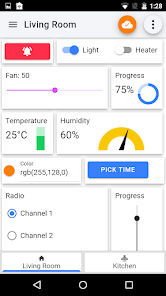
This application allow you to mange and visualize IoT project, based on MQTT protocol.
With this app you can make DIY Smart Home project in a minute. The configurations are very simple. Well documented FAQ and User Guide are available at application info page.
Features:
1. Designed to run 24x7 in background
2. Supports both MQTT (TCP) and Websocket protocol.
3. SSL for secure communication.
4. JSON Support for both subscribe and publish message.
5. Panels subscribe and / or publish the topic automatically, hence get updated in real time.
6. Designed to work with public broker efficiently (using device prefix).
7. Sent and Received timestamp from broker.
8. Material design.
9. Flexible panel width, merge any panels
10. More than 250 icons to customize specific panels.
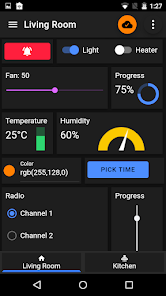
11. Dark theme for comfortable use in low light.
12. Clone connection, device or panel for effortless configuration
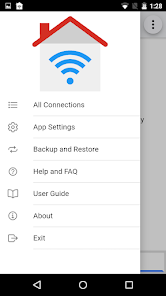
13. Import/Export application configuration for easy share with multiple devices.
14. Runs in background and re-connects automatically.
15. Notification on receiving message. (Available on pro version only)
16. Persist export message for log and graph. (Available on pro version only)
Available panels:
-Button
-Slider
-Switch
-LED Indicator
-Combo Box
-Radio Buttons
-Multi-State Indicator
-Progress
-Gauge
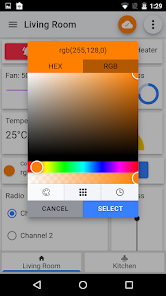
-Color Picker
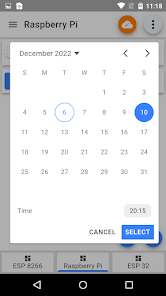
-Time Picker
-Text Input
-Text Log
-Image
-Barcode scanner
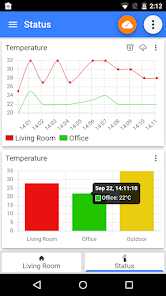
-Line graph
-Bar graph
-Chart
-URI Launcher
This list will grow upon feedback from users.
Your feedback is much appreciated. If you find any issue please feel free to leave a comment in my blog with steps to reproduce.
https://blog.snrlab.in/iot/iot-mqtt-panel-user-guide/
Please purchase the add free pro version to show appreciation.
With this app you can make DIY Smart Home project in a minute. The configurations are very simple. Well documented FAQ and User Guide are available at application info page.
Features:
1. Designed to run 24x7 in background
2. Supports both MQTT (TCP) and Websocket protocol.
3. SSL for secure communication.
4. JSON Support for both subscribe and publish message.
5. Panels subscribe and / or publish the topic automatically, hence get updated in real time.
6. Designed to work with public broker efficiently (using device prefix).
7. Sent and Received timestamp from broker.
8. Material design.
9. Flexible panel width, merge any panels
10. More than 250 icons to customize specific panels.
11. Dark theme for comfortable use in low light.
12. Clone connection, device or panel for effortless configuration
13. Import/Export application configuration for easy share with multiple devices.
14. Runs in background and re-connects automatically.
15. Notification on receiving message. (Available on pro version only)
16. Persist export message for log and graph. (Available on pro version only)
Available panels:
-Button
-Slider
-Switch
-LED Indicator
-Combo Box
-Radio Buttons
-Multi-State Indicator
-Progress
-Gauge
-Color Picker
-Time Picker
-Text Input
-Text Log
-Image
-Barcode scanner
-Line graph
-Bar graph
-Chart
-URI Launcher
This list will grow upon feedback from users.
Your feedback is much appreciated. If you find any issue please feel free to leave a comment in my blog with steps to reproduce.
https://blog.snrlab.in/iot/iot-mqtt-panel-user-guide/
Please purchase the add free pro version to show appreciation.
Updated on
Safety starts with understanding how developers collect and share your data. Data privacy and security practices may vary based on your use, region, and age. The developer provided this information and may update it over time.

No data shared with third parties
Learn more about how developers declare sharing

No data collected
Learn more about how developers declare collection
Ratings and reviews
4.6
2.75K reviews

A Google user
- Flag inappropriate
March 20, 2019
Very easy to use app. Although, right before I upgraded to the paid version, I stopped because of one issue, that is you cannot export a dashboard configuration. If you use multiple devices to monitor the same group of topics, you will have to manually add all the dashboard elements to each one (phone1, phone2, tablet1, tablet2). So if you have a dashboard using 20+ topics, it is very time consuming to set everything set up the same way on all extra devices. Will buy when this feature is avail.
11 people found this review helpful
Rahul Kundu
May 9, 2019
Hi Mike you have multiple ways to export / share configuration.
1. Export via file: Go to application settings from home page and export configuration.
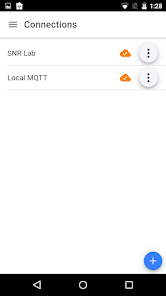
2. Share via MQTT: In home page tap option on a connection, there you will get share option.
Let me know if are able to do it. Drop me a mail if you have more query.
***Are you able to do it?

Prabhu Singh
- Flag inappropriate
- Show review history
October 24, 2025
Hi, I have been using this application for one year and appreciate the customizable panel features. However, I have observed that performance becomes significantly slower (slow data speed) when a large number of connections are added (I added around 30 connections).

Mohammad Arash Sharifian
- Flag inappropriate
- Show review history
November 24, 2025
perfect . but After the last update, all the button sizes were messed up after adding icons. If you enlarge the buttons and add icons, you will understand what I mean. I am waiting for the update as soon as possible. Thank you.
Rahul Kundu
November 26, 2025
Hi Mohammed,
I have published an update. Once you update the app please edit the panel and save it. It should adjust the size. You may need to increase adjacent panels height manually.
Feel free to reach out to me over email if you have any queries.
What’s new
- Trigger Alarm: Alarm sound for notification
- Grid Layout: Resize and rearrange the dashboard grid layout in both vertically and horizontal direction to suit your preferences.
- Grid Layout: Resize and rearrange the dashboard grid layout in both vertically and horizontal direction to suit your preferences.
App support
About the developer
Rahul Kundu
snrlab.in@gmail.com
Elyati
Onda
Bankura, West Bengal 722144
India


