
VOICEYE
2,5star
247 reseñas
100 mil+
Descargas

Para todos
info


Información de la aplicación
The new way to access printed information for print and visually impaired!
VOICEYE is the smartphone application enabling those with print impairments to access printed information using a VOICEYE code on the printed material.
Information regarding the VOICEYE code on the printed material:
•VOICEYE can hold as much as two A4 pages of text on a 2.5 square centimeter code.
•There’s no need for a data or internet connection to decode a VOICEYE code, as the code itself stores the data.
•The VOICEYE App will use the phone camera to automatically scan the code and bring all of the text into the phone.
Just imagine! You can access any printed information that is around you with your own smartphone.
All education materials, all government materials, all books, notice boards in museums or libraries, in fact just about anything, once a document is produced with a VOICEYE code, any material becomes accessible and is accurately identified.
In South Korea, the VOICEYE solution has been successfully applied to schools for the blind, universities with special education, publishing companies, state-run corporations, local newspapers and others. The VOICEYE solution is very popular for Dyslexia and the visually impaired. The Korean government has adopted the VOICEYE solution on its official documents, such as social security information, electricity, water, local tax bills and so on.
VOICEYE App:
Make your dreams come true with a VOICEYE code.
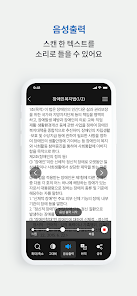
Scan a VOICEYE code at the top right corner of the printed material. You then have access to the book you buy, the textbook you study, utility bills and prescriptions, it will then be opened automatically on your smartphone and the text can be read aloud with TTS (Text-to-Speech) software.
The VOICEYE code is created by the VOICEYE Maker Add-In, which you add into MS-Word, Quark Xpress and Adobe InDesign programs. Quark Xpress and InDesign are programs for publishers.
[Main Features]
1. Access to printed information
- Scan a VOICEYE code at the top right corner of a page.
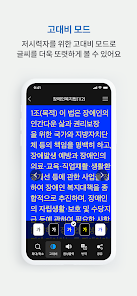
- Text can be displayed on your smartphone screen in 5 high contrast text viewing modes (colored text) and read out the text with TTS like.
- 10 zoom levels in font size
2. Voice Tag (Buy labels: http://www.voiceye.com/eng)
- Attach a label to the object that you want to identify. (documents, music CDs, food containers, etc.)
- The object can be easily identified by recording a voice message or inputting text.
3. Magnifier
- Provides 6 zoom levels
- 5 high contrast viewing modes to maximize text readability
- Magnifying various sources using camera or gallery
VOICEYE is the smartphone application enabling those with print impairments to access printed information using a VOICEYE code on the printed material.
Information regarding the VOICEYE code on the printed material:
•VOICEYE can hold as much as two A4 pages of text on a 2.5 square centimeter code.
•There’s no need for a data or internet connection to decode a VOICEYE code, as the code itself stores the data.
•The VOICEYE App will use the phone camera to automatically scan the code and bring all of the text into the phone.
Just imagine! You can access any printed information that is around you with your own smartphone.
All education materials, all government materials, all books, notice boards in museums or libraries, in fact just about anything, once a document is produced with a VOICEYE code, any material becomes accessible and is accurately identified.
In South Korea, the VOICEYE solution has been successfully applied to schools for the blind, universities with special education, publishing companies, state-run corporations, local newspapers and others. The VOICEYE solution is very popular for Dyslexia and the visually impaired. The Korean government has adopted the VOICEYE solution on its official documents, such as social security information, electricity, water, local tax bills and so on.
VOICEYE App:
Make your dreams come true with a VOICEYE code.
Scan a VOICEYE code at the top right corner of the printed material. You then have access to the book you buy, the textbook you study, utility bills and prescriptions, it will then be opened automatically on your smartphone and the text can be read aloud with TTS (Text-to-Speech) software.
The VOICEYE code is created by the VOICEYE Maker Add-In, which you add into MS-Word, Quark Xpress and Adobe InDesign programs. Quark Xpress and InDesign are programs for publishers.
[Main Features]
1. Access to printed information
- Scan a VOICEYE code at the top right corner of a page.
- Text can be displayed on your smartphone screen in 5 high contrast text viewing modes (colored text) and read out the text with TTS like.
- 10 zoom levels in font size
2. Voice Tag (Buy labels: http://www.voiceye.com/eng)
- Attach a label to the object that you want to identify. (documents, music CDs, food containers, etc.)
- The object can be easily identified by recording a voice message or inputting text.
3. Magnifier
- Provides 6 zoom levels
- 5 high contrast viewing modes to maximize text readability
- Magnifying various sources using camera or gallery
Última actualización
La seguridad empieza por entender cómo recogen y comparten tus datos los desarrolladores. Las prácticas de privacidad y seguridad de los datos pueden variar en función de tu uso de la aplicación, el territorio donde la uses y tu edad. El desarrollador ha proporcionado esta información y puede actualizarla con el tiempo.

No se comparten datos con terceros
Más información sobre cómo los desarrolladores declaran lo que comparten

No se recogen datos
Más información sobre cómo los desarrolladores declaran lo que recogen
Valoraciones y reseñas
2,6
242 reseñas
Novedades
mprovements and bug fixes.
Asistencia de la aplicación
Información del desarrollador
보이스아이(주)
android@voiceye.com
대한민국 16108 경기도 의왕시
광진말로 54 A동 517호 (초평동,의왕스마트시티퀀텀)
+82 70-5204-0026