
USB Lockit - Pendrive Password
Enthält WerbungIn-App-Käufe
3.3star
4.62 Tsg. Rezensionen
500 Tsg.+
Downloads

Jedes Alter
info


Über diese App
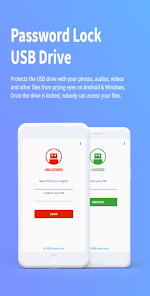
Protects the USB drive with your photos, audios, videos and other files from prying eyes on Android & Windows. Once the drive is locked, nobody can access your files.
All in 3 Easy Steps:
1. To lock the USB drive and protects all your files, simply set a PIN and click on LOCK button.
2. To unlock the USB drive and access to all your files, enter your PIN and click on UNLOCK button.
3. To relock the USB drive without entering the PIN every time, just a click on the LOCK button.
ATTENTION: If you lose or forget the PIN, it cannot be recovered. It is advisable to write it in a safe place.
Features:
• Fast Locking - Drive locking in few seconds through a simple but powerful user interface.
• Cross Platform - When the drive is locked your files remain safe in all operating systems.
• Standard Device - Works with all USB flash drives on the market formatted in FAT32/exFAT.
• Fully Portable - Designed for Android & Windows for access without root or admin rights.
Supported Language:
English, German, French, Spanish, Italian, Portuguese, Russian, Chinese.
Available on Android & Windows
All in 3 Easy Steps:
1. To lock the USB drive and protects all your files, simply set a PIN and click on LOCK button.
2. To unlock the USB drive and access to all your files, enter your PIN and click on UNLOCK button.
3. To relock the USB drive without entering the PIN every time, just a click on the LOCK button.
ATTENTION: If you lose or forget the PIN, it cannot be recovered. It is advisable to write it in a safe place.
Features:
• Fast Locking - Drive locking in few seconds through a simple but powerful user interface.
• Cross Platform - When the drive is locked your files remain safe in all operating systems.
• Standard Device - Works with all USB flash drives on the market formatted in FAT32/exFAT.
• Fully Portable - Designed for Android & Windows for access without root or admin rights.
Supported Language:
English, German, French, Spanish, Italian, Portuguese, Russian, Chinese.
Available on Android & Windows
Aktualisiert am
Was die Sicherheit angeht, solltest du als Erstes verstehen, wie Entwickler deine Daten erheben und weitergeben. Die Datenschutz- und Sicherheitspraktiken können je nach deiner Verwendung, deiner Region und deinem Alter variieren. Diese Informationen wurden vom Entwickler zur Verfügung gestellt und können jederzeit von ihm geändert werden.

Keine Daten werden mit Drittunternehmen oder -organisationen geteilt

Keine Daten erhoben

Daten werden bei der Übertragung verschlüsselt

Daten können nicht gelöscht werden
Bewertungen und Rezensionen
3.4
4.51 Tsg. Rezensionen
Neuerungen
New fingerprint feature.
Bug fixes.
Bug fixes.
Support für diese App
Informationen zum Entwickler
Nicola Bezze
usblockit@gmail.com
Via Tazzoli, 37
35027 Noventa Padovana
Italy


