
ScreenConnect
2.1star
898 reviews
500K+
Downloads

Everyone
info
About this app
SECURITY NOTICE:
Only install this app if you were instructed to do so by your IT team or a trusted technician. Remote connections grant full control of your device; never share your session or access details with anyone you don’t know or trust.
Support users. Access systems. Work from anywhere.
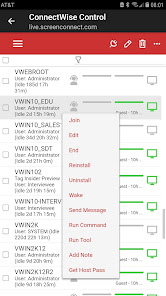
ScreenConnect combines attended support sessions and always-on remote access in one powerful mobile app, so IT teams, service providers, and end users the tools to troubleshoot issues, maintain systems, and stay connected to their devices quickly, securely, and reliably.
Key capabilities
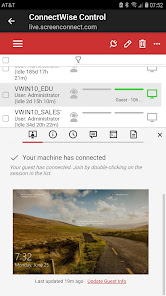
- Start and join remote support sessions
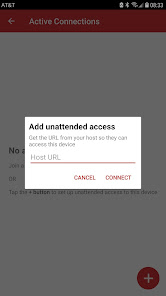
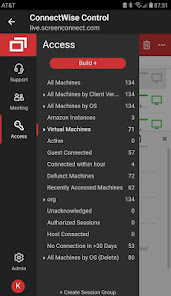
- Access unattended computers and workstations anytime
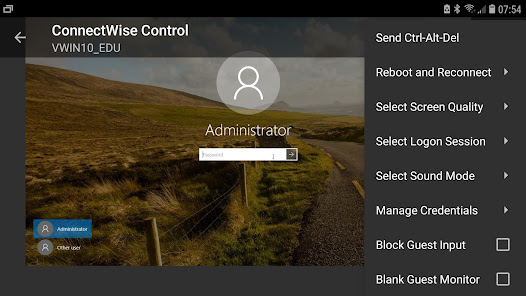
- Remotely control Windows, Mac, Linux, and ChromeOS devices
- Enable full interaction on Android devices using the Accessibility Service API permissions (requires Android 7+)
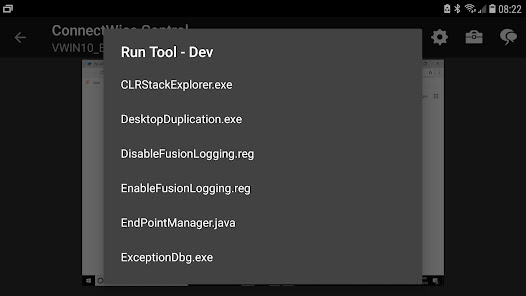
- Send commands to remote systems
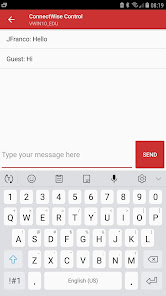
- Troubleshoot issues in real time
- Support users from the office, home, or the field
- Review and approve privileged access (PAM) requests from your device (requires upgraded licensing)
Built for IT teams and the people they support
Ideal for:
- Helpdesks
- MSPs and service providers
- System administrators
- Field technicians
- Internal IT teams
Connect and begin supporting instantly
Don’t have ScreenConnect yet? Learn more at: https://www.screenconnect.com/
Help us improve ScreenConnect
Share feedback, request features, or get support from our team and community.
Community and feature requests: https://screenconnect.product.connectwise.com/
Support: https://www.screenconnect.com/partner-support
Documentation: https://docs.connectwise.com/ScreenConnect_Documentation/Mobile_apps/Android
Getting started
Install the app
Sign in to your ScreenConnect instance
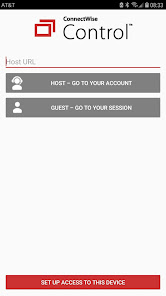
Join or start a session
Connect and begin supporting instantly
Don’t have ScreenConnect yet? Learn more at: https://www.screenconnect.com/
Help us improve ScreenConnect
Share feedback, request features, or get support from our team and community.
Only install this app if you were instructed to do so by your IT team or a trusted technician. Remote connections grant full control of your device; never share your session or access details with anyone you don’t know or trust.
Support users. Access systems. Work from anywhere.
ScreenConnect combines attended support sessions and always-on remote access in one powerful mobile app, so IT teams, service providers, and end users the tools to troubleshoot issues, maintain systems, and stay connected to their devices quickly, securely, and reliably.
Key capabilities
- Start and join remote support sessions
- Access unattended computers and workstations anytime
- Remotely control Windows, Mac, Linux, and ChromeOS devices
- Enable full interaction on Android devices using the Accessibility Service API permissions (requires Android 7+)
- Send commands to remote systems
- Troubleshoot issues in real time
- Support users from the office, home, or the field
- Review and approve privileged access (PAM) requests from your device (requires upgraded licensing)
Built for IT teams and the people they support
Ideal for:
- Helpdesks
- MSPs and service providers
- System administrators
- Field technicians
- Internal IT teams
Connect and begin supporting instantly
Don’t have ScreenConnect yet? Learn more at: https://www.screenconnect.com/
Help us improve ScreenConnect
Share feedback, request features, or get support from our team and community.
Community and feature requests: https://screenconnect.product.connectwise.com/
Support: https://www.screenconnect.com/partner-support
Documentation: https://docs.connectwise.com/ScreenConnect_Documentation/Mobile_apps/Android
Getting started
Install the app
Sign in to your ScreenConnect instance
Join or start a session
Connect and begin supporting instantly
Don’t have ScreenConnect yet? Learn more at: https://www.screenconnect.com/
Help us improve ScreenConnect
Share feedback, request features, or get support from our team and community.
Updated on
Safety starts with understanding how developers collect and share your data. Data privacy and security practices may vary based on your use, region, and age. The developer provided this information and may update it over time.

No data shared with third parties
Learn more about how developers declare sharing

No data collected
Learn more about how developers declare collection
Ratings and reviews
2.2
815 reviews

David Medina
- Flag inappropriate
February 16, 2026
this app does work great and I am able to remote on to clients computers if I need to troubleshoot a problem and I only have my phone available to view their screen. You are able to connect a Bluetooth mouse and keyboard to your phone and use them like if you had a mini laptop. only thing I wish they would add to this is to be able to to select individual screens and make whichever one you want to see, and make it full screen without their navigation tool bar getting in the way.

Sherry Bernklau
- Flag inappropriate
March 6, 2024
The app has been great up until a couple months ago when the mobile version started freezing when using the remote keypad. Sometimes I can close & reopen the app multiple times and then it will work, but even that has become less & less effective. The issue only occurs in the mobile app. I do not have the problem when using my laptop. Unfortunately, my phone is the device I use most for remote work.
15 people found this review helpful

Joey Eury
- Flag inappropriate
October 10, 2025
App is issuing wrong call for stored credentials after this latest update. After I manually login using the app, I'm presented with "Do you want to delete your stored credentials?". It wouldn't take much to fix this. Otherwise it's a great program. I use it more than my laptop most days.
5 people found this review helpful
What’s new
- We've updated the logos and theme in the app to reflect the new ScreenConnect rebranding.
- Updated target SDK to API level 34
- Improved consent dialog behavior
- Updated target SDK to API level 34
- Improved consent dialog behavior
App support
phone
Phone number
+19195320022
About the developer
Connectwise, LLC
slongway@connectwise.com
400 N Tampa St Ste 130
Tampa, FL 33602
United States
+1 813-407-9433


