
AudioPen: AI Voice to Text
Achats via l'appli

3,9star
231 avis

Tout public
info
50K+
Téléchargements

Tout public
En savoir plus


À propos de l'application
Turn your voice into clear, structured text.
Speak naturally. AudioPen cleans, rewrites, and formats your words instantly.
It’s faster than typing and far more useful than basic dictation.
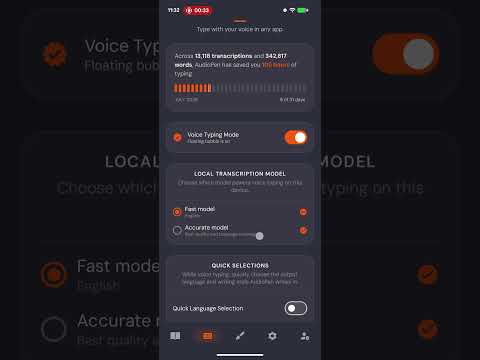
Use it to take notes, or to type inside any app with the AudioPen Voice Typing Mode.
- Speak instead of typing
- Get clean, readable text, not messy transcripts
- Rewrite in any tone or style.
- Capture notes, ideas, emails, and thoughts
- Save and organize everything in one place
- Works fast, right when you need it
Use cases:
- Notes on the go
- Writing emails faster
- Brain dumping ideas
- Journaling
- Thinking out loud
- Typing anywhere, in any style with your voice
If you can speak, you can write.
Try AudioPen and move faster.
Speak like a human. Write like a pro.
------
Accessibility Service Disclosure
AudioPen optionally uses Android's Accessibility Service to let you dictate text into text fields across your device. Android does not provide another way for third-party apps to offer this type of system-wide voice input.
When enabled, the Accessibility Service is used only to support this functionality by:
- Detecting when an editable text field is active so AudioPen can be made available when needed.
- Inserting the transcribed text into the currently selected text field.
- Determining when the on-screen keyboard is visible so AudioPen can appear and behave correctly.
- Collecting limited diagnostic information, such as crash reports and performance data, to help identify and fix technical issues.
AudioPen does not use the Accessibility Service to read, collect, store, or share information from other apps beyond what is necessary to provide voice dictation. It never reads passwords or collects other on-screen content.
You can disable these permissions at any time in Android's Accessibility settings.
Speak naturally. AudioPen cleans, rewrites, and formats your words instantly.
It’s faster than typing and far more useful than basic dictation.
Use it to take notes, or to type inside any app with the AudioPen Voice Typing Mode.
- Speak instead of typing
- Get clean, readable text, not messy transcripts
- Rewrite in any tone or style.
- Capture notes, ideas, emails, and thoughts
- Save and organize everything in one place
- Works fast, right when you need it
Use cases:
- Notes on the go
- Writing emails faster
- Brain dumping ideas
- Journaling
- Thinking out loud
- Typing anywhere, in any style with your voice
If you can speak, you can write.
Try AudioPen and move faster.
Speak like a human. Write like a pro.
------
Accessibility Service Disclosure
AudioPen optionally uses Android's Accessibility Service to let you dictate text into text fields across your device. Android does not provide another way for third-party apps to offer this type of system-wide voice input.
When enabled, the Accessibility Service is used only to support this functionality by:
- Detecting when an editable text field is active so AudioPen can be made available when needed.
- Inserting the transcribed text into the currently selected text field.
- Determining when the on-screen keyboard is visible so AudioPen can appear and behave correctly.
- Collecting limited diagnostic information, such as crash reports and performance data, to help identify and fix technical issues.
AudioPen does not use the Accessibility Service to read, collect, store, or share information from other apps beyond what is necessary to provide voice dictation. It never reads passwords or collects other on-screen content.
You can disable these permissions at any time in Android's Accessibility settings.
Date de mise à jour
Sélection d'actualités

La sécurité, c'est d'abord comprendre comment les développeurs collectent et partagent vos données. Les pratiques concernant leur confidentialité et leur protection peuvent varier selon votre utilisation, votre région et votre âge. Le développeur a fourni ces informations et peut les modifier ultérieurement.

Aucune donnée partagée avec des tiers
En savoir plus sur la manière dont les développeurs déclarent le partage

Cette appli peut recueillir ces types de données
Informations personnelles

Les données sont chiffrées lors de leur transfert

Vous pouvez demander la suppression des données
Notes et avis
220 avis
Nouveautés
Voice typing is here!
Tout public
En savoir plusAssistance de l'appli
À propos du développeur
Nicheless, Inc.
louis@nicheless.com
651 N Broad St Ste 206
Middletown, DE 19709
United States
+91 85888 00962


