
Edworking: All-in-One for Work

4,3star
189 avis
5K+
Téléchargements

Tout public
info
À propos de l'application
The only productivity app you will ever need.
Stop juggling multiple apps to manage your work. Edworking is the all-in-one productivity platform that unifies Tasks, Chat, Docs, and AI into a single, intuitive workspace.
Designed for remote teams, freelancers, and startups, Edworking helps you save money and stay focused by replacing your scattered toolset (Slack, Trello, Zoom, Notion) with one powerful solution.
🚀 WHY CHOOSE EDWORKING? Most teams lose hours every week switching between apps. Edworking eliminates the noise. Whether you are managing a complex project, writing a proposal, or jumping on a quick video call, you can do it all without ever leaving the app.
🔥 KEY FEATURES:
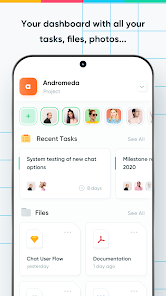
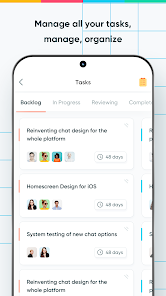
1. INTELLIGENT TASK MANAGEMENT Manage projects your way. Keep your team aligned and your deadlines on track.
Kanban & List Views: Visualize your workflow with flexible boards.
Integrated Chat: Discuss task details directly inside the task card—no more lost context.
Sprints & Milestones: Plan efficiently with built-in agile tools.
Estimations: Set time estimates to track productivity.
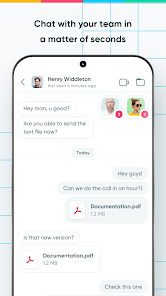
2. UNIFIED TEAM COMMUNICATION Communication shouldn't be separated from execution. In Edworking, chat is built into the work itself.
Real-Time Chat: Private DMs, group channels, and topic-based threads.
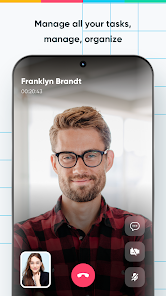
Integrated Video Calls: Start high-quality video meetings instantly. No links, no installs, no "Zoom fatigue."
Video Stories: Share asynchronous video updates (like Instagram Stories) for daily standups.
Voice Notes: Send quick audio feedback when typing takes too long.
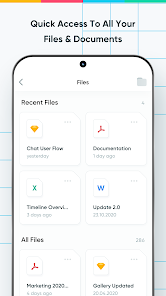
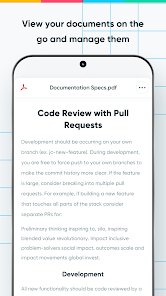
3. COLLABORATIVE DOCS & FILES Create, edit, and share content seamlessly.
Live Collaboration: Edit documents together in real-time.
Media Hub: Centralize all your design assets, files, and contracts.
Rich Editing: formatting, image uploads, and easy sharing options.
4. POWERED BY EDWORKING AI 🤖 Your personal AI assistant for work is here.
AI Writing Partner: Draft emails, summarize documents, or brainstorm ideas instantly.
Smart Search: Find any task, file, or conversation using natural language.
Productivity Booster: Let AI handle the repetitive work so you can focus on creativity.
WHO IS EDWORKING FOR?
Remote Teams: Keep everyone on the same page, no matter where they are.
Freelancers: Manage clients, contracts, and deliverables in one professional hub.
Startups: Scale your operations without paying for expensive enterprise software.
Digital Agencies: streamline client approvals and creative workflows.
💡 ALL-IN-ONE VS. THE REST: Why pay for 5 different subscriptions?
❌ No more separate subscription for Chat.
❌ No more separate subscription for Video Calls.
❌ No more separate subscription for Project Management.
❌ No more separate subscription for Cloud Storage.
✅ Get it ALL in Edworking.
Stop juggling multiple apps to manage your work. Edworking is the all-in-one productivity platform that unifies Tasks, Chat, Docs, and AI into a single, intuitive workspace.
Designed for remote teams, freelancers, and startups, Edworking helps you save money and stay focused by replacing your scattered toolset (Slack, Trello, Zoom, Notion) with one powerful solution.
🚀 WHY CHOOSE EDWORKING? Most teams lose hours every week switching between apps. Edworking eliminates the noise. Whether you are managing a complex project, writing a proposal, or jumping on a quick video call, you can do it all without ever leaving the app.
🔥 KEY FEATURES:
1. INTELLIGENT TASK MANAGEMENT Manage projects your way. Keep your team aligned and your deadlines on track.
Kanban & List Views: Visualize your workflow with flexible boards.
Integrated Chat: Discuss task details directly inside the task card—no more lost context.
Sprints & Milestones: Plan efficiently with built-in agile tools.
Estimations: Set time estimates to track productivity.
2. UNIFIED TEAM COMMUNICATION Communication shouldn't be separated from execution. In Edworking, chat is built into the work itself.
Real-Time Chat: Private DMs, group channels, and topic-based threads.
Integrated Video Calls: Start high-quality video meetings instantly. No links, no installs, no "Zoom fatigue."
Video Stories: Share asynchronous video updates (like Instagram Stories) for daily standups.
Voice Notes: Send quick audio feedback when typing takes too long.
3. COLLABORATIVE DOCS & FILES Create, edit, and share content seamlessly.
Live Collaboration: Edit documents together in real-time.
Media Hub: Centralize all your design assets, files, and contracts.
Rich Editing: formatting, image uploads, and easy sharing options.
4. POWERED BY EDWORKING AI 🤖 Your personal AI assistant for work is here.
AI Writing Partner: Draft emails, summarize documents, or brainstorm ideas instantly.
Smart Search: Find any task, file, or conversation using natural language.
Productivity Booster: Let AI handle the repetitive work so you can focus on creativity.
WHO IS EDWORKING FOR?
Remote Teams: Keep everyone on the same page, no matter where they are.
Freelancers: Manage clients, contracts, and deliverables in one professional hub.
Startups: Scale your operations without paying for expensive enterprise software.
Digital Agencies: streamline client approvals and creative workflows.
💡 ALL-IN-ONE VS. THE REST: Why pay for 5 different subscriptions?
❌ No more separate subscription for Chat.
❌ No more separate subscription for Video Calls.
❌ No more separate subscription for Project Management.
❌ No more separate subscription for Cloud Storage.
✅ Get it ALL in Edworking.
Date de mise à jour
La sécurité, c'est d'abord comprendre comment les développeurs collectent et partagent vos données. Les pratiques concernant leur confidentialité et leur protection peuvent varier selon votre utilisation, votre région et votre âge. Le développeur a fourni ces informations et peut les modifier ultérieurement.

Cette appli peut partager ces types de données avec des tiers
Activité dans l'application, Infos et performance des applis

Cette appli peut recueillir ces types de données
Informations personnelles, Messages et 4 autres

Les données sont chiffrées lors de leur transfert

Vous pouvez demander la suppression des données
Notes et avis
4,3
186 avis
Nouveautés
NEW! Ask Brain and get instant AI-powered answers.
NEW! Side panel for easy space navigation and management.
NEW! Personal hub for Events and AI-generated Daily Reports.
Fixed some performance issues.
AI-Powered search.
Manage all the tasks of your spaces.
Stay up to date with live chats and notifications.
Share and download images, files and documents.
Organize your tasks and events from calendar.
Use Docs to share documentation in real time.
NEW! Side panel for easy space navigation and management.
NEW! Personal hub for Events and AI-generated Daily Reports.
Fixed some performance issues.
AI-Powered search.
Manage all the tasks of your spaces.
Stay up to date with live chats and notifications.
Share and download images, files and documents.
Organize your tasks and events from calendar.
Use Docs to share documentation in real time.
Assistance de l'appli
À propos du développeur
EDWORKING LTD
support@edworking.com
Flat 507
36 Wandsworth Road
LONDON
SW8 5HA
United Kingdom
+44 7723 806115


