
Screenshot - Screen Capture
Contient des annoncesAchats via l'appli
3,8star
408 avis
50K+
Téléchargements

Tout public
info

À propos de l'application
Screenshot - Screen Capture, Webpage Shot & Image Editor
Looking for the fastest and easiest way to capture your screen? 📸
Screenshot - Screen Capture is a powerful yet lightweight screen capture app that lets you take high-quality screenshots, capture webpages, and edit images instantly—perfect for everyday use or professional needs.
✨ Key Features:
✅ One-Tap Screenshot
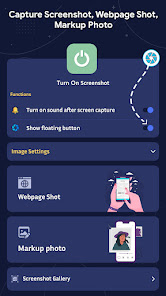
Capture your screen with a single tap using the floating button or notification bar shortcut. No root required!
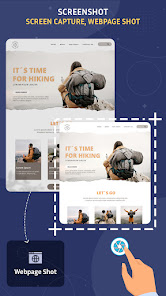
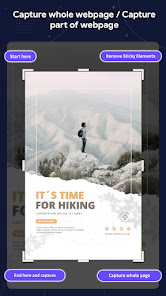
✅ Webpage Screenshot (Full Page)
Capture full or partial web pages in high resolution—ideal for saving articles, chats, and documents.
✅ Floating Button & Overlay Tool
Access the screenshot feature anytime with our easy-to-use floating control—perfect for gamers, students, and professionals.
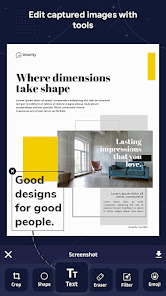
✅ Edit Captured Screenshots
Crop, add text, draw shapes, insert emojis, and apply image filters—turn basic screenshots into shareable content in seconds.
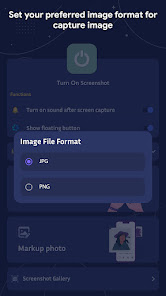
✅ Save in JPG or PNG Format
Choose your preferred image format and quality level to save space or preserve detail.
✅ Built-in Screenshot Gallery
View, manage, and share all your screenshots from one organized place.
✅ Share Instantly
Quickly share your screenshots via WhatsApp, Instagram, Gmail, or any app you choose.
Why Choose Screenshot - Screen Capture?
✔ Fast screen grabber with clean UI
✔ Lightweight and battery-friendly
✔ Works on all Android devices
✔ Supports scrolling screenshot for full-page capture
✔ Optimized for Android 13 & above
📲 Whether you're a content creator, student, gamer, or casual user—Screenshot - Screen Capture is your ultimate tool for grabbing, editing, and sharing screen content with ease.
🔽 Download now and start capturing your screen smarter & faster than ever!
Looking for the fastest and easiest way to capture your screen? 📸
Screenshot - Screen Capture is a powerful yet lightweight screen capture app that lets you take high-quality screenshots, capture webpages, and edit images instantly—perfect for everyday use or professional needs.
✨ Key Features:
✅ One-Tap Screenshot
Capture your screen with a single tap using the floating button or notification bar shortcut. No root required!
✅ Webpage Screenshot (Full Page)
Capture full or partial web pages in high resolution—ideal for saving articles, chats, and documents.
✅ Floating Button & Overlay Tool
Access the screenshot feature anytime with our easy-to-use floating control—perfect for gamers, students, and professionals.
✅ Edit Captured Screenshots
Crop, add text, draw shapes, insert emojis, and apply image filters—turn basic screenshots into shareable content in seconds.
✅ Save in JPG or PNG Format
Choose your preferred image format and quality level to save space or preserve detail.
✅ Built-in Screenshot Gallery
View, manage, and share all your screenshots from one organized place.
✅ Share Instantly
Quickly share your screenshots via WhatsApp, Instagram, Gmail, or any app you choose.
Why Choose Screenshot - Screen Capture?
✔ Fast screen grabber with clean UI
✔ Lightweight and battery-friendly
✔ Works on all Android devices
✔ Supports scrolling screenshot for full-page capture
✔ Optimized for Android 13 & above
📲 Whether you're a content creator, student, gamer, or casual user—Screenshot - Screen Capture is your ultimate tool for grabbing, editing, and sharing screen content with ease.
🔽 Download now and start capturing your screen smarter & faster than ever!
Date de mise à jour
La sécurité, c'est d'abord comprendre comment les développeurs collectent et partagent vos données. Les pratiques concernant leur confidentialité et leur protection peuvent varier selon votre utilisation, votre région et votre âge. Le développeur a fourni ces informations et peut les modifier ultérieurement.

Aucune donnée partagée avec des tiers
En savoir plus sur la manière dont les développeurs déclarent le partage

Aucune donnée collectée
En savoir plus sur la manière dont les développeurs déclarent la collecte

Les données sont chiffrées lors de leur transfert
Notes et avis
3,6
388 avis
Assistance de l'appli
À propos du développeur
ALPABEN HARESHBHAI PAGHADAL
futuretechapps29@gmail.com
212 LAXMINARAYAN SOC
DHARAMNAGAR ROAD
SURAT, Gujarat 395008
India


